

Quick AI Wins: Monitoring Tenant Health with Yutori Scouts
We’re kicking off a new A.CRE series called Quick AI Wins: bite-sized, high-impact AI tools and use cases that owners, investors, brokers, and managers can use to create leverage in CRE.
While many of these tools are in the early stages (this one is in private beta as of the writing of this post), these ‘quick AI wins’ demonstrate the capability of AI to transform how we work in commercial real estate.
So, with that, first up: Yutori Scouts.
- Quick Note: We’re unaffiliated with any of the tools featured in our Quick AI Wins series. As the A.CRE team has been building out our AI.Edge program, we’ve come across a number of practical AI use cases and tools that we think are worth sharing publicly here on the front end of A.CRE.
What is Yutori Scouts?
Yutori Scouts are always-on AI agents that monitor the web for what you tell them to look for and then email you when there’s a match. Think of it as a customizable, natural-language Google Alert built by ex-Meta AI leaders.
You describe the signal. Scouts do the hunting.
They can monitor specific URLs (like EDGAR, ratings sites, or press release feeds), or search the broader web. And unlike black-box scraping tools, each Scout includes a transparent activity log so you can see where it looked, what it found, and what it filtered out.
Why It Matters for Us in CRE
We’re constantly monitoring various attributes and metrics of the tenants, markets, partners, properties, and clients we’re working with.
And so, imagine you’re the owner of a Walgreens. Changes to Walgreens’ credit not only impact the likelihood they’ll continue to pay you rent, but also the likelihood they’ll renew at lease expiration, the cap rate (i.e. value) a Walgreens commands in the market, and so forth.
Thus, automatically keeping tabs on their credit is a worthwhile endeavor (and a great use case for AI—a quick AI win so to speak!).
Tenant Credit as a Use Case
Tenant health shows up first in places like credit ratings changes, SEC filings, store closure lists, press releases, and local news. Tools like Yatari Scouts let you catch those early signals, without hiring an analyst to manually check 30 sites each week.
Set it once. Let it run. Get notified only when something important happens.
How to Set Up Scouts in 10 Minutes
- Get access: Join the Yutori Scouts private beta waitlist and log in when approved (my invite came about 10 days after requesting access).
- Create a Scout: In the New Scout screen, describe your watch task in plain English. Pick specific sources (or let it search broadly).
- Choose notification rules: Get emailed immediately or in a daily digest.
- Check the log: Review which pages were visited and what matched, to fine-tune the quality of the signal.
Copy-Paste Examples for Walgreens
Here’s how you might monitor a corporate tenant like Walgreens. Each of these is a standalone Scout:
- Credit ratings and outlook. “Alert me any time S&P, Moody’s, or Fitch downgrades or places Walgreens Boots Alliance on Watch Negative, or changes outlook to negative. Include report title, action, rationale, and link.”
- Liquidity stress in SEC filings. “Watch Walgreens’ SEC filings in EDGAR. Notify me on new 8-K, 10-Q, or 10-K that includes: ‘amendment to credit agreement’, ‘going concern’, ‘material impairment’, ‘store closure program’, or ‘dividend suspension’. Summarize the section with the exact paragraph.”
- Earnings or guidance changes. “Monitor Walgreens press releases and investor relations for earnings releases, guidance withdrawals, or updates mentioning cost reduction, store closures, or debt refinancing. Extract guidance, free cash flow, closure counts, and comments on leverage.”
- Buyout or restructuring chatter. “Track credible outlets for Walgreens sale, breakup, or take-private developments. Alert on terms, likely buyers, breakup structure, and expected debt load.”
- Store closures and local exposure. “Scan local and regional news for ‘Walgreens closing’ plus my target counties. Send me store addresses, closure dates, and whether pharmacy services are relocating.”
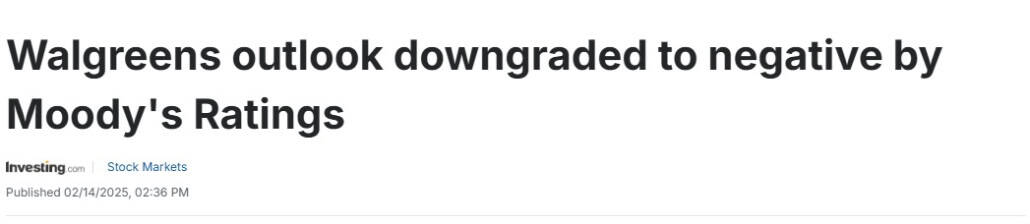
The type of news you’d like to be aware of if this was a tenant in your building.
Pro Tips
- Name Scouts by risk type: e.g., “Walgreens – Credit Actions”
- Scope to specific domains when needed (e.g., spglobal.com for ratings)
- Ask for structured outputs: “Return action, date, source, quote, link.”
- Use negative filters like: “exclude blogs without primary sourcing”
- Review activity logs weekly and tighten noisy Scouts
Scale to Your Portfolio
- Clone them across tenants; just swap out the name
- Create cross-tenant Scouts for big signals like rating changes
- Add one digest Scout per market to catch local store closures
What You’re Replacing
Hours spent manually checking across EDGAR, Google Alerts, and ratings sites. Scouts are more surgical, continuous, and organized.
A Few Caveats
It’s still private beta, so expect the occasional rough edge. For now, we recommend keeping critical alerts backed up with at least one redundant source.
Frequently Asked Questions about Monitoring Tenant Health with Yutori Scouts
What are Yutori Scouts?
Yutori Scouts are “always-on AI agents that monitor the web for what you tell them to look for and then email you when there’s a match.” They work like customizable Google Alerts, with transparent logs showing where they searched and what they found.
Why are Yutori Scouts useful for CRE professionals?
They save time and catch early signals that affect tenant health. For example, changes to a tenant’s credit rating can impact rent payments, lease renewals, and property valuation. Scouts automate monitoring across filings, press releases, ratings, and news sites.
What tenant health signals can Scouts track?
Signals include:
Credit ratings and outlook changes.
Liquidity stress in SEC filings.
Earnings releases or guidance withdrawals.
Buyout or restructuring chatter.
Store closure announcements in local news.
How do you set up a Scout?
Setup is simple:
Join the private beta and log in.
Create a Scout in plain English.
Select notification rules (instant email or daily digest).
Review the log to refine results.
Can you give an example of how Scouts monitor a tenant like Walgreens?
Yes. Scouts can:
Alert on ratings downgrades by S&P/Moody’s/Fitch.
Flag 10-Q or 10-K filings with “going concern” or “store closure program.”
Track press releases for cost-cutting or refinancing.
Watch credible outlets for sale or restructuring chatter.
Scan local news for “Walgreens closing” in specific counties.
What tips improve the quality of Scout alerts?
Pro tips include:
Naming Scouts by risk type.
Limiting scope to trusted domains.
Asking for structured outputs (action, date, source, link).
Using negative filters (exclude low-quality sources).
Reviewing logs weekly to reduce noise.
How can Scouts be scaled across a portfolio?
You can clone Scouts for each tenant, create cross-tenant alerts for major signals (like rating changes), and add digest Scouts per market to catch local closures. This scales coverage without scaling manual effort.
What limitations should users be aware of?
The tool is in private beta, so occasional rough edges are expected. The post advises keeping “critical alerts backed up with at least one redundant source” until the tool matures.