
• Link to Facebook
  • Link to Youtube
  • Link to LinkedIn
  • Link to X
  • Link to Tiktok
  • Link to Instagram
  • EN ESPAÑOL
    • Inicio
    • Glosario de Términos
    • Modelos Financieros
    • Tutoriales Cortos
  • A.CRE HELP
    • Support Section
    • Contact Us
  • LOGIN/REGISTER
  • Shopping Cart Shopping Cart
    0Shopping Cart
Adventures in CRE
  • A.CRE
    • A.CRE Home
    • A.CRE Help
    • Accelerator
      • Learn More
      • Login
    • AI.Edge
      • Learn More
      • Login
    • Artificial Intelligence
    • Careers
    • CRE Event Calendar
    • CRE Job Board
    • Education
    • Library of Excel Models
    • Meet the A.CRE Team
  • RE Modeling
    • 1031 Exchange
    • Audio Series
    • All-in-One (Ai1) Model
      • Download
      • Guides and Tutorials
      • Support
    • Ask Me Anything (Live)
    • Beginner’s Guide to Excel
    • Excel Models
      • Excel Add-ins
      • Library of Excel Models
      • All-in-One (Ai1) Model
      • Apartment
      • Condo
      • Debt
      • Development
      • Equity Waterfall
      • Hotel
      • Industrial
      • Office
      • Portfolio
      • Retail
      • Single Family
      • Tutorial
    • Excel Tips
    • Practice Library of Case Studies
    • Stochastic Modeling
    • Argus
    • My Downloads / My Account
  • Careers
    • About Careers in Real Estate
    • Ask Me Anything (Live)
    • Audio Series
    • Compensation in Real Estate
    • CRE Job Board
      • Find a Job
        • Browse Jobs
        • Post a Resume
        • Register
        • Login
      • Post a Job
    • CRE Event Calendar
    • CRE Interviews
    • Day in the Life Series
    • Real Estate Legal Content
    • What CRE Pros Do
  • Education
    • Accelerator
    • AI.Edge
    • A.CRE 101
    • Ask Me Anything (Live)
    • A.CRE Audio Series
    • Audio Series
    • Book Reviews
    • CRE Event Calendar
    • Deep Dive Series
    • Glossary of CRE Terms
    • Real Estate Legal Content
    • Real Estate Clubs
    • University Profiles
    • Watch Me Build
  • AI
    • AI Skills
    • AI Use Cases in CRE
    • AI for CRE Training
    • AI Tools for CRE
    • AI.Edge Membership
      • Learn More
      • Login
  • Accelerator
    • Accelerator Reviews
    • Accelerator Story
    • Enroll Now
    • Learn More
    • See What’s New
    • Enterprise Members Only
      • General Enterprise Login
      • ICSC Login
      • M&M Login
    • Members Only
      • Extend/Renew Membership
      • Login
      • Manage Membership
  • My Downloads
    • View My Downloads
    • Find an Excel Model
    • Register
    • Login
  • Click to open the search input field Click to open the search input field Search
  • Menu Menu
You are here: Home1 / Real Estate Financial Modeling2 / Excel Models3 / Advanced Mortgage Amortization Schedule – Custom GPT by A.CRE
Spencer Burton
Real Estate Financial Modeling, Excel Models, Debt, Artificial Intelligence, AI Applications for CRE, AI Tools for CRE, Custom GPT

Advanced Mortgage Amortization Schedule – Custom GPT by A.CRE

At A.CRE, we’ve built dozens of custom GPTs for internal and external purposes. Some of the GPTs have general application, while others are custom GPTs specifically for commercial real estate. One such CRE-specific GPT that we recently built and that I’m particularly excited to share today is our first real estate analyst GPT: our Advanced Mortgage Amortization Schedule custom GPT.

Created by using my Advanced Amortization Schedule Excel Model, this GPT has been trained to take inputs the user provides and update that Excel model accordingly. It is also trained to provide the user guidance on inputs and outputs in the model. In the coming months, we’ll release other custom GPTs that will perform most of the financial modeling for the user in this same way.

  • Note: Custom GPTs are now available to both paid and free users of ChatGPT. Click here to learn more.

Why we built the Advanced Mortgage Amortization Schedule GPT?

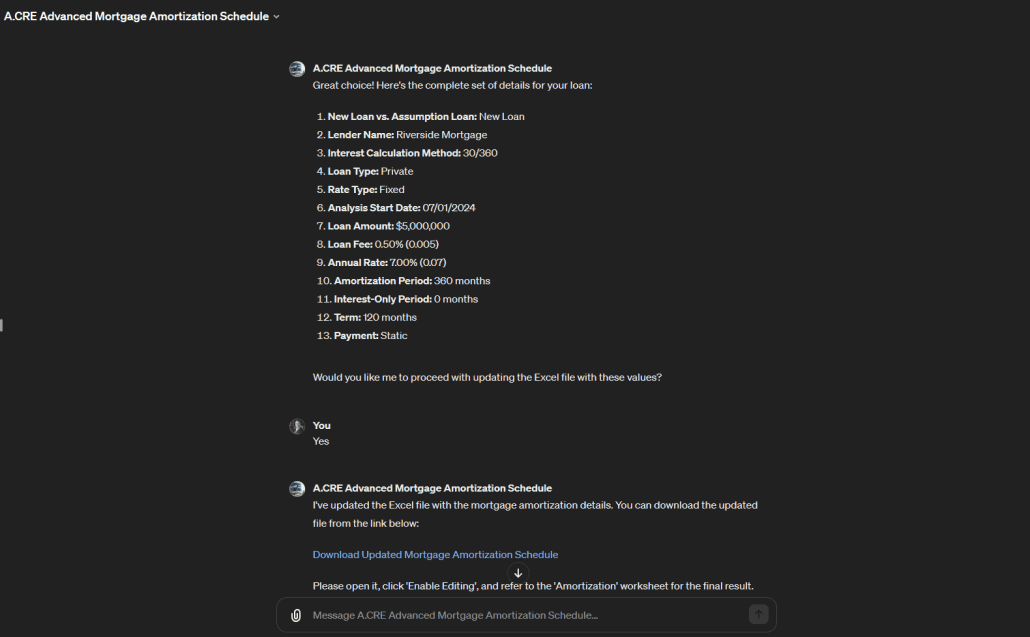
As mentioned, this tool marks the first in what will be a series of real estate analyst GPTs designed to help those less technically versed in using A.CRE’s real estate Excel models. Essentially, the GPT guides users through the necessary inputs, answers their questions about the model’s inputs and outputs, and updates the Excel file accordingly.

In essence, the GPT serves as a personal real estate analyst, modeling mortgage amortization schedules for users.

We also developed this GPT as a pilot project for future, more sophisticated real estate analyst GPTs aimed at modeling real estate deals. It provided valuable insights into the capabilities and limits of GPT-4 (the version on which this tool is based) and allowed us to explore innovative ways to maximize the GPT’s utility. Just as it took me three attempts to perfect my first All-in-One model without breaking Excel, this GPT has been instrumental in understanding the current boundaries of LLMs when applied to real estate analysis.

Access the Advanced Mortgage Amortization Schedule GPT

We developed this custom GPT as a service to A.CRE readers and the industry. OpenAI currently only makes custom GPTs accessible to paid ChatGPT Plus, Teams, and Enterprise users.

We regularly update the GPT (see version notes).

Click to chat with the Advanced Mortgage Amortization Schedule GPT and then use a simple prompt such as “Help me create an amortization schedule” to get started. Note that as with all generative AI applications and Excel models, there may be output mistakes.
Access the Advanced Mortgage Amortization Schedule GPT

User’s Guide – Advanced Mortgage Amortization Schedule GPT

To use the Advanced Mortgage Amortization Schedule GPT effectively, follow these steps:

  1. Get Started. Enter a simple prompt to get started such as ‘Help me create an amortization schedule’ or ‘Please create an amortization for the deal in this offering memorandum’.
  2. Provide Inputs. Once you start the GPT, it will guide you through the inputs it needs to create the model. Either answer its questions or provide it a PDF of an offering or financing memorandum that contains the mortgage assumptions. If you have questions about any input it asks for, simply ask it for clarification.
  3. Confirm Inputs. After you’ve provided the necessary inputs, the GPT will confirm with you that the inputs are correct. Either ask it to make changes, or confirm the inputs are correct.
  4. Download the finished Excel model. Once you confirm the inputs, the GPT will take those inputs, update the Excel file, and then provide you with a link to download the Excel file. Click that link, open the file, click ‘Enable Editing’, and then refer to the ‘Amortization’ worksheet.
  5. Ask it Questions and/or report bugs. If you have questions about any of the inputs or outputs in the model, just ask. It has been trained on the model. If you run into a bug, let it know and it will direct you to where you can report the bug to us.

Inputs You’ll Need to Provide the Advanced Mortgage Amortization Schedule GPT

To prepare you for your conversation with this GPT, below are the inputs that the AI will ask you for. Have these inputs ready to share with the AI. If you’re unclear on what to enter, ask the GPT.

  1. New Loan vs. Assumption Loan: Specify whether the scenario is a new loan or an assumption of an existing loan, which determines if you’ll need to enter an existing monthly payment.
  2. Lender Name: Enter the name of the lender providing the loan, useful for identifying the loan in analyses or presentations.
  3. Interest Calc Method: Choose the method for calculating interest (30/360, Actual/Actual, Actual/360, Actual/365), affecting how interest accrues over time.
  4. Loan Type: Select the type of lender (e.g., Bank, CMBS, LifeCo, Private, Other), which can influence the terms and conditions of the loan.
  5. Rate Type: Decide between a fixed or variable interest rate, which impacts how interest is calculated and the need for benchmark rates.
  6. Analysis Start: Enter the start date for the loan analysis, setting the timeline for loan repayments and interest calculations.
  7. Loan Amount: Input the principal amount of the loan, which is the basis for calculating monthly payments and interest.
  8. Loan Fee (% of Loan): Specify the fee charged by the lender as a percentage of the loan amount, important for understanding the upfront costs of the loan.
  9. Annual Rate (%): Enter the interest rate as a percentage, central to calculating the cost of borrowing.
  10. Amortization (In Months): Define the number of months over which the loan will be paid off, essential for determining the payment schedule.
  11. Interest-Only Period (In Months): Specify if there is an interest-only period and its duration, during which only interest payments will be made.
  12. Term (In Months): Input the total duration of the loan in months, critical for scheduling the full repayment.
  13. Payment: Choose between static or dynamic debt service payments, affecting how payments are recalculated over the loan term.
  14. Monthly Payment: Enter the monthly payment amount if assuming an existing loan, necessary for continuing the existing repayment schedule.
  15. Benchmark Rates: If the rate type is variable, specify the benchmark rates for adjusting the interest rate, essential for monthly payment recalculations.

a discussion of the A.CRE Accelerator real estate financial modeling courses

Tips for Using Real Estate Analyst GPTs Such as this Advanced Mortgage Amortization Schedule

As this is likely the first custom GPT of this type you’ve used, I thought I’d share a few tips I’ve found helpful when working with this type of AI.

  • Treat the AI like your analyst: Engage with the AI as if it’s part of your real estate analyst team, expecting the same level of detail and engagement you would from a human analyst.
  • Ask for clarification: If results aren’t clear, don’t hesitate to ask the AI for further explanation to ensure understanding.
  • Be explicit with your requests: Clearly articulate your needs; precise questions yield precise answers.
  • Provide exact figures: Input precise data (e.g., loan amount, interest rate, term) to get the most accurate amortization schedules from the AI. Garbage in, garbage out, as they say!
  • Double-check the outputs: Always verify the AI’s calculations against your own to ensure accuracy before making any financial decisions.

Video Walkthrough – Advanced Mortgage Amortization Schedule GPT

To further help you get started using this custom GPT, below find a video walkthrough. The video walks you through how to use the GPT to create an advanced mortgage amortization schedule in Excel. This video was built using v1.1 of the tool. We regularly update our Excel models and AI tools, and OpenAI is constantly updating ChatGPT. So, the version in the video may look different but nonetheless the base functionality is the same.


Frequently Asked Questions about the Advanced Mortgage Amortization Schedule GPT

What is the Advanced Mortgage Amortization Schedule GPT?

It is a custom GPT built by A.CRE to help users create advanced mortgage amortization schedules by guiding them through inputs, answering questions, and updating a specialized Excel model accordingly.

Who can access the custom GPT?

Custom GPTs like this one are available to ChatGPT Plus, Teams, and Enterprise users via OpenAI. A.CRE provides access to the GPT through a direct chat link on their site.

What inputs are required to use the GPT effectively?

You’ll need to provide: loan type (new/assumed), lender name, interest calculation method, loan and rate type, start date, loan amount, fees, rate, amortization and interest-only period, term, payment type, and any applicable benchmark rates for variable loans.

How does the GPT generate the Excel amortization schedule?

After confirming inputs with the user, the GPT updates a pre-built Excel model with those values. It then provides a link to download the updated file, which contains the customized amortization schedule.

Can the GPT extract inputs from a PDF?

Yes. Version 1.1 includes a feature allowing users to upload a PDF offering or financing memorandum. The GPT will extract inputs from the file to populate the model.

What interest calculation methods does the model support?

The model supports 30/360, Actual/Actual, Actual/360, and Actual/365 interest accrual methods.

What’s the difference between static and dynamic payment options?

Static payment keeps monthly payments fixed over time, while dynamic payment recalculates payments periodically based on outstanding balance and interest changes—especially important for variable-rate loans.

How should I use this GPT for best results?

Treat the GPT like a junior analyst: give precise data, ask clarifying questions, verify outputs, and ensure your request is clearly stated to get accurate results. Always review the final model manually.

What updates were made in version 1.1 of the GPT?

Version 1.1 removed merged input cells in the Excel model for better GPT integration, added guidance for file naming and date formatting, and included PDF upload functionality along with standard disclaimers.


Version Notes

v1.1

  • Changes to Excel file
    • Removed merged input cells to help GPT
    • Misc updates to version tab
    • Renamed model
  • Changes to GPT instructions
    • Added guidance for proper file naming in order to avoid Python compile error
    • Added guidance for proper date formatting to ensure Analysis Start Date works properly
    • Added option for user to upload a PDF (e.g. an offering or financing memorandum) from which the GPT may extract some or all inputs
    • Added standard disclaimer

v1.0

  • Initial release
  • Built based on v3.1 of the ‘Advanced Mortgage Amortization’ model

About the Author: Spencer Burton is Co-Founder and CEO of CRE Agents, an AI-powered platform training digital coworkers for commercial real estate. He has 20+ years of CRE experience and has underwritten over $30 billion in real estate across top institutional firms.

Spencer also co-founded Adventures in CRE, served as President at Stablewood, and holds a BS in International Affairs from Florida State University and a Masters in Real Estate Finance from Cornell University.

Contact Spencer
by Spencer Burton
Share this entry
  • Share on X
  • Share on LinkedIn
  • Share by Mail
  • Link to Instagram
  • Link to Youtube
https://www.adventuresincre.com/wp-content/uploads/2024/04/advanced-mortgage-amortization-schedule-gpt.webp 1024 1024 Spencer Burton https://adventuresincre.com/wp-content/uploads/2022/04/logo-transparent-black-e1649023554691.png Spencer Burton2024-04-27 11:28:232025-08-13 16:18:59Advanced Mortgage Amortization Schedule – Custom GPT by A.CRE
You might also like
Announcing the Winners of the AI.Edge Founder’s Build Competition
The AI.Edge Q1 2026 Build Competition Is Live!
Domina la IA en 30 Días: Ruta Práctica para Profesionales
The Best AI Tools for Excel in 2025
An AI Skill for Our (Original) Apartment Acquisition Model
Case Study #10 – Class A Industrial Warehouse + Rooftop Solar PV Plant (Case + Solution)

Featured AI Content

  • AI Use Cases in CRE
  • AI for CRE Training
  • AI Tools for CRE
  • GPTs for CRE

Recent Posts

  • A.CRE Real Estate Financial Models Download Guide (Updated Jun 2026)
  • Episodio 3 de Multiplicadores: La Brecha de la IA Ya Está Aquí
  • Nuevo Contenido en Español (Actualizado Junio 2026)
  • An AI Skill for the A.CRE Short-Term Rental Acquisition Model
  • Short-Term Rental Acquisition Model (Updated June 2026)
AI.Edge

Search Adventures in CRE

Search Search

Have a Question or Need Help?

Visit our Help Section

Contact Adventures in CRE

  • Visit A.CRE Help
  • Via Email
  • Via LinkedIn

You Might Also Like

  • Real Estate Modeling Courses
  • Real Estate Financial Modeling
  • A.CRE Job Board
  • Careers in Commercial Real Estate
  • Real Estate Education

A.CRE Library of Excel Models

  • Browse Excel Models
  • Login/Register
  • View My Downloads
  • Edit Account Details

Terms, Policies, and Disclaimer

  • Privacy Policy
  • Cookie Policy
  • AI Usage Policy
  • Terms of Use
  • Disclaimer
© 2014 - Present - Copyright - www.AdventuresinCRE.com, LLC | Adventures in CRE | A.CRE
  • Link to Facebook
  • Link to Youtube
  • Link to LinkedIn
  • Link to X
  • Link to Tiktok
  • Link to Instagram
Link to: Optimizando Espacios: Modelo de Cálculo Para la Ocupación Física de Inmuebles Link to: Optimizando Espacios: Modelo de Cálculo Para la Ocupación Física de Inmuebles Optimizando Espacios: Modelo de Cálculo Para la Ocupación Física de Inmu... Link to: Watch Me Build – American-Style Real Estate Equity Waterfall (Updated Apr 2024) Link to: Watch Me Build – American-Style Real Estate Equity Waterfall (Updated Apr 2024) Watch Me Build – American-Style Real Estate Equity Waterfall (Updated...
Scroll to top Scroll to top Scroll to top