
Becoming AI-Capable in 30 Days – A Proven Roadmap
We’re in a moment where the advantage from being AI native is disproportionately high and the effort to achieve it is surprisingly low. In fact, in most rooms of 10 professionals, the one who’s spent even a few weeks tinkering with AI tools stands out.
This post lays out a 30-day roadmap to becoming that person.
This isn’t about becoming a machine-learning expert. It’s about learning to use the tools to multiply your own output, free up time, and stay relevant in an increasingly AI-native world.
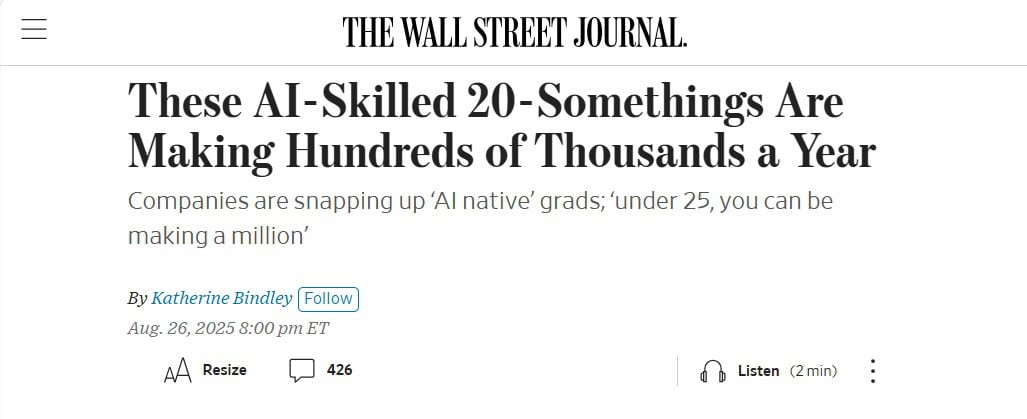
There’s a growing baseline expectation that college grads are AI-native/AI-first.
Why Now?
Think about AI like electricity. You don’t need to understand electromagnetic fields to flip a switch, but you do need to understand the switch. The same is true of AI. You don’t need to know how large language models (LLMs) are trained, but you do need to know how to use them productively.
AI will increasingly become an everyday utility. The professionals who know how to plug in (i.e. how to leverage AI to write, analyze, build, and automate) will outperform their peers, land better opportunities, and stay ahead as the bar rises.
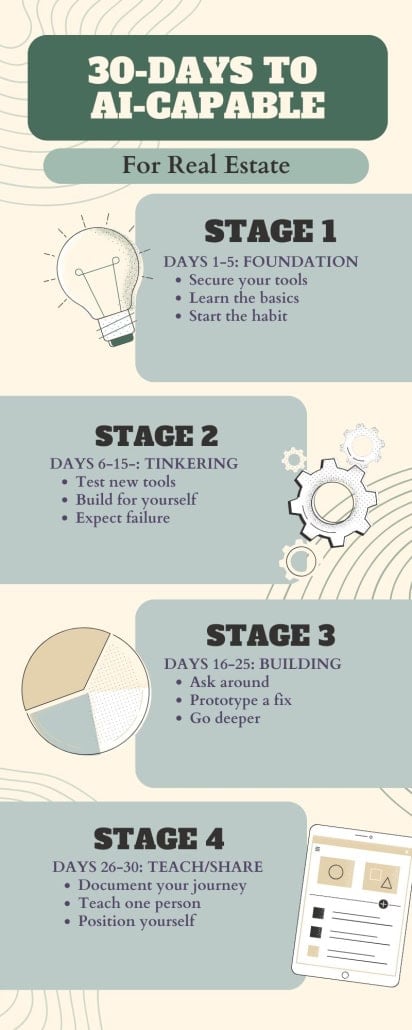
The key: small daily experiments that build compound knowledge. So, let’s walk through a four-stage, 30-day plan to becoming AI-capable – the first step toward becoming AI-native.
- Note: This framework was originally introduced in episode five, season six of the A.CRE Audio Series.
Stage 1: Foundation (Days 1–5)
- Secure Your Tools. Sign up for a paid LLM account (ChatGPT, Claude, Gemini, etc.). Paid plans give access to better models and larger context windows—important for any serious experimentation.
- Learn the Basics. Spend 1–2 hours understanding context windows, tokens, model types, and prompting strategies. Ask your LLM to explain them in plain English. If you understand how the model “thinks,” you’ll write better prompts and get better results.
- Start the Habit. Commit to using your LLM every day. Summarize documents, write quick drafts, brainstorm ideas—anything you already do, just faster. The goal is fluency.
Stage 2: Personal Tinkering (Days 6–15)
- Test New Tools. Explore 3–5 platforms that spark your interest. A few to try:
- v0.dev for coding UI
- Framer AI for websites
- Lindy.ai or Zapier/Make for automations
- Custom GPT / Claude Project / Claude Gem for custom builders
- Build for Yourself. Pick a recurring task in your life or work and build something to make it easier. A custom email writer in your tone. A property report generator. A model documentation tool. Anything.
- Expect Failure. Most early builds will be rough or break. That’s the point. The wins come through repetition and refinement.
Stage 3: Build for Others (Days 16–25)
- Ask Around. Find someone who wishes they could automate or simplify something in their day-to-day. Ask them what they hate doing.
- Prototype a Fix. Use what you’ve learned to build something useful, even if it’s scrappy. This stage teaches you how to think through use cases beyond your own.
- Go Deeper: Build an Agent. Try creating a simple AI agent. Tools like OpenAI’s custom GPTs or Digital Ocean’s open-source agents are a great start. Upload a knowledge base, write some system instructions, and wire it to a workflow (Google Sheets, Notion, Slack, etc.).
Stage 4: Teach and Share (Days 26–30)
- Document Your Journey. Record a demo or write a short guide walking through what you’ve built. This forces clarity of thought—and helps others follow the same path.
- Teach One Person. Sit down with a friend or colleague and teach them what a context window is, how to prompt well, or how to build a custom GPT. Teaching cements your own expertise.
- Position Yourself as AI-Capable. By this point, you’ll be the AI person in the room. Not because you have a PhD in machine learning, but because you’ve built things, solved problems, and helped others get started.
A Final Word: Why This Works
Mastery here doesn’t come from theory. It comes from tinkering. In 30 days, you’ll gain:
- Fluency in how to think and prompt with LLMs.
- Intuition about which tools work best for what.
- Confidence to build and share.
- Positioning as a resource for others.
The window is still open. Most professionals haven’t crossed the AI chasm. But the bar will rise. Tinker now, and you’ll have a head start others won’t catch.
Frequently Asked Questions about Becoming AI-Capable in 30 Days
Why is it important to become AI-capable now?
AI is becoming a baseline professional skill. “The advantage from being AI native is disproportionately high and the effort to achieve it is surprisingly low.” Those who learn early will stand out, land better opportunities, and stay ahead as the bar rises.
Do I need to know machine learning to follow this roadmap?
No. “This isn’t about becoming a machine-learning expert. It’s about learning to use the tools to multiply your own output, free up time, and stay relevant.” The focus is on practical application, not technical theory.
What happens in Stage 1 (Days 1–5)?
Stage 1 is about building your foundation:
Secure your tools by signing up for a paid LLM account.
Learn the basics of tokens, context windows, and prompting.
Start the habit of using your LLM daily for tasks like summarizing, brainstorming, and drafting.
“The goal is fluency.”
What’s the focus of Stage 2 (Days 6–15)?
Stage 2 emphasizes personal tinkering: testing 3–5 tools (e.g., Framer AI, Lindy.ai, Zapier), and building something for yourself like a custom email writer or property report generator. “Most early builds will be rough or break. That’s the point.”
How does Stage 3 (Days 16–25) help me grow further?
Stage 3 shifts focus to building for others. You:
Ask around for pain points.
Prototype solutions to help colleagues.
Go deeper by building a simple AI agent using custom GPTs or open-source tools.
This stage develops use-case thinking beyond your own needs.
What should I do in Stage 4 (Days 26–30)?
Stage 4 is about teaching and sharing:
Document your journey with a demo or guide.
Teach one person the basics of prompting or building.
Position yourself as AI-capable by showing what you’ve built.
“Teaching cements your own expertise.”
What results can I expect after 30 days?
By the end, you’ll have:
Fluency in prompting and LLM thinking.
Intuition about which tools fit which tasks.
Confidence to build and share.
A reputation as the AI person in the room.
“Tinker now, and you’ll have a head start others won’t catch.”
Why does this roadmap work?
Because mastery comes from experimentation, not theory. “Small daily experiments build compound knowledge.” By building, testing, failing, and teaching, you cement practical skills quickly.