

AI Data Privacy: Where Your Deal Data Goes After You Hit Enter
Most people using AI at work have pasted something sensitive into ChatGPT or Claude at some point. An OM, a rent roll, an investor list. Far fewer have checked what happens to it afterward, and that’s the part of AI data privacy worth understanding before the next upload.
November gave everyone a good reason to look. Security researchers at Dragos spent five months seeding roughly two million AI prompts with unique tracking links and fake credentials, then watched to see who would use them. Some were accessed days later, including prompts that were supposed to be covered by zero data retention (Cloud Security Alliance).
The fallout came quickly. OpenRouter, a widely used service that routes AI requests to different model providers, dropped three providers and pulled 125 endpoints from its zero data retention program. That same week, Together AI disclosed that someone downloaded stored prompt samples after “an AI coding agent committed a credential” to a code repository (Together AI). If you read Part 1 of this series, that last detail will sound familiar.
The short answer on whether this affects you: if you only use ChatGPT or Claude directly, it didn’t. But a lot of AI tools sit between you and the model, and your data can end up in three different places depending on how you use them. This post walks through each one and the settings that control it.
- You might also like: Part 2 of this series, on the hidden text that can steer your AI: Prompt Injection: How Hidden Text in an OM Can Fool Your AI
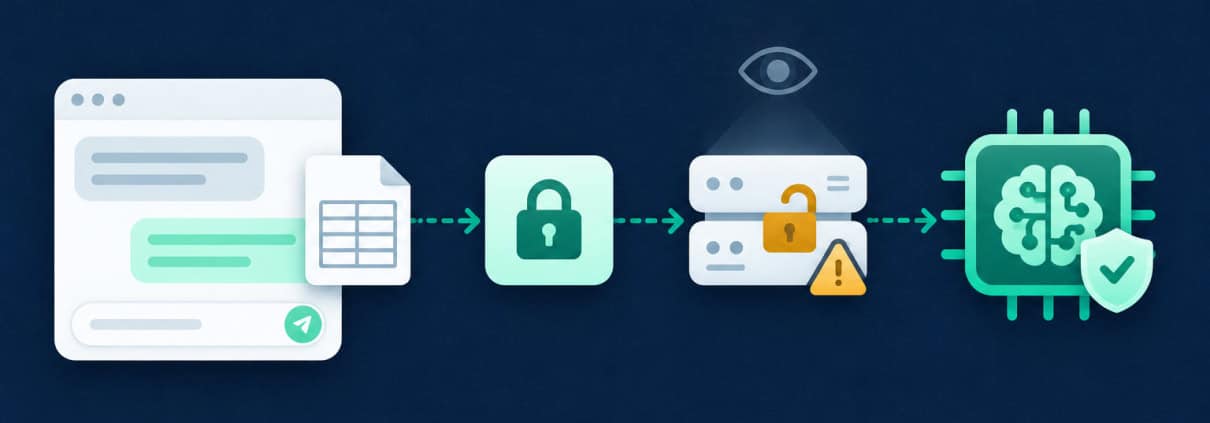
How AI data privacy works in ChatGPT and Claude
The first place your data goes is the AI company itself. Both OpenAI and Anthropic let you control whether your chats are used to train their models, but the defaults are different.
ChatGPT
On personal accounts (Free, Plus, and Pro), OpenAI uses your chats for training by default. To turn it off, go to Settings, then Data controls, and switch off “Improve the model for everyone” (OpenAI).
One thing worth knowing: if you rate a response with a thumbs up or thumbs down, the entire conversation may still be used for training. For one-off sensitive questions, Temporary Chat keeps the conversation out of training and out of your history, although OpenAI may keep a copy for up to 30 days for safety purposes.
Claude
Anthropic handles it as a choice. Since a 2025 update to its consumer terms, Free, Pro, and Max accounts have a model improvement setting under Settings, then Privacy (Anthropic). If it’s on, your chats can be kept in de-identified form for up to five years for training. If it’s off, the standard retention period is 30 days.
The same feedback caveat applies here: a thumbs up or down stores the whole conversation for up to five years, regardless of the setting. Incognito chats are excluded from training even when the setting is on (Anthropic).
Business plans
Business accounts work differently. ChatGPT Business, Enterprise, and Edu workspaces aren’t used for training by default (OpenAI), and neither are Claude’s Team and Enterprise plans or either company’s API.
For a firm handling confidential deal data, this matters more than any individual setting. A personal account with training turned off is better than nothing, but confidential work belongs in a firm-managed business account.
The apps in between
This is where the November incidents happened. Many AI tools aren’t AI models themselves. They’re applications built on top of one, and your prompt can pass through a router or a hosting provider before it reaches the model. That includes AI startups, browser extensions, and internal tools someone on your team built over a weekend.
Zero data retention (ZDR) is a provider’s commitment not to store your prompts. It’s worth asking for, but it only works if every company in the chain follows through, and the Dragos research found cases where that didn’t happen. As Dragos’s HD Moore put it, “A privacy flag doesn’t help when the attacker is already inside.”
Before uploading a rent roll to any AI tool other than ChatGPT or Claude directly, ask the vendor four questions:
- Which AI models do you use, and do my prompts pass through any other company to reach them?
- Do you or those providers store prompts, and for how long?
- Is my data used to train anything?
- Do you offer zero data retention, and is it on by default?
A good vendor can answer all four in a single email. If the answers are vague, keep the sensitive files out of it until they aren’t.
What you share yourself
The third place is the one you control directly. ChatGPT shared links from personal accounts can be opened by anyone who has the link, and they don’t expire. OpenAI says shared pages aren’t intended for search engine indexing, but that doesn’t make them private (OpenAI).
To review yours, go to Settings, then Data controls, then Shared links, and click Manage. Keep in mind that deleting a link doesn’t remove copies someone already saved.
Before you paste a rent roll: a quick checklist
- Turn off model training in your personal ChatGPT and Claude settings, and skip the thumbs up and down on sensitive chats.
- Use a business plan for confidential deal work, or check whether your firm already has one.
- Remove what the AI doesn’t need. Names, contact details, and investor info often don’t matter for the analysis, so replace them with placeholders like Tenant A and Tenant B.
- Use Temporary Chat or Claude’s incognito mode for one-off sensitive questions.
- Send the four vendor questions above before uploading anything to a third-party AI tool.
- Delete shared links you no longer need.
- For the most sensitive files, keep everything on your own machine with a local AI model.
Where to start
If you only do one thing, check the training settings in ChatGPT and Claude. It’s the fastest AI data privacy fix on this list and takes about two minutes.
For firms, the bigger step is deciding which AI tools are allowed to see deal data in the first place. Spencer covers that in How to Implement AI Across a Commercial Real Estate Firm.
AI companies update these policies often. Everything here reflects OpenAI’s and Anthropic’s help pages as of November 2026, so check the current versions before relying on them.
Frequently Asked Questions: AI Data Privacy for CRE
Does ChatGPT use my conversations to train its models?
On personal Free, Plus, and Pro accounts, yes, by default. You can turn it off under Settings, then Data controls, by switching off “Improve the model for everyone.” ChatGPT Business, Enterprise, and Edu workspaces are not used for training by default.
How do I stop Claude from using my chats for training?
On a Free, Pro, or Max account, go to Settings, then Privacy, and turn off the model improvement setting. With it off, Anthropic’s standard retention is 30 days. Team, Enterprise, and API use fall under commercial terms and aren’t used for training.
Is ChatGPT safe for confidential information?
It depends mostly on the account type. A business plan like ChatGPT Business or Enterprise isn’t used for training by default and comes with firm-level controls, which makes it the right place for confidential work. On a personal account, at minimum turn off model training and remove names and other details the analysis doesn’t need.
What is zero data retention?
Zero data retention (ZDR) is a commitment that a provider won’t store your prompts and responses after processing them. It’s worth asking any AI vendor about, but it only protects you if every company your prompt passes through honors it. The November 2026 Dragos research found cases where prompts labeled ZDR were still accessed later.
Do business AI plans use my data for training?
Not by default. OpenAI doesn’t train on ChatGPT Business, Enterprise, or Edu workspaces or API data, and Anthropic doesn’t train on Claude Team, Enterprise, or API data. OpenAI notes that opting in, for example by sending feedback, can change that, so check your workspace settings.
Does a thumbs up or thumbs down share my conversation?
It can. OpenAI says the entire conversation tied to your feedback may be used for training, and Anthropic stores the whole related conversation for up to five years, regardless of your training setting. Skip the feedback buttons on chats that include deal data.
Can anyone see my ChatGPT shared links?
Anyone who has a link created from a personal account can open it, and links don’t expire. You can delete them under Settings, then Data controls, then Shared links. Deleting a link won’t remove copies someone already saved.
What is the safest way to use AI with a rent roll?
Use a business plan, or at least a personal account with training turned off, and replace tenant names and contact details with placeholders. Avoid uploading it to third-party AI tools until the vendor tells you where your prompts go and how long they’re kept. For the most sensitive files, a local AI model keeps everything on your own machine.
What happened with OpenRouter and Together AI in November 2026?
Dragos researchers published results showing prompts sent through some AI hosting providers were accessed by outside parties, sometimes days later. OpenRouter then dropped three providers and pulled 125 endpoints from its zero data retention program. Separately, Together AI disclosed that stored prompt samples were downloaded after an AI coding agent exposed a credential.
Where can I learn to use AI safely in commercial real estate?
AI.Edge is A.CRE’s AI training community for commercial real estate professionals, covering tools, workflows, and hands-on builds. It’s a good place to see how others are using AI on real deals while keeping their data under control.
