An AI Skill for the A.CRE Residential Land Development Model
I’ve been working on a project to make our library of Excel models AI-ready. The idea is straightforward, pair every A.CRE Excel model with an AI Skill, a packaged set of instructions and reference files that teaches an AI assistant how to operate that specific model on your behalf. The Residential Land Development Model is the latest in that effort, and this post introduces the AI Skill we built to accompany it.
Think of this as a sister post to the Residential Land Development Model post, which walks through the model itself, sections, inputs, outputs, and mechanics. If you haven’t seen that one yet, start there. This post focuses specifically on the AI Skill: what it does, how it works, and how to use it.
- While we refer to these as Claude Skills (or AI Skills, Agent Skills), the instructions inside the Skill are largely platform-neutral. You can use the Skill with Claude in other platforms such as ChatGPT, Gemini, or any other capable AI assistant. You can also use these in Claude in Excel, ChatGPT in Excel, etc.
What is an AI Skill?
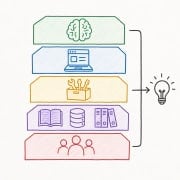
If you’re new to the concept, an AI Skill is a packaged set of instructions and reference files that an AI assistant loads alongside your file. It teaches the assistant things it wouldn’t otherwise know — in this case, every input cell, every output, the three user roles the Residential Land Development BOE Model serves, the modeling discipline behind the analysis, and the most common ways analysts misconfigure the phasing toggle or misread returns on short-duration land holds.
The result is an AI assistant that can actually operate the model on your behalf, rather than one that talks about residential land development in the abstract.
For a primer with a short video tutorial, see our practical guide to Claude Skills.
What the AI Skill Does for You
A residential land development BOE is one of those exercises where the user’s role completely changes which number matters. A land developer wants to know if the deal pencils — Profit % of Revenue, equity required, equity at absolute risk before entitlements close. A broker working either side of a transaction needs a different deliverable: the developer-side floor or the seller-side ceiling. A land owner wants the most defensible answer to “what could a developer pay me and still hit their target margin?” The model handles all three, but the right outputs and the right framing are completely different in each case.
So the Skill handles a few jobs for you that you’d otherwise be doing manually.
Role Triage
Before the Skill touches a single input, it asks what role you’re working in:
- Land developer — screening an incoming opportunity to decide whether to commit time to a full underwriting effort. The Skill populates inputs, computes headline metrics, and frames a “yes / no / maybe” in the language of the investment triage decision.
- Broker / advisor — with an immediate branch: are you representing the developer or the seller? Representing the developer follows the developer workflow; representing the seller switches to the residual-land approach, sized to what a developer would need to pay to hit a target margin.
- Land owner — using the model to understand what a developer might be willing to pay. The Skill runs a Goal Seek on cell J25 (Land Purchase Price) against a target Profit % of Revenue (H16) and surfaces the result as a price defensibility argument, not a market valuation.
Populating Inputs Conversationally
You can paste in a deal summary, upload a land OM, share a GC construction estimate, or describe the property from comparable lot sales in your market — the Skill pulls the relevant terms (acres, lot count, construction cost per lot, finished lot value, A&D loan rate, timing assumptions) and stages them for the model. Nothing writes to the workbook until you confirm. For the two-phase toggle (cell O4) and the equity funding timing toggle (Partnership!G5), the Skill flags those explicitly before writing — both have outsized effects on the outputs.
Catching Common Mistakes
Four errors show up repeatedly on this model. The phasing toggle (O4) set to “1 Phase” when the deal is actually two-phase, silently gating Phase II out of the combined returns. Lot Sales Forecast Type (F39 or F131) switched to “Detailed” without populating the month-by-month lot counts in row 41 or 133, which leaves the completeness indicator (“INCOMPLETE”) showing while the user reads outputs they think are correct. Phase II timing hardcoded in a way that disconnects it from Phase I — the model defaults Phase II timing to formula links off Phase I cells, and overwriting those cells without realizing it breaks the chain. And the equity funding timing toggle on the Partnership tab (G5) flipped from “As Needed” to “In Month 1,” which can roughly halve the LP IRR without any visible warning in the headline outputs.
Framing Outputs in Your Role
Returns are always framed relative to the user’s decision. A land developer gets Profit % of Revenue (H16) as the headline — the single number a developer holds in their head — alongside Combined Equity Multiple and Equity at Absolute Risk, which is the narrower number representing what’s gone if entitlements don’t close. A broker representing the seller gets the residual land value as a range, not a point estimate, with an honest note that different developers running different cost assumptions will arrive at different answers. A land owner gets the resulting land price alongside the implied developer margin, so the pricing argument is grounded in the economics rather than a negotiating position.
One output framing note that applies across all roles: this model’s typical hold is 18–30 months. IRR is mathematically noisy at that duration — small timing shifts can swing it by hundreds of basis points without meaningfully changing the deal. The Skill leads with Equity Multiple, Net Profit, and Profit % of Revenue, and reports IRR as a secondary metric rather than the headline.
Operating Contexts (Chat / Cowork and Claude in Excel)
The Skill works in two environments. You can upload the Excel file to a Claude conversation and have Claude operate the model via code execution. Or — if you’re using Claude in Excel — operate the model live with Claude reading and writing to the workbook directly. The Skill handles both, with the mechanics adjusted under the hood. And as noted earlier, the Skill is also portable to other AI assistants, though the integration may be lighter.
A Note on the Underlying Model
The Residential Land Development Model is a back-of-the-envelope model for quickly evaluating the feasibility of single-family lot development opportunities. It supports up to two project phases, runs up to 120 months of unlevered and levered monthly cash flows, and produces returns at both the project level (IRR, Equity Multiple, Profit % of Revenue) and the partnership level (LP and Sponsor IRR, EMx, and promote via a four-hurdle waterfall). The model is intentionally simplified — interest is an estimate, not a monthly schedule, and vertical construction is out of scope. See the model post for the full walkthrough.
Note: This AI Skill is built for v2.3 of the model. If you’ve got an older version, the Skill will flag the mismatch, but you’ll want to grab the current version of both the model and the Skill for the cleanest experience.
Video Walkthrough: Using the AI Skill
The video below walks through the full AI-assisted workflow: uploading the model, selecting your role, populating inputs from a deal summary or land OM, running the residual-land Goal Seek for the land owner workflow, and interpreting the outputs in the language of the investment decision.
Before You Use This AI Skill with the Residential Land Development Model
A couple of notes worth surfacing before you download.
Who this Skill is for. This Skill is built for real estate professionals with a strong grasp of financial modeling — and ideally some prior exposure to residential land development, back-of-envelope underwriting, and equity waterfall mechanics. It’s best suited to graduates of our A.CRE Accelerator real estate financial modeling program, or analysts comfortable building models from scratch. AI assistants make mistakes; the Skill assumes an analyst on the other side who can catch them. Treat its output the way you’d treat work from a sharp junior analyst — useful, fast, and always verified before it goes into a memo.
License. The Skill is distributed under the A.CRE software license, with full terms in the LICENSE.txt file included in the bundle. The short version: use it for personal, organizational, and client-facing analysis; don’t resell or redistribute it. Use by an AI assistant operating on your behalf is expressly permitted — that’s the whole point.
Download the Residential Land Development Model + AI Skill
To make this model accessible to everyone, it is offered on a “Pay What You’re Able” basis with no minimum (enter $0 if you’d like) or maximum (your support helps keep the content coming – typical real estate Excel models sell for $100 – $300+ per license). Just enter a price together with an email address to send the download link to, and then click ‘Continue’. If you have any questions about our “Pay What You’re Able” program or why we offer our models on this basis, please reach out to either Mike or Spencer.
Your download includes three files: the Excel model, the AI Skill (.skill file), and a short README explaining how to use them together.
We regularly update both the model and the AI Skill (see version notes below). Paid contributors receive a new download link via email each time either is updated.
Frequently Asked Questions about An AI Skill for the A.CRE Residential Land Development Model
Version Notes – AI Skill
Version 2.3
- Initial release of the AI Skill for the A.CRE Residential Land Development BOE Model
- Paired with v2.3 of the Excel model
- Supports both Chat / Cowork (upload the .xlsx and operate via code execution) and Claude in Excel (operate the live workbook directly, including Goal Seek for residual-land workflows)
- Includes 3-role triage (land developer, broker with developer/seller branch, land owner), conversational input population from land OMs and deal summaries, Goal Seek execution for residual land value, and mistake-catching across the phasing toggle, Detailed lot sales mode, Phase II timing chain, and equity funding timing toggle
- Portable to other capable AI assistants (ChatGPT, Gemini, etc.) via the SKILL.md file