
Applying Elon Musk’s Five Automation Principles to The Multiplier Framework
AI is finally good enough that you can now leverage it to realistically multiply your output in CRE.
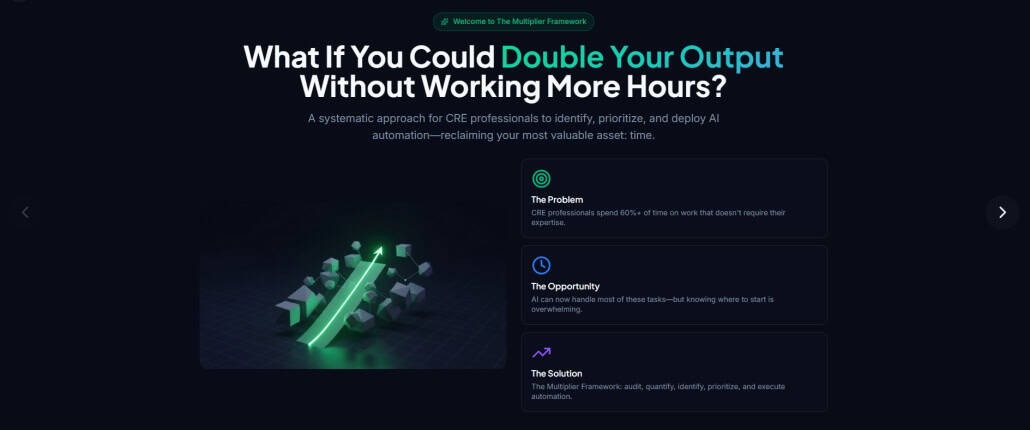
The AI Multiplier Framework is our method for doing just that. It gives you a structured way to find, rank, and execute automation opportunities so you can actually hit a meaningful multiplier in 12 months.
This post adds a second piece to that system.
If the Multiplier Framework tells you what to automate and in what order, Elon Musk’s five automation principles give you a proven playbook for how to redesign a specific workflow before you touch AI.
Used together, they keep you from making the classic mistake in process automation:
Automating a bad process and locking the pain in forever.
A Quick Recap: The Multiplier Framework
You already know the core idea: treat your time like a financial asset.
- Step 1 – Audit: List your recurring deliverables and the tasks required for each one.
- Step 2 – Quantify: Put time and dollar values on those tasks.
- Step 3 – Identify: Find potential automation solutions.
- Step 4 – Prioritize: Rank tasks with an Impact Score so you know where to start.
- Step 5 – Execute: Move tasks through Manual → Implementing → Iterating → Automating.
That framework sits at the portfolio level. It tells you where the value is.
Musk’s principles of automation sit at the task level. It tells you how to design what you are about to build.
Musk’s 5 Principles of Automation, Adapted For CRE
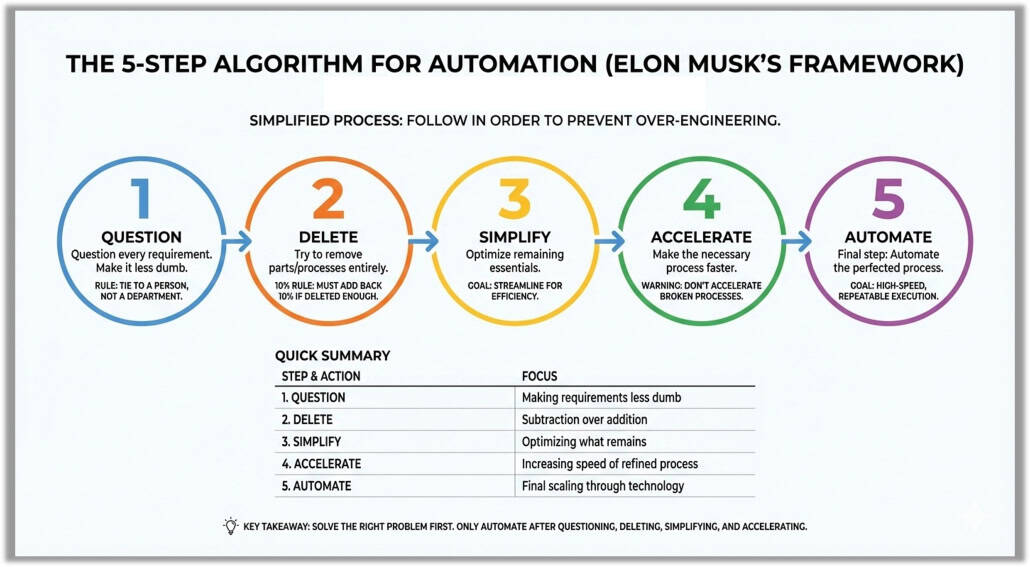
From the transcript, Musk’s process is:
- Make the requirements less dumb
- Delete the part or process
- Simplify and optimize
- Accelerate cycle time
- Automate
The order matters. Most people start at step 5. That is why most automation projects stall or produce marginal gains.
Step 1: Make The Requirements Less Dumb
Musk’s point: everyone is wrong some of the time. If you do not question the requirements, you bake old mistakes into new systems.
In CRE terms: before you automate anything, question what the deliverable is supposed to do and who it is actually for.
Examples:
- Quarterly asset report:
- Do investors really read 25 pages, or do they care about 6 charts and 2 paragraphs?
- Are you tracking metrics that no one has asked about in 3 years?
- BOV package:
- Does the client need three different formats of the rent roll, or did someone ask for that once and it became “the way we do things”?
Questions to ask before you automate:
- If I were designing this today, with a blank slate, what would this deliverable look like?
- Who reads it, and which sections change their decisions?
- Which pages, charts, or checks exist only because “we have always done it this way”?
You are not being difficult here. You are protecting your future self from automating nonsense.
Step 2: Delete The Part Or Process
Musk’s rule: if you are not occasionally adding a step back, you are not deleting enough.
The bias in CRE is always toward more: more checks, more tabs, more approvals, more slides. Most of those were added “in case we need it.”
Your move: aggressively remove steps before you simplify or automate anything.
For a given task or workflow, ask:
- What if we removed this check entirely for deals under $X million?
- What if the junior on the team handled this inside their model instead of as a separate spreadsheet?
- What if we stopped producing this appendix unless someone explicitly asks for it?
Concrete examples:
- IC Memos:
- Drop legacy appendices that are never discussed in committee.
- Remove duplicate model outputs that show the same story in three different ways.
- Lease abstraction:
- Stop abstracting fields that never show up in decisions for a given asset class.
- Create “lite” and “full” abstraction profiles instead of treating every lease the same.
Only when you have subtracted aggressively is it worth asking how to automate what is left.
Step 3: Simplify And Optimize
This is where most people think they started.
Once you have questioned the requirements and deleted anything you reasonably can, start tightening what remains.
Ways to simplify CRE work before you touch AI:
- Standardize templates:
- One IC memo template per strategy with fixed section order and naming.
- One underwriting workbook template per asset class.
- Standardize inputs:
- Keep rent rolls, T‑12s, and OM inputs in consistent formats so you are not reinventing the wheel every time.
- Define required vs optional fields for each deliverable.
- Batch and sequence work:
- Pull comps for all active BOVs once a week instead of one at a time.
- Review all redlines in one block instead of scattered through the day.
You should be able to explain the workflow to a new analyst in a couple of minutes and they can map it on a single page.
If you cannot describe it simply, you are not ready for step 5.
Step 4: Accelerate Cycle Time
Before you automate, shorten the loop.
In manufacturing, this is about moving materials faster through the line. In CRE, it is about reducing the delay between:
- Data in and first draft out
- First draft out and review
- Review and final signoff
Examples:
- Move from ad hoc email reviews to scheduled, recurring review blocks on the calendar.
- Use checklists for BOVs, ICs, and closing memos so reviewers can move quickly.
- Cut down the number of people who must sign off to the smallest reasonable group.
You are trying to remove waiting, not thinking.
This matters for AI because:
- Faster cycles mean you test and refine prompts, workflows, and tools much quicker.
- You get more learning per week from the same automation experiment.
Now you are finally ready for the step everyone wants to start with.
Step 5: Automate
At this point you have:
- Sanity checked the requirements
- Removed junk steps
- Simplified and standardized what is left
- Tightened the feedback loop
Only now should you plug in AI tools for commercial real estate:
- General LLMs: ChatGPT, Claude, Gemini for drafts, summaries, and checks
- CRE-specific AI: CRE Agents tasks, AI.Edge prompts, data integrations
- Workflow tools: Zapier, Make, n8n to connect your CRM, email, project tools
- Document AI: For leases, OMs, lender term sheets, legal docs
You are no longer trying to “use AI somewhere.”
You are telling the AI exactly what input to expect, what output to produce, and where that output goes next.
That is where the multiplier shows up.
How This Fits Inside the Multiplier Framework
Think of it this way:
- Multiplier Steps 1–2 (Audit, Quantify):
- Find out where your time and dollars actually go.
- Build your list of deliverables and tasks with value attached.
- Multiplier Step 3 (Identify):
- For the highest value tasks, apply Musk Steps 1–4 first.
- Only then list potential AI or workflow solutions.
- Multiplier Step 4 (Prioritize):
- Use the Impact Score to rank opportunities, but also give extra points to tasks where you have already cleaned up the process with Musk’s five steps. Those will implement faster and with fewer surprises.
- Multiplier Step 5 (Execute):
- As you move tasks from Manual to Implementing, force yourself to run through the five questions:
- Are the requirements still dumb?
- What can I delete?
- How can I simplify this?
- How do I shorten the loop?
- What exactly am I automating?
- As you move tasks from Manual to Implementing, force yourself to run through the five questions:
Automation becomes the last 20 percent of the work, not the first 80.
Example: Applying The Framework to a Real Estate Investment Committee Memo
Applying “The Algorithm” to IC memos is a high‑stakes exercise in efficiency. These documents tend to accumulate scar tissue. Every edge case that burned someone in 1998 turns into a permanent section that never gets revisited.
So, you might use Musk’s framework to cut the time it takes to produce a 100-hour memo in half.
1. Make Requirements Less Dumb
The biggest waste in private equity and real estate is answering questions the IC is not actually asking.
The action: sit down with committee members and ask a blunt question:
“What are the data points that actually matter on deal?”
You will find:
- Entire “Market Overview” sections exist because “that is how we have always done it”
- 40 pages of demographics are there because a lender wanted them once ten years ago
- Risk factors that never change across deals still get full-page treatment
If a requirement is justified with “industry standard” but no one can tie it to a specific decision or risk, it is a dumb requirement.
The rule: every section needs a named owner. If the VP of Acquisitions (or whoever owns the memo) cannot explain in one sentence why a chart is there, it goes.
2. Delete The Part or Process
“The best page is no page.”
If you can explain the risk in two sentences inside the main memo, you do not need a 10‑page appendix.
The action:
- Delete boilerplate market commentary that has not changed in two years
- Delete third‑party reports that are already summarized in your underwriting or risk section
- Strip out duplicate tables that show the same information in three formats
The 10 percent rule: challenge the team to cut the memo length by at least 20 percent without losing a single true “deal breaker” or key risk. If nobody feels even slightly nervous about what got cut, you have not cut enough.
The goal: kill “CYA” pages that exist so someone can say “it was in the memo” if a deal goes sideways. IC memos are decision tools, not litigation archives.
3. Simplify And Optimize
Once you are down to the essential sections, make them fast to read.
The action:
- Replace dense narrative with tight “Executive Bullets” for each section
- Introduce a simple traffic light system (Red / Yellow / Green) for key risk categories so the committee can scan the memo in five minutes:
- Red: true potential deal killers
- Yellow: manageable but requires a mitigation plan
- Green: within normal bounds
Standardization:
- Lock in a single model output format across all deals: same Sources & Uses layout, same return summary, same sensitivity table structure
- Fix the order and naming of sections in the memo template so decisionmakers never have to “relearn” where to find leverage, coverage, downside, or exit assumptions
If the committee has to pause to interpret a table or guess what a chart is showing, you have not optimized enough.
4. Accelerate Cycle Time
“The deal fog” shows up when it takes six weeks from signed PSA to investment committee. By the time IC meets, pricing, debt, or comps have become somewhat stale.
The action:
- Run work in parallel instead of a sequence:
- Draft the Thesis, Business Plan, and Key Risks on day one
- Fill in supporting analysis as environmental, physical, and other third‑party reports come in
- Set a standard cadence for IC feedback instead of one giant “reveal”:
- Use a live shared document where IC members and seniors can drop questions while the memo is being built
- Resolve small clarifications in‑line rather than adding extra meetings
You are trying to shorten the loop between “first view of the deal” and “confident go / no‑go,” not just speed up typing.
5. Automate
Only after you have:
- Clarified what actually matters
- Deleted legacy sections
- Standardized the structure
- Tightened the review loop
…does it make sense to bring in automation and AI.
The action:
- Dynamic linking:
- Link your Excel (or model) directly to the IC memo template (Word, Google Docs, or Slides). Change a rent growth assumption or exit cap in the model, and the key metrics and charts in the memo update automatically.
- AI drafting:
- Use an LLM to:
- Summarize 200‑page appraisal or Phase I reports into three to five bullets for the Risk section
- Draft initial versions of the Business Plan, Market Summary, or Tenant Overview based on structured inputs from your underwriting
- Use an LLM to:
- Data pulls:
- Use APIs or integrations to pull data straight into the memo template for:
- Rent comps
- Sale comps
- Submarket performance metrics
- Use APIs or integrations to pull data straight into the memo template for:
Now you are automating a memo that deserves to exist, not a Frankenstein document that grew by accident.
Comparison: Legacy IC Memo vs. “Algorithm‑Designed” IC Memo
| Feature | Legacy IC Memo | “The Algorithm” IC Memo |
|---|---|---|
| Length | 60–80 pages | 15–25 pages + targeted appendices |
| Focus | Comprehensive data dump | Decision‑driving variables and risk calls |
| Creation time | 100+ man‑hours | 20–30 man‑hours |
| Decision speed | Slow, requires days of reading | Fast, highlights “the big why” in minutes |
| Tech use | Manual copy‑paste | Linked model outputs and AI‑generated summaries |
Key takeaway: the win is not “producing a 100‑page memo faster.” The win is realizing that a tight 20‑page memo is a better decision tool, then automating the production of those 20 pages from your models and data sources.
How To Start Using This in Your Firm
If you already have your Multiplier roadmap sketched out, add one small layer:
- Pick your top 3 automation targets from your prioritized list.
- For each one, write out the current process in simple steps.
- Run those steps through Musk’s five questions.
- Only then move the task to “Implementing” in your Multiplier execution plan.
If you have not built that roadmap yet, the sequence is:
- Use the Multiplier Framework to find your highest value tasks.
- Use Musk’s 5‑steps to reimagine each of those tasks before you apply AI.
- Reinvest the hours you save into strategic thinking, relationships, and skill building so your multiplier actually climbs over time.
The Multiplier Framework and this Automation Ladder were put together by AI.Edge by A.CRE and CRE Agents to give CRE professionals a practical, repeatable system for adopting AI.
Frequently Asked Questions about Applying Elon Musk’s Automation Principles to the Multiplier Framework
What are Elon Musk’s 5 automation principles?
- Make the requirements less dumb
- Delete the part or process
- Simplify and optimize
- Accelerate cycle time
- Automate
Used in this order, they help prevent the mistake of automating broken or bloated workflows.
How do these principles relate to the Multiplier Framework?
The Multiplier Framework helps you find what to automate (based on time and value). Musk’s 5 principles help you decide how to redesign each workflow before applying AI, ensuring you don’t automate bad processes.
Why is “Make the requirements less dumb” the first step?
Because most legacy processes include outdated or unnecessary requirements. By rethinking what actually needs to be done, and for whom, you avoid embedding old mistakes into new systems.
What does “Delete the part or process” mean in practice?
It means ruthlessly removing steps that add little value. For example:
– Stop abstracting lease fields no one uses
– Remove IC memo appendices no one reads
– Eliminate duplicate outputs that say the same thing
If you never delete anything, you’re likely overcomplicating everything.
When should I actually automate a process?
Only after:
– You’ve clarified what matters
– You’ve deleted what doesn’t
– You’ve simplified what’s left
– You’ve shortened the feedback loop
Automation should be the last 20% of the work, not the first 80%.
Can you give an example of this in real estate?
Yes, the post walks through applying Musk’s five steps to investment committee (IC) memos.
The result:
– Memo length drops from 80 to 20 pages
– Drafting time drops from 100+ hours to 20–30
– Output becomes more decision-focused
Then and only then is it automated using live model links, AI summaries, and data pulls.
What’s the biggest mistake CRE firms make with automation?
Automating bloated or outdated processes. That locks in inefficiency, fast. The smarter move is to re-engineer the workflow first using Musk’s framework, then apply automation tools once the process is clean.
How can I start using these principles in my own work?
Start with your Multiplier roadmap:
Pick 2–3 high-value tasks
Map the current steps
Run each through the 5 Musk questions
Only then begin implementing AI or automation solutions this method ensures you build better workflows, not just faster ones.
Where can I find the Multiplier Framework App?
You can access the free Multiplier Framework App here: https://multiplier.adventuresincre.ai
It walks you through the five steps and lets you manage automation efforts across your deliverables.