
Set Your New Year’s Resolutions Using Our Custom GPT
As we approach the end of the year, it’s a time many of us pause to reflect and plan for the future. In my own career, I’ve always found the transition into a new year to be a prime opportunity for setting ambitious yet achievable goals. This year, I took a slightly different approach.
Inspired by my passion for AI and its potential to revolutionize not just CRE but all professional fields, I built something unique: a ChatGPT custom GPT (Generative Pre-trained Transformer) – specifically designed to assist in setting and keeping my New Year’s Resolutions.
- Note: Custom GPTs are now available to both paid and free users of ChatGPT. Click here to learn more.
In true A.CRE spirit, where we share our learnings and tools, I’m excited to introduce my ‘New Year’s Resolution Helper GPT’. This tool isn’t just a reflection of my personal goal-setting practice using the BSQ (Big, Small, Quick) framework but an embodiment of our belief in the power of sharing knowledge and resources.
In this blog post, I’ll briefly explain what OpenAI custom GPTs are, share a link to my New Year’s Resolution GPT, show how to use it, and provide a basic overview of how to create your own GPT using ChatGPT similar to this one.
So, let’s dive in!

What are Custom GPTs?
Custom GPTs are innovative adaptations of the ChatGPT AI model, designed for specific purposes or industries. Introduced by OpenAI, these specialized models offer a new dimension of flexibility and utility for AI chatbots, allowing users to tailor the technology to their unique requirements. This feature is especially significant in fields that demand specialized knowledge, like commercial real estate, enabling professionals to create AI assistants that cater to their distinct needs.
Creating a Custom GPT is straightforward and does not require coding skills. Users can start by giving the AI model specific instructions and extra knowledge, then select its capabilities, such as web searching, image creation, or data analysis. This level of customization extends beyond setting preferences, enabling the integration of various skills and knowledge areas. The development of Custom GPTs is not limited to tech experts but is accessible to anyone, encouraging innovation across different sectors.
- You might also be interested in our recent post on custom GPTs in the context of commercial real estate

Screenshot of the New Year’s Resolution Helper ChatGPT custom GPT created by Spencer Burton
Introducing the ‘New Year’s Resolution Helper GPT’
In the spirit of embracing new beginnings and setting meaningful goals, I’m thrilled to introduce my ‘New Year’s Resolution Helper‘ GPT. This tool is a culmination of my personal 25-year practice in goal setting, now transformed into an AI-powered assistant. Its core function is to guide users in creating and achieving personalized New Year’s resolutions and/or general goal setting.
When you engage with this GPT, it starts by understanding you: your background, aspirations, and improvement areas, be it mental, emotional, physical, professional, or spiritual. It’s designed to handle a manageable number of resolutions, ideally between 1-6, ensuring each goal is focused and achievable.
The uniqueness of this tool lies in its ability to generate specific, impactful goals – such as losing 15 pounds, getting a raise, or making new friends. It encourages specificity in your ambitions and, if needed, offers a range of suggestions tailored to your situation. Once your goals are set, the GPT crafts a customized plan using the BSQ (Big, Small, Quick) framework, a proven methodology that I’ve personally utilized over the years.
But it doesn’t stop there. The GPT acts like a personal life coach, encouraging you to check in regularly during which it offers ongoing support and adjustments to keep you on track. It’s intended to be more than a tool, but also a coach in your journey towards personal growth and achievement.
While most A.CRE readers are commercial real estate professionals, this GPT is useful for anyone with a drive to set and achieve meaningful goals. It’s about having a personalized, motivational guide by your side, ensuring your resolutions are not just wishes but plans set into motion.
The ‘New Year’s Resolution Helper’ GPT is a reflection of my commitment to effective goal setting by bringing structure, accountability, and personalization to my resolutions. I hope you find value in using it.
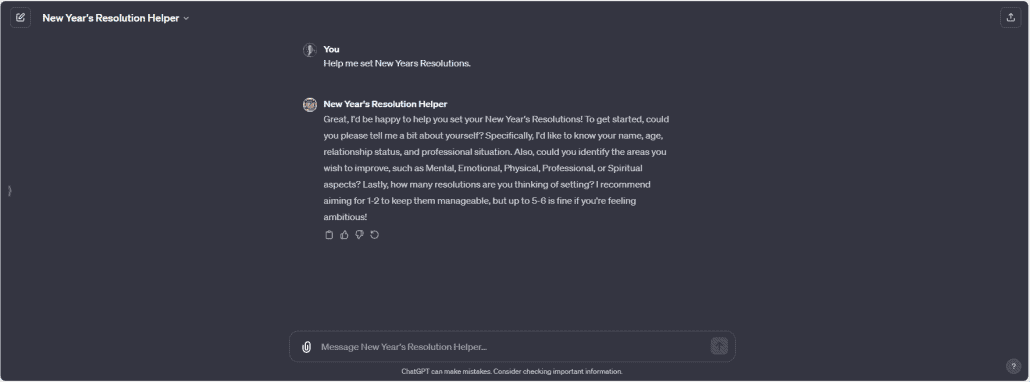
The beginning of a conversation with the New Year’s Resolution Helper GPT
How to Use the ‘New Year’s Resolution Helper GPT’
Engaging with the ‘New Year’s Resolution Helper GPT’ is an interactive and intuitive experience, akin to conversing with a human life coach. Here’s a step-by-step guide to get you started:
- Access the GPT: Click here to navigate to the ‘New Year’s Resolution Helper’ GPT via ChatGPT (Note: As of December 2023, you must be a ChatGPT Plus member to create or use custom GPTs). You’ll know you’re in the right place because the page will read: “New Year’s Resolution Helper: Guides users in setting and achieving New Year’s Resolutions and Other Goals.” Quick Tipe: select the ‘New Year’s Resolution Helper’ menu in the upper-left to add or hide the GPT from your ChatGPT sidebar.
- Initial Interaction: Start by entering something such as “Let’s get started” or “Help me set New Year’s Resolutions” into the chat box, and the GPT will start by gathering basic personal information from you – like your name, age, relationship status, professional situation, and areas you wish to improve, such as mental, emotional, physical, professional, or spiritual aspects.
- Setting Goals: It will then guide you to articulate very specific big goals (e.g., lose 15 pounds, make two new friends). The GPT will encourage specificity and can provide suggestions if you’re seeking ideas.
- Developing a Plan: Based on your goals, the GPT crafts a customized plan using the BSQ (Big, Small, Quick) framework, ensuring your goals are actionable and trackable.
- Ongoing Interaction: You’re encouraged to provide weekly updates. The GPT will use these updates to offer support and make necessary adjustments to your plan, maintaining a motivational and guiding approach.

Tips for Best Use:
- Treat the GPT as you would a human coach; be open and conversational.
- Be specific about your goals and personal story.
- Don’t hesitate to express your preferences – whether you like or dislike a suggestion.
- Remember, this tool is designed to adapt to your individual needs and preferences, making your goal-setting journey personalized and effective.
Video Demonstration: Using the ‘New Year’s Resolution Helper GPT’
To give you a real feel of how the ‘New Year’s Resolution Helper GPT’ works, I’ve prepared a short video demonstration. This walkthrough showcases the tool in action, highlighting how it interacts with users and assists in setting and achieving personalized goals.
In this video, you’ll see:
- How to initiate a conversation with the GPT.
- The process of providing your personal information and preferences.
- The GPT in action, helping to formulate specific and meaningful goals.
- The development of a tailored plan using the BSQ framework.
Parting Thoughts – New Year’s Resolution Helper
Whether you’re a seasoned professional or just starting out, the ability to set clear, actionable goals is crucial. The ‘New Year’s Resolution Helper’ GPT offers a unique, personalized way to do just that. It’s my hope that this tool not only helps you achieve your New Year’s resolutions but also inspires you to explore the potential of AI in your daily life.
As always, at A.CRE, we’re committed to sharing innovative tools and insights. Let’s embrace the new year with determination and the support of cutting-edge technology. Here’s to a year of growth, achievement, and transformation!
Frequently Asked Questions about the New Year’s Resolution Helper GPT
What is the New Year’s Resolution Helper GPT?
The New Year’s Resolution Helper GPT is a custom-built AI tool designed to help users set and achieve their New Year’s resolutions. It uses a personalized approach based on your background, goals, and preferences, and creates action plans using the BSQ (Big, Small, Quick) framework.
How do I access and use the GPT?
You can access it via the ChatGPT platform. Simply click the provided link to open the tool, then start the conversation with phrases like “Let’s get started.” The GPT will guide you through setting goals and developing a plan. Note: as of December 2023, you must be a ChatGPT Plus user to access and use custom GPTs.
What kind of goals can this GPT help with?
It helps with a wide range of goals across mental, emotional, physical, professional, and spiritual categories. Examples include losing weight, getting a promotion, building relationships, or improving focus and well-being.
What is the BSQ (Big, Small, Quick) framework?
BSQ stands for Big, Small, and Quick—a framework for organizing goals:
Big goals are overarching, long-term objectives.
Small goals are incremental actions supporting the big goal.
Quick goals are immediate tasks to build momentum.
The GPT uses this method to create a structured plan for goal achievement.
How many resolutions can I work on at once?
The GPT is optimized to help you set and manage between 1 to 6 resolutions. This ensures each goal gets the attention and planning it needs to be achievable.
Can the GPT help me stay accountable over time?
Yes. The GPT is designed to act like a personal life coach, encouraging weekly check-ins. It will adjust your plan and provide encouragement based on your updates to keep you on track.
Is this GPT only useful for CRE professionals?
No. While it was created by and for an audience familiar with A.CRE (a CRE-focused platform), the tool is useful for anyone looking to set structured, achievable goals for personal or professional growth.
What makes this tool different from a regular goal-setting app?
Unlike static apps, this GPT provides conversational, adaptive, and personalized guidance. It helps you brainstorm, refine, and revisit your goals dynamically and provides ongoing encouragement and adjustments along the way.