
• Link to Facebook
  • Link to Youtube
  • Link to LinkedIn
  • Link to X
  • Link to Tiktok
  • Link to Instagram
  • EN ESPAÑOL
    • Inicio
    • Glosario de Términos
    • Modelos Financieros
    • Tutoriales Cortos
  • A.CRE HELP
    • Support Section
    • Contact Us
  • LOGIN/REGISTER
  • Shopping Cart Shopping Cart
    0Shopping Cart
Adventures in CRE
  • A.CRE
    • A.CRE Home
    • A.CRE Help
    • Accelerator
      • Learn More
      • Login
    • AI.Edge
      • Learn More
      • Login
    • Artificial Intelligence
    • Careers
    • CRE Event Calendar
    • CRE Job Board
    • Education
    • Library of Excel Models
    • Meet the A.CRE Team
  • RE Modeling
    • 1031 Exchange
    • Audio Series
    • All-in-One (Ai1) Model
      • Download
      • Guides and Tutorials
      • Support
    • Ask Me Anything (Live)
    • Beginner’s Guide to Excel
    • Excel Models
      • Excel Add-ins
      • Library of Excel Models
      • All-in-One (Ai1) Model
      • Apartment
      • Condo
      • Debt
      • Development
      • Equity Waterfall
      • Hotel
      • Industrial
      • Office
      • Portfolio
      • Retail
      • Single Family
      • Tutorial
    • Excel Tips
    • Practice Library of Case Studies
    • Stochastic Modeling
    • Argus
    • My Downloads / My Account
  • Careers
    • About Careers in Real Estate
    • Ask Me Anything (Live)
    • Audio Series
    • Compensation in Real Estate
    • CRE Job Board
      • Find a Job
        • Browse Jobs
        • Post a Resume
        • Register
        • Login
      • Post a Job
    • CRE Event Calendar
    • CRE Interviews
    • Day in the Life Series
    • Real Estate Legal Content
    • What CRE Pros Do
  • Education
    • Accelerator
    • AI.Edge
    • A.CRE 101
    • Ask Me Anything (Live)
    • A.CRE Audio Series
    • Audio Series
    • Book Reviews
    • CRE Event Calendar
    • Deep Dive Series
    • Glossary of CRE Terms
    • Real Estate Legal Content
    • Real Estate Clubs
    • University Profiles
    • Watch Me Build
  • AI
    • AI Skills
    • AI Use Cases in CRE
    • AI for CRE Training
    • AI Tools for CRE
    • AI.Edge Membership
      • Learn More
      • Login
  • Accelerator
    • Accelerator Reviews
    • Accelerator Story
    • Enroll Now
    • Learn More
    • See What’s New
    • Enterprise Members Only
      • General Enterprise Login
      • ICSC Login
      • M&M Login
    • Members Only
      • Extend/Renew Membership
      • Login
      • Manage Membership
  • My Downloads
    • View My Downloads
    • Find an Excel Model
    • Register
    • Login
  • Click to open the search input field Click to open the search input field Search
  • Menu Menu
You are here: Home1 / Real Estate Financial Modeling2 / Excel Models3 / Using an IRR Matrix to Determine Hold Period (Updated Dec 2023)
Spencer Burton
Real Estate Financial Modeling, Excel Models, Tutorial, Modules, Acquisition, Value-Add

Using an IRR Matrix to Determine Hold Period (Updated Dec 2023)

When building a real estate financial pro forma, it’s important to model for and include a summary of various return and risk metrics. Among the different return metrics, the internal rate of return (IRR) – both on an unlevered and levered basis – is one of the more important metrics to include in your analysis.

One issue common to most models (my own models included!), is that the internal rate of return is generally only be calculated for the entire hold period. The problem with doing this, is you’re not necessarily sure that the hold period you’ve selected (e.g. 10 years) maximizes the internal rate of return.

One solution to this problem, is to include an IRR matrix into your model that calculates and reports the internal rate of return at the end of each year of the hold period. This way, you can see the projected internal rate of return in any given year helping you to better determine an appropriate hold period.

In this post, I’ll show you how I build an IRR matrix and share an Excel Workbook with an IRR matrix included for you to use in your own real estate financial models. In December 2023, I added the Equity Multiple metric to this IRR matrix to provide a more holistic look at the returns in each year.

Are you an Accelerator member? A member asked in the original Accelerator forum how to create the column chart below in Excel. So, we created a lesson in the ‘Mastering MS Excel for Real Estate’ Accelerator endorsement (available to all Accelerator members). See course 4, lesson 5 of the ‘Mastering MS Excel for Real Estate’ endorsement. Not yet an Accelerator member? Considering joining today!
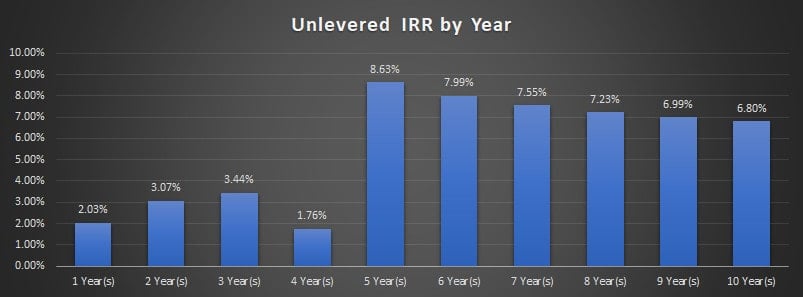
IRR by Year – Results of an IRR Matrix Analysis

Cash Flows Necessary to Build an IRR Matrix Module

In this example, I’ll build both an investment-level unlevered IRR Matrix (IRR before debt without taking into account partnership split) and an investment-level levered IRR Matrix (IRR after debt without taking into account partnership split). To do this, you’ll first need to model certain cash flows:

  1. Model Investment Cash Flows. These are the capital outflows such as acquisition costs, development costs, and value-add capital costs required to acquire a string of positive cash flows into the future. To calculate levered IRR, you will also need to model in loan fundings in this section.
  2. Model Operating Cash Flow. These are the operating cash flows acquired via the Investment Cash Flows above. This would include net operating income, less any capital expenses during operation. On a levered basis, it will also necessitate subtracting debt service to arrive at Cash Flow after Financing.
  3. Model Reversion Cash Flow. This is the value of the property at the end of the analysis period, as well as the estimated value at the end of each period. Additionally, the model provides for some reduction of the value due to selling costs. To model levered cash flow, it’s also necessary to include loan payoffs.

The file includes both a module for annual periods, as well as a second module for monthly periods. Use the module that fits the period length used in your model.

Once you’ve modeled the appropriate property-level cash flows, simply link those to the blue font cells in the module and the IRR Matrix will do the rest. The output will look something like this:
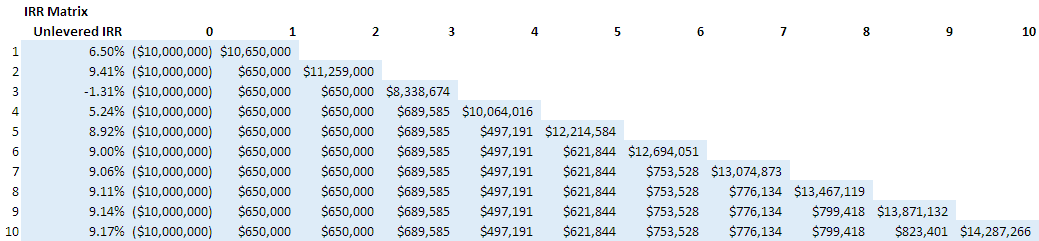
IRR Matrix in Real Estate

How to Build an IRR Matrix – Two Options

If you’re looking to build your own IRR Matrix, a few years ago I created a video tutorial on how to build an IRR Matrix for acquisition scenarios. The exercise assumes annual periods, and can only accommodate scenarios where 100% of the Investment Cash Flow (i.e. acquisition costs) occur in time zero.

As you’ll see, the key to building the IRR Matrix portion of the module is the proper use of absolute and relative cell references in the formula. This allows you to write just one formula and then copy over and down all at once. Below the video, find a link to the latest version of my IRR Matrix module.

In 2020, after making a significant update to this module, I created a follow up video. That video (shared below) both walks you through how to use the module in your own model, as well as how to build the matrix yourself. Check out either (or both) video walkthroughs/tutorials below.

Video Tutorial – Build an IRR Matrix (Using Version 1.0)

Note that the video tutorial is based on version 1.0 of this module. Version 2.0 (and later) uses updated logic, allows for investment cash flow in periods beyond time zero, and offers both an annual and monthly version.

Video Tutorial – How to Use Version 2.0 + How to Build the IRR Matrix

As mentioned above, this video walkthrough + tutorial uses version 2.0 of the module released in late 2020. Hope the combination of these two videos are helpful to your own real estate financial modeling!

Download the IRR + EMx Matrix Module (Annual and Monthly Periods)

To make this module accessible to everyone, it is offered on a “Pay What You’re Able” basis with no minimum (enter $0 if you’d like) or maximum (your support helps keep the content coming – similar real estate modules sell for $100+). Just enter a price together with an email address to send the download link to, and then click ‘Continue’. If you have any questions about our “Pay What You’re Able” program or why we offer our models on this basis, please reach out to either Mike or Spencer.

Proceed to Download Page

Frequently Asked Questions about Using an IRR Matrix to Determine Hold Period

What is an IRR Matrix and why is it useful?

An IRR Matrix displays the internal rate of return (IRR) for each year of a property’s projected hold period. It allows users to identify which hold year produces the optimal IRR, offering a clearer decision framework than calculating IRR for only one fixed hold period.

What key cash flows are needed to build an IRR Matrix?

To build an IRR Matrix, model:

Investment Cash Flows (e.g., acquisition, development, capital costs)

Operating Cash Flows (e.g., NOI less expenses and debt service)

Reversion Cash Flows (e.g., estimated sale proceeds minus selling costs and loan payoff).

What’s the difference between levered and unlevered IRR in the matrix?

Unlevered IRR excludes debt and measures returns on total investment capital.

Levered IRR includes financing impacts like loan funding and debt service, showing returns on equity after debt is applied.

What update was added in December 2023?

Version 2.2 of the IRR Matrix added the Equity Multiple (EMx) metric, enhancing the matrix’s ability to present both annual IRR and cumulative return on equity for each period.

How is the IRR Matrix structured in Excel?

The matrix is built using proper absolute and relative cell references, allowing the IRR and EMx formulas to be written once and copied across multiple years and scenarios. It includes both annual and monthly period versions.

Can I use this IRR Matrix for development or value-add deals?

Yes. As of version 2.0, the matrix supports non-time-zero investment cash flows, making it suitable for development and value-add projects with staggered capital expenditures.

Where can I find a tutorial on building or using this matrix?

Two video tutorials are available:

Version 1.0 tutorial for acquisition-based models with upfront investment

Version 2.0 tutorial for enhanced matrix use and logic explanation. Both are linked in the blog post.

How can I download the IRR Matrix module?

The IRR + EMx Matrix Module (for annual and monthly periods) is available on a “Pay What You’re Able” basis. Enter $0 or any amount to support A.CRE’s ongoing content. Link is provided in the blog post download section.


Version Notes

v2.2

  • Added the Equity Multiple to the matrix
    • Inserted column/calculation for EMx in both Annual and Monthly tabs
    • Renamed the file
    • Updated headings/labels to include EMx
  • Updates to placeholder values

v2.1

  • Updates to placeholder values
  • Added link to Best Practices guide
  • Misc. formatting updates

v2.0

  • Major update to accommodate development and value-add scenarios
    • Added ‘Investment Cash Flow’ section to bring in development (or value add capital) cash flows
    • Added ‘Annual Reversion Cash Flow’ section to calculate reversion value by period
    • Added Selling Costs assumption
    • Re-built IRR Matrix section to simplify the logic
  • Added Monthly IRR Matrix
    • Updated logic to accommodate monthly, rather than annual, periods
  • Misc. formatting updates

v1.0

  • Initial release

About the Author: Spencer Burton is Co-Founder and CEO of CRE Agents, an AI-powered platform training digital coworkers for commercial real estate. He has 20+ years of CRE experience and has underwritten over $30 billion in real estate across top institutional firms.

Spencer also co-founded Adventures in CRE, served as President at Stablewood, and holds a BS in International Affairs from Florida State University and a Masters in Real Estate Finance from Cornell University.

Contact Spencer
by Spencer Burton
Share this entry
  • Share on X
  • Share on LinkedIn
  • Share by Mail
  • Link to Instagram
  • Link to Youtube
https://www.adventuresincre.com/wp-content/uploads/2020/11/using-irr-matrix-in-real-estate.png 427 640 Spencer Burton https://adventuresincre.com/wp-content/uploads/2022/04/logo-transparent-black-e1649023554691.png Spencer Burton2023-12-26 07:02:472025-07-02 11:29:29Using an IRR Matrix to Determine Hold Period (Updated Dec 2023)
You might also like
Analyzing a Real Estate Investment from the Perspective of an LP
Using “Money Ball” Strategies In Commercial Real Estate With Brandon Taubman | S3SP4
A.CRE 101: CRE Risk Profiles (Updated May 2023)
The Acquisition Process | Title Insurance featuring Josh Roling – Contract to Close
Putting Together Your Capital Stack – Equity | S3E4
a shopping center with robust sales and low occupancy cost Tenant Sales and Occupancy Cost in Retail Underwriting (UPDATED JUNE 2022)
Accelerator - Learn More

Featured Content

  • RE Financial Modeling Training
  • Library of Excel Models
  • Post a Job – It’s Free
  • Master Financial Modeling
  • Technical Interview Guide
  • Definitive Guide to Excel
A.CRE Library of Excel Models

Recent Posts

  • A.CRE Apartment Development Model (Updated June 2026)
  • Mejora tu Desempeño en Excel con el Complemento “Excel 4 CRE” (Actualizado Junio 2026)
  • Nuevo Contenido en Español (Actualizado Junio 2026)
  • ¡Lanzamiento del Complemento “Excel 4 CRE” Completamente en Español! (Actualizado Junio 2026)
  • An AI Skill for the A.CRE Commercial Mortgage Loan Analysis Model

Note About Models

Models downloaded from A.CRE may contain errors. Verify formulas/methodology before basing investment decisions on any model here. Read our Terms and Conditions of Use and Disclaimer.

★★★★★

Accelerator Reviews

Search Adventures in CRE

Search Search

Have a Question or Need Help?

Visit our Help Section

Contact Adventures in CRE

  • Visit A.CRE Help
  • Via Email
  • Via LinkedIn

You Might Also Like

  • Real Estate Modeling Courses
  • Real Estate Financial Modeling
  • A.CRE Job Board
  • Careers in Commercial Real Estate
  • Real Estate Education

A.CRE Library of Excel Models

  • Browse Excel Models
  • Login/Register
  • View My Downloads
  • Edit Account Details

Terms, Policies, and Disclaimer

  • Privacy Policy
  • Cookie Policy
  • AI Usage Policy
  • Terms of Use
  • Disclaimer
© 2014 - Present - Copyright - www.AdventuresinCRE.com, LLC | Adventures in CRE | A.CRE
  • Link to Facebook
  • Link to Youtube
  • Link to LinkedIn
  • Link to X
  • Link to Tiktok
  • Link to Instagram
Link to: Strategies for Better AI Prompting Link to: Strategies for Better AI Prompting Strategies for Better AI Prompting Link to: Ingeniería de Prompts de IA en Bienes Raíces Comerciales: Un Marco Efectivo Link to: Ingeniería de Prompts de IA en Bienes Raíces Comerciales: Un Marco Efectivo Ingeniería de Prompts de IA en Bienes Raíces Comerciales: Un Marco Efecti...
Scroll to top Scroll to top Scroll to top