
How to Use Debt Yield to Calculate Loan Amount (Updated July 2024)
In our glossary of commercial real estate terms, we recently answered the question: what is debt yield? As a follow up to that entry, I thought I’d expand on the concept of debt yield by showing you how lenders use debt yield to come up with the appropriate mortgage loan amount.
Lenders and Sensitivity to Loan Amount
What do first-lien commercial mortgage lenders care most about when making a loan? Getting their principal back! Sure, it’s important they also get a return (i.e. interest) on their invested capital, but at the rates these last-in-first-out lenders put out their capital, there’s not a lot of margin for error (i.e. principal loss). Therefore, they are hypersensitive to the amount of capital they invest in any given property (i.e. the loan amount), since the more they put in (i.e the greater the loan amount), the higher the risk they will lose principal.
Thus, the lender puts a lot thought and analysis into the loan amount compared to the value of the property and the amount of cash flow the property produces. This process is colloquially called “sizing the loan”, or in other words using various metrics (DSCR, LTV, DY) to arrive at a “safe” loan amount.

Debt Yield as a Metric to Size a Mortgage Loan
One such metric for determining the appropriate loan amount is debt yield. As you’ve learned, debt yield represents “the lender’s return on cost were it to take ownership of the property.” It’s calculated by dividing net operating income by the outstanding loan balance and is expressed as a percentage.
Debt Yield (%) = Net Operating Income ÷ Loan Amount
Most lenders will have internal debt yield targets that are considered as part of their underwriting process. If a borrower makes a loan request and the lender’s underwriting results in a debt yield below its target, the lender will be forced to lower the loan amount or reject the loan request.
If you’re tasked with coming up with a mortgage loan amount, either as a lender or a borrower, debt yield is one metric you can use to help you determine the optimal loan amount for your situation.
How to Use Debt Yield to Determine the Right Loan Amount
So how do you turn debt yield into a loan amount? It’s quite simple, really. If you know how to cap NOI to arrive at a value, you know how to turn debt yield into a loan amount. Just take your stabilized NOI, divide it by your target debt yield, and the resulting value is your loan amount.
Loan Amount = Net Operating Income ÷ Debt Yield
Let me walk you through the calculation step-by-step:
Download the free Debt Yield Excel Workbook containing the formulas used in the example below.
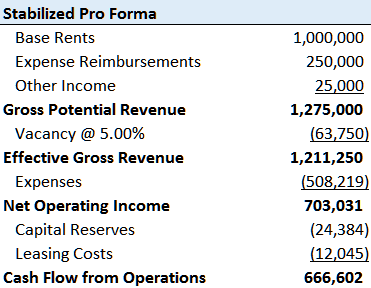
- Calculate stabilized net operating income (NOI)
This is the tough part. What is the right stabilized net operating income? Is it what the broker is telling you? Is it what the borrower is forecasting for the next 12 months? What about the actual trailing 12 months?
The answer is: that’s why you’re paid the big bucks. Use your knowledge of the market, experience with similar transactions, first-hand knowhow of the property, and the data at your disposal to come up with the most accurate NOI for the situation.
- Determine a target debt yield
With NOI in hand, you next need a debt yield assumption. But what is the right assumption to use? If you work for a lender, this is much easier. Turn to your debt yield matrix, ask your boss, or look to previous deals. This is likely a metric you use often and your firm already has pre-determined targets.
However, if you don’t work for a lender or don’t have exposure to market debt yield rates, this becomes trickier. A VERY general (i.e. not to be trusted!) rule of thumb – very general because every lender has its own risk-threshold – is take market fixed mortgage rates and add 4-5%. So, if market fixed interest rates are 4%, add 4% to arrive at an 8% debt yield. Again, this is overly simplistic. You’re better off calling your mortgage broker friend and asking them where debt yields are at for a given market/property type.

- Divide the stabilized NOI by the target debt yield to arrive at your loan amount
Finally, take your net operating income, divide it by your debt yield, and you’ve arrived at the right loan amount.
Now keep in mind, you can show a property to five different lenders, ask them to provide you “maximum proceeds”, and you’ll get five different loan amounts. That’s because, each will have their own NOI and debt yield assumptions thus each arriving at their own right loan amount.

Additional Resources
As an additional resource to modeling debt, we recommend using our Advanced Amortization Table Creator GPT. This tool allows for more sophisticated tracking and analysis of debt payments and amortization schedules. This tool offers customized schedules for various loan structures, flexible inputs of different loan terms, interest rates, and payment frequencies, and a schedule you can automatically updated based on changes in loan assumptions or refinancing terms. By leveraging the advanced features of this tool, you can create more robust and accurate financial models, streamlining the debt modeling process and gaining deeper insights into your real estate financing strategies.
In addition, you can find our Excel tool for modeling debt here.
Wrapping it All Up
So, that’s how you calculate loan amount using debt yield. If you’re looking for a real estate model to help you calculate net operating income, be sure to check out our library of readily accessible real estate Excel pro formas. And as always, don’t hesitate to reach out with questions or comments.
Frequently Asked Questions about Using Debt Yield to Calculate Loan Amount
What is debt yield and how is it calculated?
Debt yield represents “the lender’s return on cost were it to take ownership of the property.” It is calculated by dividing Net Operating Income (NOI) by the loan amount:
Debt Yield (%) = NOI ÷ Loan Amount
Why do lenders use debt yield when sizing loans?
Lenders use debt yield to assess risk and determine a “safe” loan amount. Since they are hypersensitive to protecting their principal, they prefer a loan amount that aligns with a minimum acceptable debt yield target.
How can I use debt yield to calculate a loan amount?
To calculate loan amount using debt yield:
Loan Amount = NOI ÷ Target Debt Yield
Determine stabilized NOI.
Choose a target debt yield.
Divide NOI by the debt yield to find the loan amount.
How do I determine the correct stabilized NOI?
There is no one right NOI. You should use your market knowledge, experience, and available data to assess the most accurate stabilized NOI for the property. “[T]hat’s why you’re paid the big bucks.”
What is a typical debt yield target?
Debt yield targets vary by lender and market. A very general rule of thumb is to take the market fixed interest rate and add 4–5%. However, this is highly simplistic and may not reflect actual market conditions.
Why might different lenders offer different loan amounts?
Each lender may use different NOI assumptions and debt yield targets, which results in different maximum loan amounts for the same property.
What tools are available to assist with debt modeling?
The Advanced Amortization Table Creator GPT and the downloadable Debt Yield Excel Workbook can help create detailed loan models with custom structures, terms, and analysis.
Where can I get models to calculate NOI for debt yield analysis?
You can find models in the A.CRE library of real estate Excel pro formas designed to calculate NOI and perform other analyses.