
• Link to Facebook
  • Link to Youtube
  • Link to LinkedIn
  • Link to X
  • Link to Tiktok
  • Link to Instagram
  • EN ESPAÑOL
    • Inicio
    • Glosario de Términos
    • Modelos Financieros
    • Tutoriales Cortos
  • A.CRE HELP
    • Support Section
    • Contact Us
  • LOGIN/REGISTER
  • Shopping Cart Shopping Cart
    0Shopping Cart
Adventures in CRE
  • A.CRE
    • A.CRE Home
    • A.CRE Help
    • Accelerator
      • Learn More
      • Login
    • AI.Edge
      • Learn More
      • Login
    • Artificial Intelligence
    • Careers
    • CRE Event Calendar
    • CRE Job Board
    • Education
    • Library of Excel Models
    • Meet the A.CRE Team
  • RE Modeling
    • 1031 Exchange
    • Audio Series
    • All-in-One (Ai1) Model
      • Download
      • Guides and Tutorials
      • Support
    • Ask Me Anything (Live)
    • Beginner’s Guide to Excel
    • Excel Models
      • Excel Add-ins
      • Library of Excel Models
      • All-in-One (Ai1) Model
      • Apartment
      • Condo
      • Debt
      • Development
      • Equity Waterfall
      • Hotel
      • Industrial
      • Office
      • Portfolio
      • Retail
      • Single Family
      • Tutorial
    • Excel Tips
    • Practice Library of Case Studies
    • Stochastic Modeling
    • Argus
    • My Downloads / My Account
  • Careers
    • About Careers in Real Estate
    • Ask Me Anything (Live)
    • Audio Series
    • Compensation in Real Estate
    • CRE Job Board
      • Find a Job
        • Browse Jobs
        • Post a Resume
        • Register
        • Login
      • Post a Job
    • CRE Event Calendar
    • CRE Interviews
    • Day in the Life Series
    • Real Estate Legal Content
    • What CRE Pros Do
  • Education
    • Accelerator
    • AI.Edge
    • A.CRE 101
    • Ask Me Anything (Live)
    • A.CRE Audio Series
    • Audio Series
    • Book Reviews
    • CRE Event Calendar
    • Deep Dive Series
    • Glossary of CRE Terms
    • Real Estate Legal Content
    • Real Estate Clubs
    • University Profiles
    • Watch Me Build
  • AI
    • AI Skills
    • AI Use Cases in CRE
    • AI for CRE Training
    • AI Tools for CRE
    • AI.Edge Membership
      • Learn More
      • Login
  • Accelerator
    • Accelerator Reviews
    • Accelerator Story
    • Enroll Now
    • Learn More
    • See What’s New
    • Enterprise Members Only
      • General Enterprise Login
      • ICSC Login
      • M&M Login
    • Members Only
      • Extend/Renew Membership
      • Login
      • Manage Membership
  • My Downloads
    • View My Downloads
    • Find an Excel Model
    • Register
    • Login
  • Click to open the search input field Click to open the search input field Search
  • Menu Menu
You are here: Home1 / Real Estate Financial Modeling2 / Excel Tips3 / Watch Me Build a Tenant Rollover Analysis Model
Spencer Burton
Real Estate Financial Modeling, Excel Tips, Excel Models, Office, Retail, Industrial, Tutorial, Modules, Acquisition, Watch Me Build

Watch Me Build a Tenant Rollover Analysis Model

The feedback has been positive on the ‘Watch Me Build a Multifamily Model’ video I recorded earlier this year. So I thought I’d follow that up with another. This time I build a Real Estate Tenant Rollover Analysis Model and talk through the methodology, keyboard shortcuts, and formulas I use as I build the model.

In addition to the written instructions and video tutorial, I’ve included the option to download a pre-formatted template worksheet as well as a completed worksheet.

Are you an Accelerator member? See the ‘Modeling Short-Term and Long-Term Leases course in the core curriculum. Additionally, if you’re an Accelerator Advanced Member check out course 4, lesson 7 of the ‘Advanced Modeling – Property and Portfolio’ endorsement for additional techniques for modeling leases. Not yet an Accelerator member? Consider joining the real estate financial modeling training program used by top real estate companies and elite universities to train the next generation of CRE professionals.
Watch Me Build – Performing tenant rollover analysis

What is Tenant Rollover Analysis?

Tenant rollover risk is the possibility that a tenant will vacate its space at the end of its lease term. Tenant rollover analysis describes the process by which the real estate investment professional identifies the lease expiration date of each tenant in a property’s rent roll and then analyzes how much rollover risk exists in each year of the proposed hold period.

So for instance, if you’re considering buying a strip center with ten tenants, you’ll first want to determine when each existing tenant’s lease expires. You’ll also want to estimate when future tenants’ leases might expire. Then with this data, you’ll aggregate the expiring square footage (or gross income) in each year and assess which years have greater exposure to rollover.

Why Analyze Tenant Rollover?

The value of any commercial real estate asset is a product of its future cash flows and the level of certainty that those cash flows will occur. The less certain an investor is that the cash flows will occur, the greater the return the investor expects.

When an investor is analyzing whether to purchase a real estate investment, the investor will perform various analyses to estimate the potential future cash flows and vet the likelihood that those cash flows will occur.

One area of uncertainty is in tenant lease expiration. The more leases that expire, either in terms of square footage or gross income, the greater the uncertainty. The Tenant Rollover Analysis is a great tool for assessing how much rollover risk exists in an investment.

a discussion of the A.CRE Accelerator real estate financial modeling courses

How this Rollover Analysis Model Works

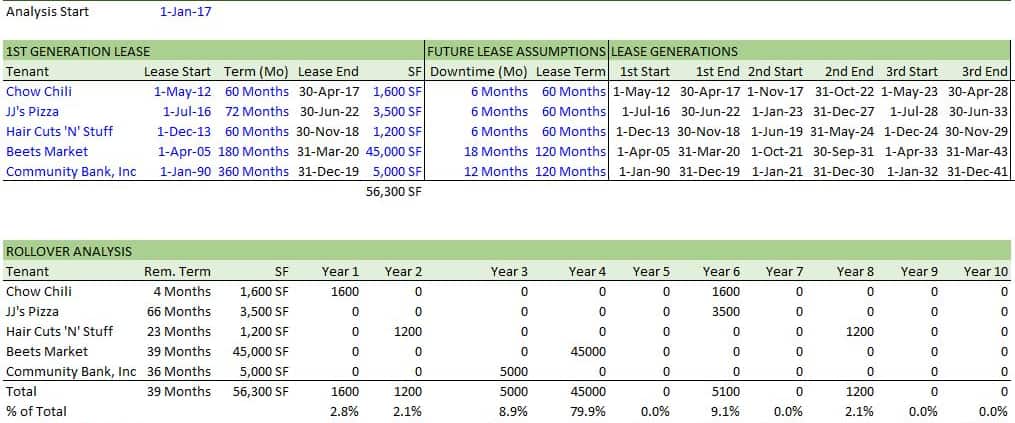
The rollover model I build in this video is basic, but handles the most important aspects of rollover analysis. The outputs that I’m working towards in this model are:

  1. the average remaining lease term of the existing rent roll,
  2. the percent of total net rentable area expiring in any given year,
  3. the cumulative percent of total net rentable area having expired from year to year as the hold period progresses

I arrive at the above outputs by taking the following steps:

  1. I first drop in the basic rent roll assumptions needed to perform this analysis; namely lease start and end dates, lease term length, net rentable area occupied by each tenant, and future lease assumptions including downtime between leases and average lease length.
  2. I then model the various lease generations’ start and end dates, meaning I estimate when present and future leases will start and end using the assumptions in step 1.
  3. Next, I model the hold period by month. I write logic that asks, is there a lease expiring in this month and if so, set that cell to the net rentable area for that tenant, if not set that cell to zero.
  4. Finally, I add up the expiring square footage values by month and then by year.

Having performed the above steps, calculating the desired outputs is fairly simple. In my video, I finish by creating a column chart to visualize the rollover by year – a nice way to present your findings to partners, lenders, and friends.

Download the Template and Completed File

To get the most out of this video, I suggest you use the practice model (download link below) and build the model yourself as I go. The download link includes a Workbook containing both a pre-formatted blank template worksheet and a completed worksheet. The practice worksheet has identical formatting to the completed worksheet, but the formulas have been deleted.

To make these modules accessible to everyone, they are offered on a “Pay What You’re Able” basis with no minimum (enter $0 if you’d like) or maximum (your support helps keep the content coming – similar real estate training exercises sell for $100+). Just enter a price together with an email address to send the download link to, and then click ‘Continue’. If you have any questions about our “Pay What You’re Able” program or why we offer our models on this basis, please reach out to either Mike or Spencer.

Proceed to Download Page

Follow Along with the Video – Tenant Rollover Analysis

Open up a blank Excel workbook (or use the pre-formatted template provided) and follow along as I build a tenant rollover analysis model.



Frequently Asked Questions about the Tenant Rollover Analysis Model

What is tenant rollover analysis in real estate?

Tenant rollover analysis assesses lease expiration risk by identifying when tenants’ leases end and how much square footage (or income) expires each year. “Tenant rollover risk is the possibility that a tenant will vacate… Tenant rollover analysis… analyzes how much rollover risk exists in each year of the proposed hold period.”

Why is tenant rollover analysis important for investors?

Because lease expirations create uncertainty in future cash flows. Greater rollover in any year increases risk, potentially requiring higher returns. “The more leases that expire… the greater the uncertainty.”

What outputs does the model produce?

The model calculates:

Average remaining lease term

% of net rentable area (NRA) expiring annually

Cumulative % of NRA expired over time
“I finish by creating a column chart to visualize the rollover by year.”

How does the model calculate rollover values?

It uses monthly logic to detect if a lease expires in that period, then assigns the tenant’s square footage. These values are then summed monthly and annually to determine rollover exposure. “I write logic that asks, is there a lease expiring in this month… then set that cell to the NRA.”

What assumptions must be input for each tenant?

The model requires:

Lease start and end dates

Lease term length

Net rentable area (NRA)

Future lease assumptions (e.g., downtime, lease length)
“I first drop in the basic rent roll assumptions needed to perform this analysis…”

What resources are included with the video tutorial?

The download includes:

A pre-formatted template worksheet

A completed worksheet with formulas
Both files are provided on a “Pay What You’re Able” basis. “The practice worksheet has identical formatting… but the formulas have been deleted.”

Can I access this model even if I’m not an Accelerator member?

Yes. The model is available to everyone, with no minimum cost. Just enter any amount (even $0) and your email to download. “They are offered on a ‘Pay What You’re Able’ basis with no minimum (enter $0 if you’d like)…”

Where can I learn more about modeling leases?

Accelerator members can explore:

Modeling Short-Term and Long-Term Leases (core curriculum)

Advanced Modeling – Property and Portfolio, Course 4, Lesson 7
“See the ‘Modeling Short-Term and Long-Term Leases’ course in the core curriculum.”


About the Author: Spencer Burton is Co-Founder and CEO of CRE Agents, an AI-powered platform training digital coworkers for commercial real estate. He has 20+ years of CRE experience and has underwritten over $30 billion in real estate across top institutional firms.

Spencer also co-founded Adventures in CRE, served as President at Stablewood, and holds a BS in International Affairs from Florida State University and a Masters in Real Estate Finance from Cornell University.

Contact Spencer
by Spencer Burton
Share this entry
  • Share on X
  • Share on LinkedIn
  • Share by Mail
  • Link to Instagram
  • Link to Youtube
https://www.adventuresincre.com/wp-content/uploads/2020/03/tenant-rollover-analysis.jpg 1080 933 Spencer Burton https://adventuresincre.com/wp-content/uploads/2022/04/logo-transparent-black-e1649023554691.png Spencer Burton2020-03-27 06:33:062025-07-02 14:56:24Watch Me Build a Tenant Rollover Analysis Model
You might also like
The Forefront of Climate Solutions for the Built Environment with Jacob Racusin | S3SP8
Watch Me Build a Multifamily Real Estate Model (Updated Feb 2020)
Data-Driven Self Storage Strategy With Drew Dolan | S3SP3
The Acquisition Process | Title Insurance featuring Josh Roling – Contract to Close
How To Source Deals | S3E3
Calculate Residual Land Value in Excel (Updated Jul 2023)
Accelerator - Learn More

Featured Content

  • RE Financial Modeling Training
  • Library of Excel Models
  • Post a Job – It’s Free
  • Master Financial Modeling
  • Technical Interview Guide
  • Definitive Guide to Excel
A.CRE Library of Excel Models

Recent Posts

  • A.CRE Apartment Development Model (Updated June 2026)
  • Mejora tu Desempeño en Excel con el Complemento “Excel 4 CRE” (Actualizado Junio 2026)
  • Nuevo Contenido en Español (Actualizado Junio 2026)
  • ¡Lanzamiento del Complemento “Excel 4 CRE” Completamente en Español! (Actualizado Junio 2026)
  • An AI Skill for the A.CRE Commercial Mortgage Loan Analysis Model

Note About Models

Models downloaded from A.CRE may contain errors. Verify formulas/methodology before basing investment decisions on any model here. Read our Terms and Conditions of Use and Disclaimer.

★★★★★

Accelerator Reviews

Search Adventures in CRE

Search Search

Have a Question or Need Help?

Visit our Help Section

Contact Adventures in CRE

  • Visit A.CRE Help
  • Via Email
  • Via LinkedIn

You Might Also Like

  • Real Estate Modeling Courses
  • Real Estate Financial Modeling
  • A.CRE Job Board
  • Careers in Commercial Real Estate
  • Real Estate Education

A.CRE Library of Excel Models

  • Browse Excel Models
  • Login/Register
  • View My Downloads
  • Edit Account Details

Terms, Policies, and Disclaimer

  • Privacy Policy
  • Cookie Policy
  • AI Usage Policy
  • Terms of Use
  • Disclaimer
© 2014 - Present - Copyright - www.AdventuresinCRE.com, LLC | Adventures in CRE | A.CRE
  • Link to Facebook
  • Link to Youtube
  • Link to LinkedIn
  • Link to X
  • Link to Tiktok
  • Link to Instagram
Link to: Commercial Real Estate Lease Abstract (Summary) Link to: Commercial Real Estate Lease Abstract (Summary) Commercial Real Estate Lease Abstract (Summary) Link to: Excel Tips: Index Match Match Link to: Excel Tips: Index Match Match Excel Tips: Index Match Match
Scroll to top Scroll to top Scroll to top