• Link to Facebook
  • Link to Youtube
  • Link to LinkedIn
  • Link to X
  • Link to Tiktok
  • Link to Instagram
  • EN ESPAÑOL
    • Inicio
    • Glosario de Términos
    • Modelos Financieros
    • Tutoriales Cortos
  • A.CRE HELP
    • Support Section
    • Contact Us
  • LOGIN/REGISTER
  • Shopping Cart Shopping Cart
    0Shopping Cart
Adventures in CRE
  • A.CRE
    • A.CRE Home
    • A.CRE Help
    • Accelerator
      • Learn More
      • Login
    • AI.Edge
      • Learn More
      • Login
    • Artificial Intelligence
    • Careers
    • CRE Event Calendar
    • CRE Job Board
    • Education
    • Library of Excel Models
    • Meet the A.CRE Team
  • RE Modeling
    • 1031 Exchange
    • Audio Series
    • All-in-One (Ai1) Model
      • Download
      • Guides and Tutorials
      • Support
    • Ask Me Anything (Live)
    • Beginner’s Guide to Excel
    • Excel Models
      • Excel Add-ins
      • Library of Excel Models
      • All-in-One (Ai1) Model
      • Apartment
      • Condo
      • Debt
      • Development
      • Equity Waterfall
      • Hotel
      • Industrial
      • Office
      • Portfolio
      • Retail
      • Single Family
      • Tutorial
    • Excel Tips
    • Practice Library of Case Studies
    • Stochastic Modeling
    • Argus
    • My Downloads / My Account
  • Careers
    • About Careers in Real Estate
    • Ask Me Anything (Live)
    • Audio Series
    • Compensation in Real Estate
    • CRE Job Board
      • Find a Job
        • Browse Jobs
        • Post a Resume
        • Register
        • Login
      • Post a Job
    • CRE Event Calendar
    • CRE Interviews
    • Day in the Life Series
    • Real Estate Legal Content
    • What CRE Pros Do
  • Education
    • Accelerator
    • AI.Edge
    • A.CRE 101
    • Ask Me Anything (Live)
    • A.CRE Audio Series
    • Audio Series
    • Book Reviews
    • CRE Event Calendar
    • Deep Dive Series
    • Glossary of CRE Terms
    • Real Estate Legal Content
    • Real Estate Clubs
    • University Profiles
    • Watch Me Build
  • AI
    • AI Skills
    • AI Use Cases in CRE
    • AI for CRE Training
    • AI Tools for CRE
    • AI.Edge Membership
      • Learn More
      • Login
  • Accelerator
    • Accelerator Reviews
    • Accelerator Story
    • Enroll Now
    • Learn More
    • See What’s New
    • Enterprise Members Only
      • General Enterprise Login
      • ICSC Login
      • M&M Login
    • Members Only
      • Extend/Renew Membership
      • Login
      • Manage Membership
  • My Downloads
    • View My Downloads
    • Find an Excel Model
    • Register
    • Login
  • Click to open the search input field Click to open the search input field Search
  • Menu Menu
You are here: Home1 / Real Estate Financial Modeling2 / Excel Models3 / Loan Payment Schedule and Balance Tracking Tool (Updated Aug 2024)
Spencer Burton
Real Estate Financial Modeling, Excel Models, Asset Management, Standalone, Debt

Loan Payment Schedule and Balance Tracking Tool (Updated Aug 2024)

A childhood friend called me this week and asked for a favor. He is the lender on a private real estate loan and was wanting a way to personally service the loan. Namely, he needed a tool to issue monthly invoices, track the principal vs interest paid in each month, and calculate the current loan balance.

Now there are far more sophisticated ways to service a loan; hiring an escrow company for instance or purchasing loan servicing software. However, he was looking for a poor man’s solution (i.e. a DIY solution) and so I offered him the following option.

I built a quick loan payment and a balance tracking tool in Microsoft Excel (download below), and then referred him to a free cloud-based accounting software with the option to send recurring invoices. After finishing the Excel tool, I thought I’d share it with the A.CRE community.
How the Loan Payment Schedule and Balance Tracking Tool Works

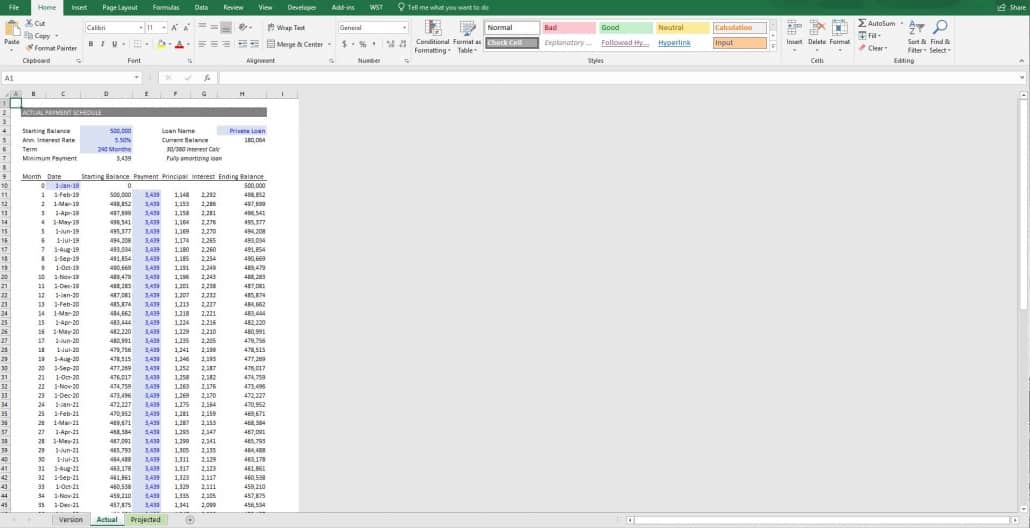
The tool is built in Microsoft Excel. It includes two tabs plus a versions tab. The first tab, entitled ‘Actual’, is where all inputs are entered. The inputs are Starting Balance, Annual Interest Rate, Term (in months), Inv. Name, Loan Funding Date, and then the actual payments as they’re made each month.

Inputs are entered into the cells with blue background and blue font. The required payment each month (i.e. minimum payment) is calculated in cell D7.

The model uses a basic amortization schedule, assumes 30/360 interest calculation, and allows for a loan term of 360 periods. The tool assumes the loan is amortizing (no interest only), and automatically calculates the proportion of payment allocated to interest vs principal in each month.

The ‘Projected’ tab shows the expected payment schedule assuming the borrower pays the minimum payment on time each month. The loan fully amortizes as of the end of the loan term.

In essence, this tool is two basic amortization tables with a slight adjustment on the Actual tab to allow for tracking. If you spot an error or have an enhancement, you’d like me to make, please let me know.

Need a More Robust Amortization Table?

I recognize this tool is simplistic. Most commercial loans in real estate are not fully amortizing loans, and many loans have at least some interest-only period. This tool was built for a specific situation, which likely doesn’t match yours.

So, if you need a more robust amortization schedule, I suggest you check out the other amortization and debt models we’ve shared on A.CRE.

We also have an additional resource to modeling debt, our Advanced Amortization Table Creator GPT. This tool allows for more sophisticated tracking and analysis of debt payments and amortization schedules. This tool offers customized schedules for various loan structures, flexible inputs of different loan terms, interest rates, and payment frequencies, and a schedule you can automatically updated based on changes in loan assumptions or refinancing terms. By leveraging the advanced features of this tool, you can create more robust and accurate financial models, streamlining the debt modeling process and gaining deeper insights into your real estate financing strategies.

Download the Loan Payment Schedule and Balance Tracking Tool

To make this model accessible to everyone, it is offered on a “Pay What You’re Able” basis with no minimum (enter $0 if you’d like) or maximum (your support helps keep the content coming). Just enter a price together with an email address to send the download link to, and then click ‘Continue’. If you have any questions about our “Pay What You’re Able” program or why we offer our models on this basis, please reach out to either Mike or Spencer.

Proceed to Download Page

Frequently Asked Questions about the Loan Payment Schedule and Balance Tracking Tool

What does the Loan Payment Schedule and Balance Tracking Tool do?

The tool allows users to track loan payments, split each payment into principal and interest, issue monthly invoices, and monitor the current loan balance for a fully amortizing private real estate loan.

How many tabs are included in the Excel tool?

The tool includes three tabs:

Actual – where you input real-world loan data and track actual payments

Projected – a standard amortization schedule assuming on-time payments

Version – a log of changes and improvements across updates

What assumptions are built into the amortization schedule?

The tool assumes a fully amortizing loan with a 30/360 interest calculation method and a loan term of up to 360 months. It does not support interest-only or balloon payment structures.

How do I use Excel Goal Seek to calculate minimum payment?

You don’t need to use Goal Seek. The minimum required monthly payment is automatically calculated in cell D7 of the Actual tab, based on the loan inputs provided.

What kind of inputs are required to use the tool?

Users need to input:

Starting Balance

Annual Interest Rate

Loan Term (months)

Loan Name

Funding Date and Actual Payment Dates

Actual Payment Amounts
Blue fonted cells are required input fields.

Can the tool be used to generate monthly invoices?

Yes, although the Excel file itself does not create invoices, the author recommends pairing it with free cloud-based accounting software that supports recurring invoice generation.

What’s the difference between the “Actual” and “Projected” tabs?

Actual Tab: Tracks real-world payments, allowing for date adjustments and irregular payment amounts

Projected Tab: Displays a standard amortization schedule assuming timely minimum payments

Is this tool suitable for complex commercial loans?

No. This tool is ideal for simple, fully amortizing loans. For more complex structures (e.g. interest-only periods, variable rates, prepayment penalties), use the Advanced Amortization Table Creator GPT or other A.CRE debt models.

How can I download the tool and is there a cost?

The tool is available on a “Pay What You’re Able” basis. You can download it for free or contribute any amount. Paid users receive access to all future updates via email.


Version Notes

Version 1.1

  • Added new Version tab
  • Fixed issue where in certain cases the ‘Current Balance’ formula was not calculating correctly
  • Fixed issue where there was a ‘Starting Balance’ greater than 0 in period 0 on the Projected tab
  • Changed number formatting to ‘Accounting’
  • Removed blue background on input cells
  • Set every ‘Actual’ date cell an input to allow user to enter the actual date when the payment was made
  • Added ‘Loan Origination Date’ input to ‘Actual’ tab
  • Added ‘Pmt #’ column to track number of payments, independent of dates
  • Added ’30/360 Interest Calc’ and ‘Fully amortizing loan’ notes to the ‘Projected’ tab
  • Renamed ‘Inv. Name’ to ‘Loan Name’ on the ‘Projected’ tab
  • Renamed ‘Interest Rate’ to ‘Ann. Interest Rate’ on the ‘Projected’ tab for consistency
  • Misc. formatting improvements

Version 1.0

  • Initial release

About the Author: Spencer Burton is Co-Founder and CEO of CRE Agents, an AI-powered platform training digital coworkers for commercial real estate. He has 20+ years of CRE experience and has underwritten over $30 billion in real estate across top institutional firms.

Spencer also co-founded Adventures in CRE, served as President at Stablewood, and holds a BS in International Affairs from Florida State University and a Masters in Real Estate Finance from Cornell University.

Contact Spencer
by Spencer Burton
Share this entry
  • Share on X
  • Share on LinkedIn
  • Share by Mail
  • Link to Instagram
  • Link to Youtube
https://www.adventuresincre.com/wp-content/uploads/2022/10/Loan-Payment-Schedule-and-Balance-Tracking-Tool.webp 1024 1024 Spencer Burton https://adventuresincre.com/wp-content/uploads/2022/04/logo-transparent-black-e1649023554691.png Spencer Burton2024-08-09 12:30:262025-10-03 15:28:21Loan Payment Schedule and Balance Tracking Tool (Updated Aug 2024)
You might also like
Dynamic Amortization Schedule (Updated 2.06.2020)
Watch Me Build a Dynamic Mortgage Amortization Table in Excel (Updated September 2024)
Advanced Mortgage Amortization Module (Updated May 2024)
Accelerator - Learn More

Featured Content

  • RE Financial Modeling Training
  • Library of Excel Models
  • Post a Job – It’s Free
  • Master Financial Modeling
  • Technical Interview Guide
  • Definitive Guide to Excel
A.CRE Library of Excel Models

Recent Posts

  • Real Estate Equity Waterfall Model – IRR and Equity Multiple Hurdles (Updated June 2026)
  • A.CRE Self Storage Development Model (Updated June 2026)
  • Episode 12 of Multipliers: Ask Why Until the Answer Changes
  • A.CRE Jobs of the Week (Updated 6.22.2026)
  • A.CRE Real Estate Financial Models Download Guide (Updated Jun 2026)

Note About Models

Models downloaded from A.CRE may contain errors. Verify formulas/methodology before basing investment decisions on any model here. Read our Terms and Conditions of Use and Disclaimer.

★★★★★

Accelerator Reviews

Search Adventures in CRE

Search Search

Have a Question or Need Help?

Visit our Help Section

Contact Adventures in CRE

  • Visit A.CRE Help
  • Via Email
  • Via LinkedIn

You Might Also Like

  • Real Estate Modeling Courses
  • Real Estate Financial Modeling
  • A.CRE Job Board
  • Careers in Commercial Real Estate
  • Real Estate Education

A.CRE Library of Excel Models

  • Browse Excel Models
  • Login/Register
  • View My Downloads
  • Edit Account Details

Terms, Policies, and Disclaimer

  • Privacy Policy
  • Cookie Policy
  • AI Usage Policy
  • Terms of Use
  • Disclaimer
© 2014 - Present - Copyright - www.AdventuresinCRE.com, LLC | Adventures in CRE | A.CRE
  • Link to Facebook
  • Link to Youtube
  • Link to LinkedIn
  • Link to X
  • Link to Tiktok
  • Link to Instagram
Link to: A.CRE Presente en el Gran Salón Inmobiliario — Bogotá 2024 Link to: A.CRE Presente en el Gran Salón Inmobiliario — Bogotá 2024 A.CRE Presente en el Gran Salón Inmobiliario — Bogotá 2024 Link to: Análisis de una Inversión Inmobiliaria desde la Perspectiva de un Socio Limitado (LP) Link to: Análisis de una Inversión Inmobiliaria desde la Perspectiva de un Socio Limitado (LP) Análisis de una Inversión Inmobiliaria desde la Perspectiva de un Socio Limitado...
Scroll to top Scroll to top Scroll to top