
• Link to Facebook
  • Link to Youtube
  • Link to LinkedIn
  • Link to X
  • Link to Tiktok
  • Link to Instagram
  • EN ESPAÑOL
    • Inicio
    • Glosario de Términos
    • Modelos Financieros
    • Tutoriales Cortos
  • A.CRE HELP
    • Support Section
    • Contact Us
  • LOGIN/REGISTER
  • Shopping Cart Shopping Cart
    0Shopping Cart
Adventures in CRE
  • A.CRE
    • A.CRE Home
    • A.CRE Help
    • Accelerator
      • Learn More
      • Login
    • AI.Edge
      • Learn More
      • Login
    • Artificial Intelligence
    • Careers
    • CRE Event Calendar
    • CRE Job Board
    • Education
    • Library of Excel Models
    • Meet the A.CRE Team
  • RE Modeling
    • 1031 Exchange
    • Audio Series
    • All-in-One (Ai1) Model
      • Download
      • Guides and Tutorials
      • Support
    • Ask Me Anything (Live)
    • Beginner’s Guide to Excel
    • Excel Models
      • Excel Add-ins
      • Library of Excel Models
      • All-in-One (Ai1) Model
      • Apartment
      • Condo
      • Debt
      • Development
      • Equity Waterfall
      • Hotel
      • Industrial
      • Office
      • Portfolio
      • Retail
      • Single Family
      • Tutorial
    • Excel Tips
    • Practice Library of Case Studies
    • Stochastic Modeling
    • Argus
    • My Downloads / My Account
  • Careers
    • About Careers in Real Estate
    • Ask Me Anything (Live)
    • Audio Series
    • Compensation in Real Estate
    • CRE Job Board
      • Find a Job
        • Browse Jobs
        • Post a Resume
        • Register
        • Login
      • Post a Job
    • CRE Event Calendar
    • CRE Interviews
    • Day in the Life Series
    • Real Estate Legal Content
    • What CRE Pros Do
  • Education
    • Accelerator
    • AI.Edge
    • A.CRE 101
    • Ask Me Anything (Live)
    • A.CRE Audio Series
    • Audio Series
    • Book Reviews
    • CRE Event Calendar
    • Deep Dive Series
    • Glossary of CRE Terms
    • Real Estate Legal Content
    • Real Estate Clubs
    • University Profiles
    • Watch Me Build
  • AI
    • AI Skills
    • AI Use Cases in CRE
    • AI for CRE Training
    • AI Tools for CRE
    • AI.Edge Membership
      • Learn More
      • Login
  • Accelerator
    • Accelerator Reviews
    • Accelerator Story
    • Enroll Now
    • Learn More
    • See What’s New
    • Enterprise Members Only
      • General Enterprise Login
      • ICSC Login
      • M&M Login
    • Members Only
      • Extend/Renew Membership
      • Login
      • Manage Membership
  • My Downloads
    • View My Downloads
    • Find an Excel Model
    • Register
    • Login
  • Click to open the search input field Click to open the search input field Search
  • Menu Menu
You are here: Home1 / Real Estate Financial Modeling2 / Excel Models3 / Dynamic Amortization Schedule (Updated 2.06.2020)
Michael Belasco
Real Estate Financial Modeling, Excel Models, Modules, Debt

Dynamic Amortization Schedule (Updated 2.06.2020)

This is a dynamic amortization schedule for debt that gives the user the capability to model a loan with an interest only period up front and an amortizing floating rate debt repayment period once the interest only period is over. This module also allows the user to model other more straightforward scenarios such as an interest only loan and a loan with no interest only period and a fixed interest rate.

Along with the download below, there are now two videos. The first explains how to use this module and also how the formulas work for those who are interested in learning more about the mechanics. The second video is a Watch Me Build that shows you how to roll up the monthly data into annual periods.

Dynamic Amortization Schedule Features
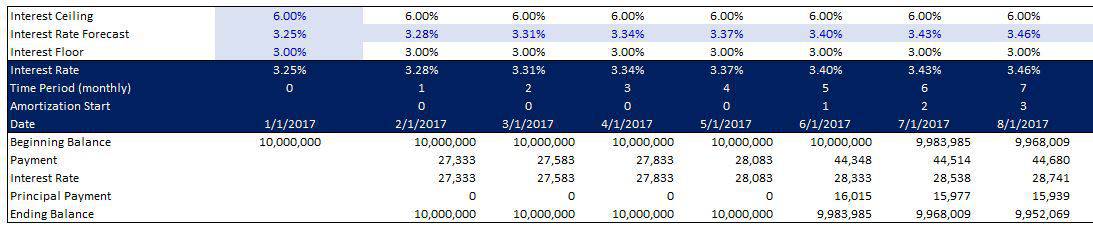
This module is built to account for a 360-month (30-year) period with an interest only period of the users choosing, a floating rate or fixed rate amortization period of the user’s choosing, and the ability to select a balloon payment date. The module has a place to insert the floating rate debt forecast (row 19) and if you would like to use this module for a fixed interest rate loan, you just need to insert the same interest rate across the entirety row 19.

a discussion of the A.CRE Accelerator real estate financial modeling courses

Additional Learning Component

I also added a second sheet to this model, as mentioned in the video, for those who are less experienced with building amortization tables and want an easy-to-understand model to see how a basic, fixed rate amortization table works. The payment function in this module is a bit more complex due to having to constantly recalculate the payment for floating rate debt, so the second sheet is provided to give a more basic understanding of straight forward amortization schedules.

This module can be inserted into your own model by simply linking the payment line form this module into the debt payment section of your model being careful to properly sync up the dates.

Hope you find the module and video useful.

Video Walkthrough – Dynamic Amortization Schedule

Convert The Data to an Annual Schedule


Download the Dynamic Amortization Schedule

To make these files accessible to everyone, they are offered on a “Pay What You’re Able” basis with no minimum (enter $0 if you’d like) or maximum (your support helps keep the content coming – similar real estate Excel modules sell for $100 – $300+). Just enter a price together with an email address to send the download link to, and then click ‘Continue’. If you have any questions about our “Pay What You’re Able” program or why we offer our models on this basis, please reach out to either Mike or Spencer.

Proceed to Download Page

Frequently Asked Questions about the Dynamic Amortization Schedule in Excel

What scenarios can the Dynamic Amortization Schedule model?

The model supports a range of loan scenarios, including:

Interest-only loans

Loans with an initial interest-only period followed by amortizing payments

Loans with fixed interest rates

Loans with floating interest rates

Loans with a user-defined balloon payment date

How is the interest rate input handled for floating and fixed loans?

Interest rates are entered in row 19 of the schedule. For floating rate debt, input your forecasted rates across the row. For fixed rate loans, simply enter the same rate across all cells in row 19.

What is the maximum term supported by the module?

The model is designed to support a maximum loan term of 360 months, or 30 years.

Can I use this module in my own Excel model?

Yes. You can insert this module into your own model by linking the payment line from this schedule to the appropriate section in your model. Be sure to align the dates correctly when integrating.

What’s included for users new to amortization modeling?

There is a second sheet in the Excel file that shows a basic, fixed-rate amortization table to help less experienced users understand the foundational concepts before tackling the dynamic module.

What do the two accompanying videos cover?

The first video explains how to use the module and how the formulas work. The second is a “Watch Me Build” that demonstrates how to convert the monthly data into annual figures.

How is this model made available to users?

The model is offered on a “Pay What You’re Able” basis, allowing users to download it for free or contribute any amount. This helps keep content accessible and supports continued development.


About the Author: Michael has spent a decade working in various capacities on more than $7 billion of real estate transactions spanning all asset classes and geographies throughout the USA. Michael is both the founder of Firm Ridge Real Estate, which has a core focus on niche and emerging real estate strategies and A.CRE Consulting, a real estate advisory and financial modeling firm that has provided services on projects totaling more than $21 billion to date. Prior, Michael was a founding member and COO of Stablewood Properties, an institutionally backed real estate operator. And before Stablewood, Michael was at Hines in San Francisco.  Michael has both an MBA and Master in Real Estate with a concentration in Real Estate Finance from Cornell University.

Contact Michael


by Michael Belasco
Share this entry
  • Share on X
  • Share on LinkedIn
  • Share by Mail
  • Link to Instagram
  • Link to Youtube
https://www.adventuresincre.com/wp-content/uploads/2017/03/floating-rate-debt-module.jpg 684 733 Michael Belasco https://adventuresincre.com/wp-content/uploads/2022/04/logo-transparent-black-e1649023554691.png Michael Belasco2020-02-06 08:27:292025-07-02 16:11:35Dynamic Amortization Schedule (Updated 2.06.2020)
You might also like
Commercial Mortgage Loan Analysis Model (Updated June 2026)
Real Estate Debt Module in Excel (Updated May 2024)
Understanding Stabilization Through The Lens Of Operating Expense Ratio
Watch Me Build a Dynamic Mortgage Amortization Table in Excel (Updated September 2024)
30/360, Actual/365, and Actual/360 – How Lenders Calculate Interest on CRE Loans – Some Important Insights (Updated July 2025)
Loan Payment Schedule and Balance Tracking Tool (Updated Aug 2024)
Accelerator - Learn More

Featured Content

  • RE Financial Modeling Training
  • Library of Excel Models
  • Post a Job – It’s Free
  • Master Financial Modeling
  • Technical Interview Guide
  • Definitive Guide to Excel
A.CRE Library of Excel Models

Recent Posts

  • AI Tools for Commercial Real Estate (Summer 2026 Edition)
  • The 2008 Financial Crisis, From the Ground Up: Why We Believed Houses Were Safe
  • Real Estate Equity Waterfall Model – IRR and Equity Multiple Hurdles (Updated June 2026)
  • A.CRE Self Storage Development Model (Updated June 2026)
  • Episode 12 of Multipliers: Ask Why Until the Answer Changes

Note About Models

Models downloaded from A.CRE may contain errors. Verify formulas/methodology before basing investment decisions on any model here. Read our Terms and Conditions of Use and Disclaimer.

★★★★★

Accelerator Reviews

Search Adventures in CRE

Search Search

Have a Question or Need Help?

Visit our Help Section

Contact Adventures in CRE

  • Visit A.CRE Help
  • Via Email
  • Via LinkedIn

You Might Also Like

  • Real Estate Modeling Courses
  • Real Estate Financial Modeling
  • A.CRE Job Board
  • Careers in Commercial Real Estate
  • Real Estate Education

A.CRE Library of Excel Models

  • Browse Excel Models
  • Login/Register
  • View My Downloads
  • Edit Account Details

Terms, Policies, and Disclaimer

  • Privacy Policy
  • Cookie Policy
  • AI Usage Policy
  • Terms of Use
  • Disclaimer
© 2014 - Present - Copyright - www.AdventuresinCRE.com, LLC | Adventures in CRE | A.CRE
  • Link to Facebook
  • Link to Youtube
  • Link to LinkedIn
  • Link to X
  • Link to Tiktok
  • Link to Instagram
Link to: A.CRE Audio Series Season Two – Coming March 2020 Link to: A.CRE Audio Series Season Two – Coming March 2020 A.CRE Audio Series Season Two – Coming March 2020 Link to: Create Dynamic Sub-Property Type Drop-Down Menus in Excel Link to: Create Dynamic Sub-Property Type Drop-Down Menus in Excel Create Dynamic Sub-Property Type Drop-Down Menus in Excel
Scroll to top Scroll to top Scroll to top