The Multiplier Framework Workshop #2: Double Underwriting Speed with AI
On a recent live follow-up workshop, we took the Multiplier Framework out of “high level theory” and applied it to the most requested target in commercial real estate:
Underwriting, the number one task CRE professionals said they want to automate.
The goal was simple. Show exactly how AI overlaps cleanly with your existing underwriting workflow, without ripping out Excel or rebuilding your process.
If you missed the live session, or want a tighter walkthrough, this post gives you:
- The full 60-minute workshop replay
- A practical breakdown of underwriting into micro-tasks (the “real” work inside underwriting)
- A short list of high-impact, high-feasibility use cases (rent rolls, T12s, OMs, comps, validation)
- A link to the Multiplier Framework app (free) and the framework overview
- Pointers to AI.Edge and CRE Agents if you want help learning or building
Watch the 60-Minute Workshop Replay
Why Underwriting is the Perfect AI Target
Underwriting is one of the most common areas in need of automation in CRE. But underwriting is not one thing. Depending on whether you’re underwriting in brokerage, asset management, acquisitions, developement, it is a collection of dozens of repeatable micro-tasks.
A few examples:
- Fit check (is it a “no” immediately?)
- Rent roll cleanup and unit mix tables
- Lease abstraction and rent schedules
- T12 cleanup, chart-of-accounts mapping, and trailing summaries
- Market comps and input research
- Model build and scenario updates
- Error checking and validation
If you want to multiply your underwriting by 2x (or eventually 100x!), you don’t need to fully automate underwriting. Instead, focus on a few of the highest impact micro-tasks from your list.
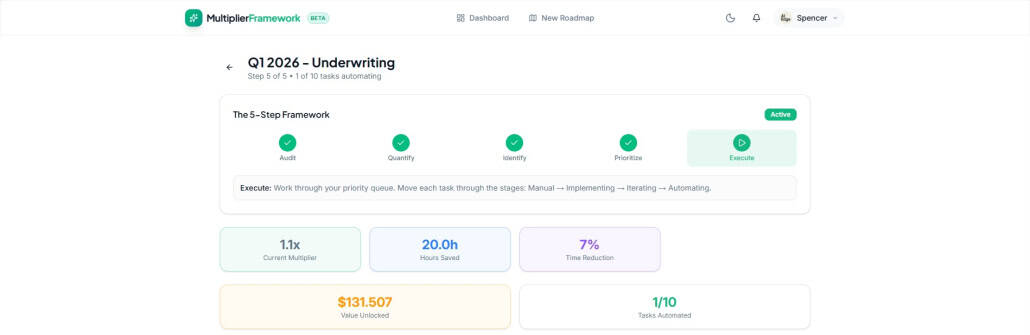
Screenshot of our free ‘Multiplier Framework’ App
Step 1: Map Underwriting as Tasks, Not a Deliverable
Deliverable: Underwritten asset value
Tasks inside that deliverable (examples):
- Investment criteria fit check
- Underwrite leases
- Parse rent rolls, build unit mix tables or rent schedules
- Organize historical financials, map to chart of accounts
- Research comps, rents, expenses, cap rates
- Assess tenant credit quality and concentration
- Assess physical condition, draft capex plan inputs
- Build pro forma, value, and sensitivity cases
The point is not perfection. The point is clarity. You cannot automate work you have not defined.
Step 2: Quantify the Impact
Example approach from the workshop:
- Goal: close 2 acquisitions this year
- Acquisition fees: $400,000 total
- Deals screened: 200 per year
- Therefore: Every deal you work through is worth $2,000 (400,000 ÷ 200)
Once you quantify the tasks, you can answer the only question that matters: which tasks have high impact and high feasibility?
Step 3: High-Impact, High-Feasibility Underwriting Use Cases (with possible solutions)
Use Case 1: Rapid Fit Check
Write a buy box prompt once, then screen incoming OMs quickly so you can decide what deserves deeper underwriting.
Use Case 2: Rent Roll to Unit Mix Tables and Clean Data
Rent rolls arrive in inconsistent spreadsheets and messy PDFs. Turning them into clean, structured data is one of the fastest underwriting wins.
Use Case 3: T12 Cleanup and Trailing Summaries
Map messy historicals to a chart of accounts and generate trailing summaries (T1, T3, T6, T12). This removes a major source of manual friction.
- Claude for Excel
- quickdata.ai
- CRE Agents ‘Map Income Statement to Standard Chart of Accounts’ or ‘Add T1, T3, T6, and T12 to Income Statement’ tasks
Use Case 4: Comps and Input Research
Because much market data sits behind paywalls, a practical approach is building your own comp database over time, for example by extracting standardized fields from incoming OMs.
- Perplexity + Comp Websites
- HelloData
- Replit custom app
- Custom GPT
- CRE Agents ‘5-Year Research with Market Summary’, ‘Deep Location Research’, or ‘Get Ownership Details’ tasks
Use Case 5: Physical Condition Summaries and Quick Screens
AI can summarize long PCRs and Phase I reports into a concise list of issues for an IC memo. Visual quick screens can be directional, but should not be treated as inspections.
- AI.Edge Prompt
- CRE Agent ‘Property Condition Report (PCR) Review’ or ‘Phase I Environmental Review’ tasks
Use Case 6: OM to Initial Excel Model Inputs
If you have a template model, you can extract inputs from the OM and populate a first-pass model quickly. Then the human judgment begins (validation and refining assumptions).
- Archer
- Custom GPT
- CRE Agents ‘Build 10-Year DCF Model from Scratch’ task
Use Case 7: Error Checking and Validation
Use a separate validation pass to spot inconsistencies, missing assumptions, and mismatches between the story and the numbers.
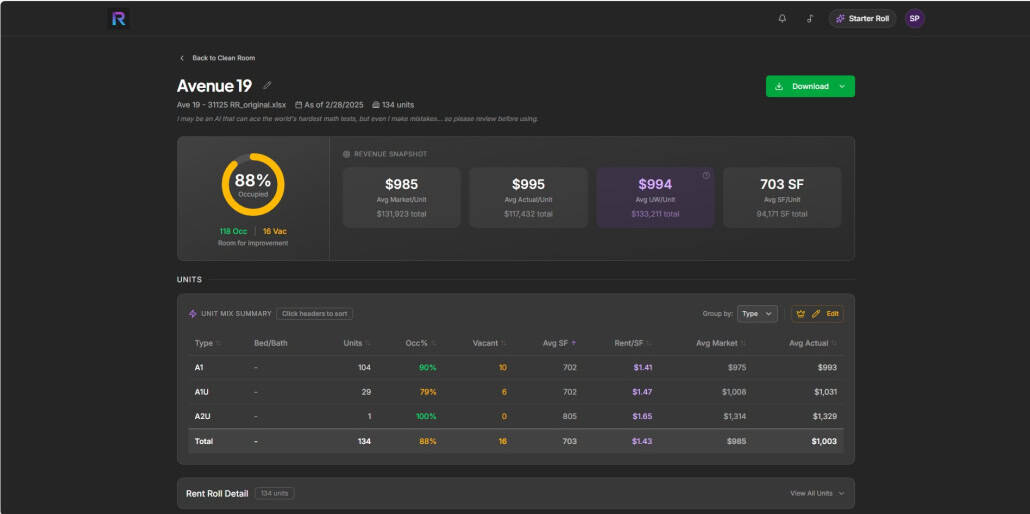
Screenshot of RROL AI – a super simple multifamily rent roll parsing and analysis tool.
The Cockpit Mindset
The next evolution of AI in CRE is orchestrating multiple micro-tasks in parallel. Fit check runs while rent roll parsing runs while T12 cleanup runs, one three different properties. Your role becomes orchestration and judgment and your multiplier effect looks like this:
- Rent roll parsing -> Manual 20 minutes, automated 5 plus 2 of validation
- T12 cleanup -> Manual 20 minutes, automated 5 plus 2 of validation
- Fit Check -> Manual 20 minutes, automated 5 plus 2 of validation
The multiplier effect on one property, where all three tasks run at once is 60 mins (20 x 3) -> 11 mins (5 + 2 x 3) = ~6x multiplier and ~50 minutes unlocked.
But imagine you ran three properties at once!
Now, the multiplier effect on three properties, where all nine tasks run at once is 180 mins (20 x 9) -> 23 mins (5 + 2 x 9) = ~8x multiplier and ~160 minutes unlocked.
Step 4: Prioritize
Rank tasks by impact and feasibility. Start with the highest impact, easiest to implement. Multifamily rent roll parsing is often a strong first win.
Step 5: Execute and Iterate
Implement, iterate on real deals, then treat it as automated and move to the next task. One small win at a time is how you double underwriting speed.
Your Underwriting Speed Challenge
- Map your underwriting workflow into micro-tasks
- Pick one task (highest impact, easiest to improve)
- Implement a simple solution
- Run it for three weeks and refine
- Then do the second task, and the third
Frequently Asked Questions about The Multiplier Framework Workshop #2: Double Underwriting Speed with AI
What is the Multiplier Framework Workshop #2? A 60-minute practical follow-up workshop that applies the Multiplier Framework directly to underwriting. The focus is on breaking underwriting into micro-tasks and showing high-impact, high-feasibility ways to use AI and automation to move faster without rebuilding your entire process.
Who is this workshop for? Anyone who underwrites in CRE: acquisitions, development, asset management, and brokerage. The session is designed for non-technical professionals and is tool-agnostic.
Do I need to stop using Excel for this to work? No. The point is to automate the repetitive micro-tasks around Excel (rent roll cleanup, T12 standardization, OM extraction, validation) so Excel becomes the final decision engine, not the bottleneck.
What are the highest impact underwriting tasks to automate first? Rent roll parsing (especially messy exports and PDFs) and historical financial cleanup (COA mapping and trailing summaries) are often the fastest wins because they are repetitive, time-consuming, and easy to validate.
What is the “cockpit mindset”? Instead of trying to build one magic agent that “does underwriting,” you orchestrate multiple micro-tasks in parallel. Fit check runs while rent roll parsing runs while T12 cleanup runs. Your role becomes orchestration and judgment.
Can I build internal tools without being a developer? Yes. Tools like Replit make it possible for non-technical CRE professionals to prototype internal apps (for example, building your own rent comp database from incoming OMs). You still need iteration and testing, but you do not need traditional coding experience to get started.
Where should I start if I feel overwhelmed? Pick one task. The simplest path is: map your underwriting tasks, choose the highest impact and easiest to implement, implement it, iterate for a few weeks, then move to the next task.
Where can I learn more or get help building? Learn and connect through AI.Edge (training, community, prompts). If you want hands-on help mapping workflows and building solutions inside your firm, that is what CRE Agents does.