
Real Estate Equity Waterfall Model With Cash-on-Cash Return Hurdle (Updated Jul 2024)
Over the years, Michael and I have built and shared numerous real estate equity waterfall models, all multi-tiered and most with internal rate of return (IRR) hurdles. And as our readers have downloaded those models, I’ve received dozens of requests for an equity waterfall model with a simpler partnership structure. This model seeks to be an answer to those requests.
This waterfall model has gone through various updates since its initial launch. With those updates has come various enhancements including the option to model preferred return on a non-compounding and compounding basis, to accrue preferred return and not accrue preferred return, and separate modules for both annual and monthly periods. We continue to make updates to this model, so watch the version notes for more details.
Are you an Accelerator member? Check out lesson 4, course 15 of the course curriculum for a video tutorial of how to create this model from scratch. Not yet an Accelerator member? Consider joining the real estate financial modeling training program used by top real estate companies and elite universities to train the next generation of CRE professionals.
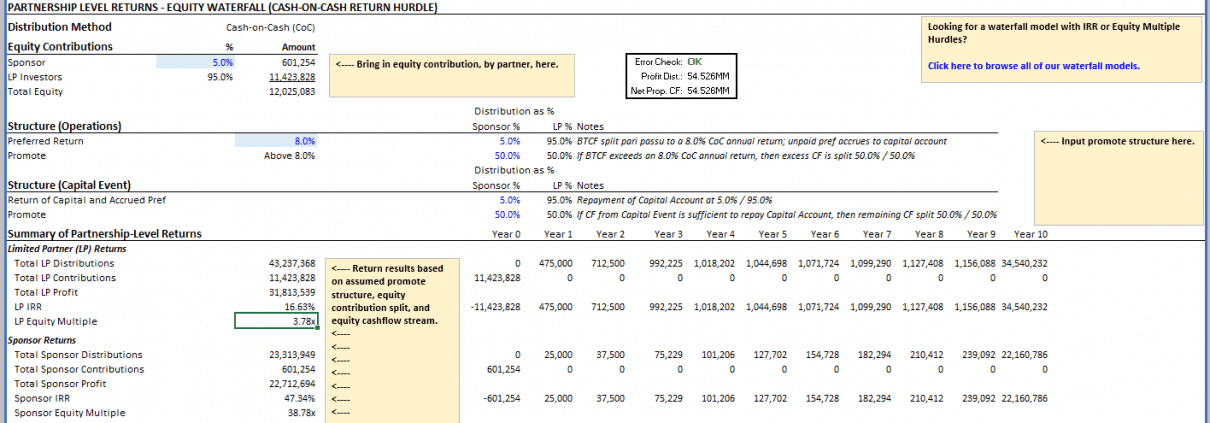
Our first equity waterfall model with cash-on-cash return hurdles
A Real Estate Partnership Structure for Dummies
I had lunch this week with an A.CRE reader and newfound friend, and he said something during our conversation that rang true when it comes to real estate limited partners (or LPs) : “If a prospective investor can’t understand a deal, they simply say no.”
Having spent time working for and with both institutional and mom-and-pop real estate investors, I can attest to the truthfulness of that statement. If an investor doesn’t understand how a given real estate partnership structure works, he or she is not likely to pull the trigger. And so it behooves us as the sponsors of a deal, to propose a structure suitable to the sophistication level of the partners.
Not a dummy? Check out my 4-tier real estate equity waterfall model with IRR and equity multiple hurdles (monthly periods)
This real estate equity waterfall model is an example of a simple partnership structure you might use with less sophisticated partners. The model assumes a preferred return to some annual cash-on-cash return hurdle, and then a split that generally pays a disproportionate share of the excess cash flow to the sponsor above the preferred return (i.e. the promote). No time value of money component, a single waterfall tier, and a simple calculation both the sponsor and LP could quickly make on the back of a napkin at any time during the investment period.
Adding the Equity Waterfall Model with Cash-on-Cash Return Hurdle to Your Model
The model is not standalone. Meaning, you’ll need to model property-level cash flows in a separate model, drop this worksheet into that model, and then link the relevant cells.
- You can either model the property-level cash flows from scratch or use one of our standalone models (e.g. apartment, industrial, office, retail, All-in-One). Make sure you have investment, operation, and residual cash flows broken out and that they are modeled on either an annual or monthly basis.
- With your property-level cash flows complete, you’ll pull this worksheet into your property-level model. To do this, open both workbooks side-by-side. Mouse-over either the ‘Waterfall (CoC) – Annual’ tab or the ‘Waterfall (CoC) – Monthly’, depending on whether you’re using annual or monthly periods in your property-level cash flow model. Then click and drag that tab it into your property-level model’s worksheet tabs section along the bottom of the window. This will merge the two workbooks.
- With the equity waterfall model added to your property-level model, you’ll next link the relevant cells. In the equity waterfall model (download below), you’ll notice various blue font cells. At minimum, you’ll need to link the analysis start date (F45), Property-Level Net Levered Cash Flow (row 49) and the Property-Level Reversion Cash Flow / Net Proceeds from Sale (row 48) to the applicable cells in your property-level model. You might also consider adding the partnership structure assumptions to your master assumptions tab. Make sure to change the font color of any cell linked to elsewhere in the workbook from blue to green.
Using the Equity Waterfall Model with Cash-on-Cash Return Hurdle
Once you’ve linked the waterfall model to your property-level model, using the waterfall model is simple.
- Set the sponsor contribution percentage (how much equity the sponsor will contribute) in cell C8. The LPs contribution percentage will automatically be calculated in cell C9.
- Set the preferred return percentage in cell C14. This is the annual required return owed to the limited partner(s) and is based on annual cash-on-cash return (annual before-tax-cash-flow divided by capital contributed to date plus any unpaid preferred return).
- Select the advanced preferred return settings:
- Unpaid Pref Accrues? (D14) – Yes means that any unpaid preferred return is added to each partner’s capital account based on their pro rata share of ownership. No means preferred return is not added to the partner’s capital account and is never payable. In other words, in any period where there is insufficient cash flow to cover the preferred return, Yes means that unpaid amount is later paid out of capital proceeds, while No means that amount is not required to be paid later.
- ‘Pref. Calculated On’ (E14) – When ‘Pref. Calculated On’ is toggled to ‘Capital Invested, the preferred return due in that period is calculated by summing the total capital contributed by the partner and multiplying it by the preferred return. When ‘Pref. Calculated On’ is toggled to ‘Capital Account’, the preferred return % is calculated by taking the beginning capital account in that period and multiplying it by the preferred return %.
- Note that for monthly periods, the preferred return % is the annual rate (e.g. 12%) divided by 12 (e.g. 12% ÷ 12 = 1% per month) resulting in a nominal monthly rate. With compounding, this methodology results in an annual rate that is greater than the annual preferred return %. This is intentional, as it is common with simple cash-on-cash return hurdles. If you need a monthly equivalent rate, try using our ‘Waterfall Model with IRR and Equity Multiple Hurdles‘.
- Set the distribution percentage (what percent of cash flow is distributed to each partner) for preferred return, promote during operations, return of capital, and promote at capital event cash flows. So, for instance, up until the LPs have hit an 8% preferred return in a given year, the before-tax-cash-flows might be split 5% to the sponsor, 95% to the LPs per each partners’ initial contribution percentage. However, once the LPs have earned an 8% cash-on-cash return in a given year, any excess cash flow might then be split at some disproportionate share (i.e. the promote) such as 50% to the sponsor, 50% to the LP for the rest of that year.
- Review the sponsor and limited partners’ cash flows and equity returns in rows 22 through 42.
Video Walk-through – Equity Waterfall Model with Cash-on-Cash Return Hurdle
Below we’ve shared a walk-through video we created showing you how to use the equity waterfall model. I recommend you download the accompanying Excel Workbook and follow along as I talk through the model. If you have any questions or comments, please don’t hesitate to reach out using the link in my bio at the end of this post.
Note that this walk-through was created based on an earlier version of the model. The model now includes new features listed in the version notes below.
Download the Real Estate Equity Waterfall Model with Cash-on-Cash Hurdle
To make this model accessible to everyone, it is offered on a “Pay What You’re Able” basis with no minimum (enter $0 if you’d like) or maximum (your support helps keep the content coming – similar real estate equity waterfall models sell for $100 – $300+ per license). Just enter a price together with an email address to send the download link to, and then click ‘Continue’. If you have any questions about our “Pay What You’re Able” program or why we offer our models on this basis, please reach out to either Mike or Spencer.
We regularly update the model (see version notes). Paid contributors to the model receive a new download link via email each time the model is updated.
Frequently Asked Questions about the Real Estate Equity Waterfall Model with Cash-on-Cash Return Hurdle
Version Notes
v.1.92
- Misc updates to Version tab
- Added row to ‘Annual’ tab so that line items match between Annual and Monthly (for easier auditing)
- Added note explaining ‘Unpaid Pref Accrues’ and ‘Pref Calculated On’ inputs
- Fixed issue where Capital Account was not properly calculating for ‘Unpaid Pref Accrues’ scenarios
- Updated row 81 (annual and monthly) to be dynamic to ‘Unpaid Pref Accrues’ input
- Updated row 58 (starting balance) to be equal to 81 (ending balance before capital event) minus 82 (any capital event distributions)
- Minor update to placeholder values
v.1.91
- Updated Required Pref calculation on ‘Invested Capital’ to calculate based on end of previous period
v.1.9
- Fixed issue where calculations were still being made beyond the analysis period in certain circumstances
- Fixed issue where row 36 on the Monthly waterfall was not dynamic to hold period
- Set ‘Analysis Period’ font to orange (optional input) to allow second method for user to adjust analysis period
- Minor update to placeholder values
v.1.8
- Fixed issue where contributions weren’t properly accounted for when OpCF was negative in same period as capital event
- Fixed issue where promote appears negative in months where net levered cash flow is negative
- Added ROUND() function to error check to avoid false error in Error Check module
- Misc. formatting updates
v.1.7
- Partner-specific cash flows (e.g. pref, return of capital, promote, excess cash flow) further broken out by period
- LP Preferred Return, Return of Capital, and Excess Cash Flow
- GP Preferred Return, Return of Capital, Excess Cash Flow, and Promote
- Broken out on both Annual and Monthly waterfall
- Added ‘Error Check’ module for partner-specific cash flow calculations
- Added ‘Year’ header to ‘Waterfall (CoC) – Monthly’
- Revised ‘Analysis Length’ formula to fix issues in edge cases
v.1.6
- Partner cash flows further broken out
- LP Preferred Return, Return of Capital, and Excess Cash Flow
- GP Preferred Return, Return of Capital, Excess Cash Flow, and Promote
- Broken out on both Annual and Monthly waterfall
- Updated number formatting to ‘Accounting’
- Added ‘Property-Level’ Cash-on-Cash Return calculation by period (row 50)
- Misc. formatting enhancements
v.1.51
- Fixed issue where ‘Unpaid Pref Accrued?; toggle had not impact on the cash flows
v1.4
- Added a ‘Monthly’ option for this model
- Copied ‘Annual’ worksheet and renamed ‘Waterfall (CoC) – Monthly’
- Extended periods out to 120
- Updated headers to make monthly
- Updated preferred return calculation to be monthly
- Changed IRR function to XIRR()
- Added ‘Analysis Length’ calculation on both Annual and Monthly waterfall tabs
- Fixed time zero label on Annual worksheet; had been text rather than a numeric value
- Fixed issue where unnecessary data was causing unnecessary rows/columns to be in memory
- Deleted Preferred Return Named Cell as it was no longer used
- Misc. formatting enhancements
v1.3
- Updated Sponsor and Limited Partner Ending Balance calculations to accommodate mid-hold capital events
- Changed ‘Cum. Pref?’ input to ‘Pref. Calculated On:’ to accommodate situations where capital account is paid off mid-hold
- Removed Conditional Formatting in cells E12:E14
v1.2
- Updated Net Cash Flow for Distribution labels to make it easier to understand what cash flows to link to from your property-level DCF
- Relabeled Section headings for greater clarity
- Added greater customization of preferred return tier during operation
- Toggle between compounding and non-compounding preferred return (E13)
- Toggle whether unpaid pref accrues to the partner’s capital account or not (D13)
- Set print range
- Misc. formatting improvements
v1.01
- Added Version tab
- Added Cash-on-Cash return row
- Added links to model instructions and other models
- Misc. formatting updates
v1.0
- Initial release