
Announcing the New A.CRE Help Section
At A.CRE, we receive thousands of emails every month from our readers, users of our financial models, and our Accelerator members. The topics of those emails range from career advice, consulting requests, and questions about the Accelerator, to technical issues, bug reports, and modeling questions. And while our administrative staff does a phenomenal job of quickly responding to the emails and passing along relevant emails to Michael and I, we’re always looking for ways to provide a more timely response to the questions you have.
So to help you quickly get answers to the most frequently asked questions we receive, we’ve created a new section of the website called A.CRE Help. This new section was made possible, thanks to the help of A.CRE’s Content Manager Lizzie Boyer and to the tens of thousands of you who have emailed us over the years.
Are you an Accelerator member? While the A.CRE Help section provides answers to questions related to the frontend of A.CRE, be sure to continue to leverage the Accelerator forums to get your more nuanced real estate financial modeling, career, and Accelerator-related questions answered.
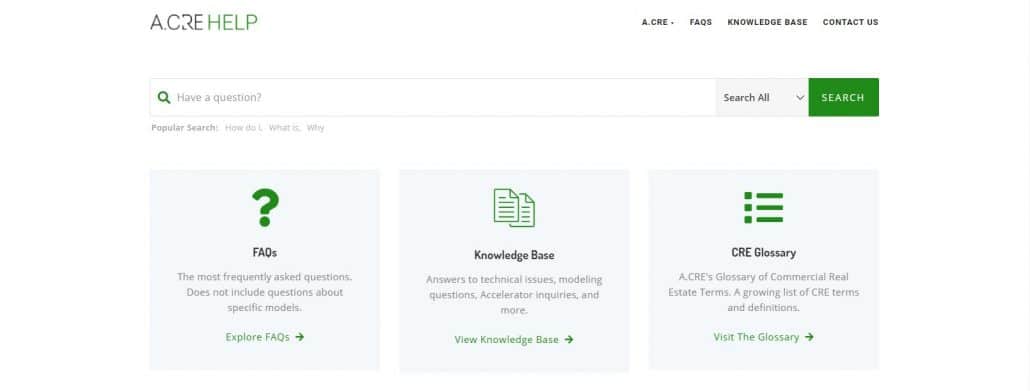
The Adventures in CRE Help Section – FAQ and Knowledge Base
What’s Included in A.CRE Help?
To build out the content for A.CRE Help, Lizzie first went through over 10,000 emails from the past year and culled out the 250 most common questions and topics from those emails. With those 250 topics as a foundation, she then created two sections within A.CRE Help: an A.CRE FAQs section and an A.CRE Knowledge Base.
A.CRE FAQs
The A.CRE FAQs section contains the 35+ most frequently asked questions over the past year. The FAQs are then broken up into four categories:
- The Accelerator. Questions from pre-Accelerator members considering joining the program.
- A.CRE Models. High-level questions related to Models downloaded from A.CRE. These questions aren’t specific to any one model.
- Excel and Other Programs. General questions related to Excel and other programs used to analyze real estate.
- General A.CRE FAQs. Common questions about A.CRE.
The purpose of the FAQ section is not to be fully comprehensive, that’s what the Knowledge Base is for. But instead, the FAQ section is meant to quickly put at your fingertips the most commonly asked questions at A.CRE.
A.CRE Knowledge Base
To supplement the FAQ section, we’ve built the A.CRE Knowledge Base with 200+ topics. The Knowledge Base will continue to grow weekly, as new inquiries come in via email. The Knowledge Base is broken up into 7 categories and 39 subcategories. The categories are:
- The Accelerator (Non-Member)
- The Accelerator (Members)
- Website Troubleshooting
- Career Advice
- What model should I use for…?
- I have a question about a model…
- Financial Modeling Questions
The ‘I have a question about a model…‘ category includes 39 subcategories with questions related to specific models in our frontend library such as the All-in-One model or the Condo Development Model.
How to Use A.CRE Help?
Using the A.CRE Help section is simple. First, head to adventuresincre.com/help. From there, either browse the FAQ or Knowledge Base or use the search bar to find an answer to the question you have.
If you choose to use the search bar, to get the best result I recommend entering one keyword related to the question you have. So if you have a question about Michael’s Condo Development Model, simply enter condo into the search bar and then review the questions and answers that come up.
Similarly, if you choose to browse either the FAQ or Knowledge Base for an answer to your question, first start with the category (or sub-category) that best fits your question. Then review the questions under that category to find the best fit.
What If My Question Isn’t Found in A.CRE Help? Can I Still Email You?
Absolutely. In fact, the purpose of A.CRE Help isn’t to discourage you from contacting us. We highly value the direct interaction we have with our A.CRE audience. Instead, the A.CRE Help section is meant to be a resource to help you get your question answered faster.
However, not every question can be answered via A.CRE Help. This is especially true of questions that are unique to your situation. In that case, simply use the A.CRE Contact Us form and a member of our team will be in touch.
Thank you again for your continued support of A.CRE! If there is anything we can do to further enhance your career in real estate, please don’t hesitate to reach out.
Frequently Asked Questions about the A.CRE Help Section
What is the A.CRE Help Section?
The A.CRE Help Section is a new area of the website designed to quickly answer frequently asked questions from users. It includes two main resources: the A.CRE FAQs and the A.CRE Knowledge Base.
How was the content for A.CRE Help created?
A.CRE’s Content Manager, Lizzie Boyer, reviewed over 10,000 emails to identify the 250 most common questions. These formed the foundation of the FAQ and Knowledge Base content.
What’s the difference between the FAQ and the Knowledge Base?
The FAQ section contains 35+ of the most frequently asked questions, organized into four categories. The Knowledge Base includes over 200 detailed topics and is designed to be more comprehensive, with updates added weekly.
What categories are included in the A.CRE Knowledge Base?
There are 7 categories: The Accelerator (Non-Member), The Accelerator (Members), Website Troubleshooting, Career Advice, What model should I use for…?, I have a question about a model…, and Financial Modeling Questions. One category alone includes 39 model-specific subcategories.
How do I search for answers in A.CRE Help?
Go to adventuresincre.com/help and use the search bar. Enter a single keyword related to your question—for example, “condo”—to find relevant answers. You can also browse categories and subcategories manually.
Can I still contact A.CRE if I don’t find my answer?
Yes. If your question is unique or not covered in A.CRE Help, you can still reach out through the Contact Us form. A team member will respond personally.
Should Accelerator members still use the A.CRE Help section?
Accelerator members can use the A.CRE Help section for general questions, but for in-depth queries related to modeling and careers, they should continue to use the Accelerator forums.