

• Link to Facebook
  • Link to Youtube
  • Link to LinkedIn
  • Link to X
  • Link to Tiktok
  • Link to Instagram
  • EN ESPAÑOL
    • Inicio
    • Glosario de Términos
    • Modelos Financieros
    • Tutoriales Cortos
  • A.CRE HELP
    • Support Section
    • Contact Us
  • LOGIN/REGISTER
  • Shopping Cart Shopping Cart
    0Shopping Cart
Adventures in CRE
  • A.CRE
    • A.CRE Home
    • A.CRE Help
    • Accelerator
      • Learn More
      • Login
    • AI.Edge
      • Learn More
      • Login
    • Artificial Intelligence
    • Careers
    • CRE Event Calendar
    • CRE Job Board
    • Education
    • Library of Excel Models
    • Meet the A.CRE Team
  • RE Modeling
    • 1031 Exchange
    • Audio Series
    • All-in-One (Ai1) Model
      • Download
      • Guides and Tutorials
      • Support
    • Ask Me Anything (Live)
    • Beginner’s Guide to Excel
    • Excel Models
      • Excel Add-ins
      • Library of Excel Models
      • All-in-One (Ai1) Model
      • Apartment
      • Condo
      • Debt
      • Development
      • Equity Waterfall
      • Hotel
      • Industrial
      • Office
      • Portfolio
      • Retail
      • Single Family
      • Tutorial
    • Excel Tips
    • Practice Library of Case Studies
    • Stochastic Modeling
    • Argus
    • My Downloads / My Account
  • Careers
    • About Careers in Real Estate
    • Ask Me Anything (Live)
    • Audio Series
    • Compensation in Real Estate
    • CRE Job Board
      • Find a Job
        • Browse Jobs
        • Post a Resume
        • Register
        • Login
      • Post a Job
    • CRE Event Calendar
    • CRE Interviews
    • Day in the Life Series
    • Real Estate Legal Content
    • What CRE Pros Do
  • Education
    • Accelerator
    • AI.Edge
    • A.CRE 101
    • Ask Me Anything (Live)
    • A.CRE Audio Series
    • Audio Series
    • Book Reviews
    • CRE Event Calendar
    • Deep Dive Series
    • Glossary of CRE Terms
    • Real Estate Legal Content
    • Real Estate Clubs
    • University Profiles
    • Watch Me Build
  • AI
    • AI Skills
    • AI Use Cases in CRE
    • AI for CRE Training
    • AI Tools for CRE
    • AI.Edge Membership
      • Learn More
      • Login
  • Accelerator
    • Accelerator Reviews
    • Accelerator Story
    • Enroll Now
    • Learn More
    • See What’s New
    • Enterprise Members Only
      • General Enterprise Login
      • ICSC Login
      • M&M Login
    • Members Only
      • Extend/Renew Membership
      • Login
      • Manage Membership
  • My Downloads
    • View My Downloads
    • Find an Excel Model
    • Register
    • Login
  • Click to open the search input field Click to open the search input field Search
  • Menu Menu
You are here: Home1 / RE Education2 / Special Topics3 / Investment Analysis4 / The A.CRE Method For Doing Cap Rate Mental Math – Practice Tool
Michael Belasco
RE Education, Investment Analysis, Special Topics, Back Of The Envelope, Real Estate Mental Math

The A.CRE Method For Doing Cap Rate Mental Math – Practice Tool

At the bottom of this post is a downloadable practice tool for the A.CRE Method for doing cap rate mental math. The tool will generate an endless number of random cap rates and NOIs to practice with and will walk you step by step through how to solve for each scenario you are working in.  You can read through this quick step-by-step guide and also watch the video below for instructions. Also, if you have not read the original post, please click here to learn more.

Step by Step Guide

The tool is an excel based file with three tabs: (1) a Prompt tab, (2) an Answer tab, and (3) an Explanation tab.

Prompt Tab

The Prompt tab is where you will be given a random cap rate and NOI to solve for the property value. Simply click F9 to generate new prompts. Cell C13 is a drop down menu that will allow you to change the range of the NOIs you are practicing with. You can pick NOI ranges from the $10,000’s to the 100,000,000’s as shown in the screenshot below.
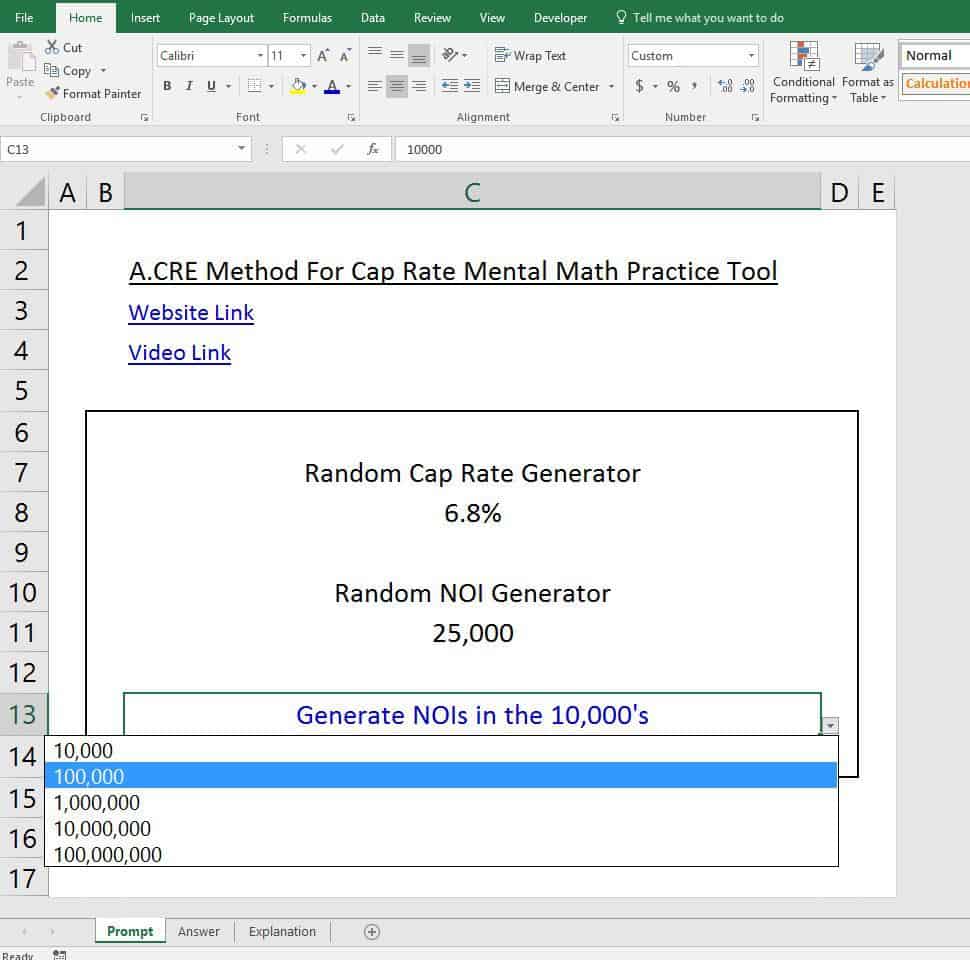
Cap Rate Mental Math

Answer Tab

The answer tab gives you both the exact answer and the approximate answer you should have come up with using the method. Keep in mind that your approximate answer may be different from what is shown. As long as you are within 5% or so of the actual answer than consider yourself right. Doing cap rate math in your head is supposed to provide approximate answers, not exact answers.

Explanation Tab

The Explanation tab walks you step by step through the process of how you would think about solving this using the A.CRE Method. The explanation tab is pretty thorough, but if you are unclear about a step or need to refresh, go back to the original post and you can reread about the process and also practice each step with the flash cards.

Download

Click here to download the file

Video about the Method For Doing Cap Rate Mental Math


Frequently Asked Questions about the A.CRE Method for Cap Rate Mental Math

What is the A.CRE Method for cap rate mental math?

The A.CRE Method is a simplified mental math technique to estimate property value using a given cap rate and NOI. It’s designed to help quickly approximate values without a calculator, which is useful in real-world scenarios where rapid estimation is required.

What does the Excel practice tool include?

The Excel tool includes three tabs:

Prompt Tab – Generates random cap rate and NOI prompts for practice.

Answer Tab – Displays both exact and approximate answers.

Explanation Tab – Step-by-step guide showing how to solve using the A.CRE Method.

How do I generate new practice prompts?

On the Prompt tab, press F9 to generate new random cap rate and NOI values. You can also adjust the NOI range using the dropdown menu in Cell C13.

What is an acceptable range for approximate answers?

Your estimate should be within 5% of the exact value. The goal is to get close enough to guide quick decision-making, not to match the exact number perfectly.

What if my mental math answer is off by more than 5%?

If your approximation is off by more than 5%, revisit the Explanation tab to review each step of the A.CRE Method. You may also want to re-read the original blog post and use the flash cards for targeted practice.

Can I change the NOI range in the practice tool?

Yes. In Cell C13 of the Prompt tab, use the dropdown menu to choose from NOI ranges spanning from $10,000s up to $100,000,000s. This allows you to tailor your practice to real-world scenarios at different investment scales.

Where can I learn the original A.CRE Method?

To learn the full A.CRE Method, click the link in the post labeled “original post”. It contains a detailed breakdown of the method along with flash card practice tools and video guidance.


About the Author: Michael has spent a decade working in various capacities on more than $7 billion of real estate transactions spanning all asset classes and geographies throughout the USA. Michael is both the founder of Firm Ridge Real Estate, which has a core focus on niche and emerging real estate strategies and A.CRE Consulting, a real estate advisory and financial modeling firm that has provided services on projects totaling more than $21 billion to date. Prior, Michael was a founding member and COO of Stablewood Properties, an institutionally backed real estate operator. And before Stablewood, Michael was at Hines in San Francisco.  Michael has both an MBA and Master in Real Estate with a concentration in Real Estate Finance from Cornell University.

Contact Michael


by Michael Belasco
Share this entry
  • Share on X
  • Share on LinkedIn
  • Share by Mail
  • Link to Instagram
  • Link to Youtube
https://www.adventuresincre.com/wp-content/uploads/2017/05/man-thinking-1238015-639x960.jpg 961 639 Michael Belasco https://adventuresincre.com/wp-content/uploads/2022/04/logo-transparent-black-e1649023554691.png Michael Belasco2017-11-12 17:14:102025-08-08 12:08:17The A.CRE Method For Doing Cap Rate Mental Math – Practice Tool

Featured Content

  • RE Financial Modeling Accelerator
  • A.CRE Job Search
  • Library of Real Estate Excel Models
  • Real Estate Financial Modeling
  • Real Estate Education
  • Real Estate Careers
  • AI in Real Estate

Recent Posts

  • A.CRE Apartment Development Model (Updated June 2026)
  • Mejora tu Desempeño en Excel con el Complemento “Excel 4 CRE” (Actualizado Junio 2026)
  • Nuevo Contenido en Español (Actualizado Junio 2026)
  • ¡Lanzamiento del Complemento “Excel 4 CRE” Completamente en Español! (Actualizado Junio 2026)
  • An AI Skill for the A.CRE Commercial Mortgage Loan Analysis Model
Accelerator - Learn More

Search Adventures in CRE

Search Search

Have a Question or Need Help?

Visit our Help Section

Contact Adventures in CRE

  • Visit A.CRE Help
  • Via Email
  • Via LinkedIn

You Might Also Like

  • Real Estate Modeling Courses
  • Real Estate Financial Modeling
  • A.CRE Job Board
  • Careers in Commercial Real Estate
  • Real Estate Education

A.CRE Library of Excel Models

  • Browse Excel Models
  • Login/Register
  • View My Downloads
  • Edit Account Details

Terms, Policies, and Disclaimer

  • Privacy Policy
  • Cookie Policy
  • AI Usage Policy
  • Terms of Use
  • Disclaimer
© 2014 - Present - Copyright - www.AdventuresinCRE.com, LLC | Adventures in CRE | A.CRE
  • Link to Facebook
  • Link to Youtube
  • Link to LinkedIn
  • Link to X
  • Link to Tiktok
  • Link to Instagram
Link to: All-in-One (Ai1) Walkthrough #10 – Underwriting a Value-Add Office Investment Link to: All-in-One (Ai1) Walkthrough #10 – Underwriting a Value-Add Office Investment All-in-One (Ai1) Walkthrough #10 – Underwriting a Value-Add Office In... Link to: A.CRE User Insights Survey Link to: A.CRE User Insights Survey A.CRE User Insights Survey
Scroll to top Scroll to top Scroll to top