
• Link to Facebook
  • Link to Youtube
  • Link to LinkedIn
  • Link to X
  • Link to Tiktok
  • Link to Instagram
  • EN ESPAÑOL
    • Inicio
    • Glosario de Términos
    • Modelos Financieros
    • Tutoriales Cortos
  • A.CRE HELP
    • Support Section
    • Contact Us
  • LOGIN/REGISTER
  • Shopping Cart Shopping Cart
    0Shopping Cart
Adventures in CRE
  • A.CRE
    • A.CRE Home
    • A.CRE Help
    • Accelerator
      • Learn More
      • Login
    • AI.Edge
      • Learn More
      • Login
    • Artificial Intelligence
    • Careers
    • CRE Event Calendar
    • CRE Job Board
    • Education
    • Library of Excel Models
    • Meet the A.CRE Team
  • RE Modeling
    • 1031 Exchange
    • Audio Series
    • All-in-One (Ai1) Model
      • Download
      • Guides and Tutorials
      • Support
    • Ask Me Anything (Live)
    • Beginner’s Guide to Excel
    • Excel Models
      • Excel Add-ins
      • Library of Excel Models
      • All-in-One (Ai1) Model
      • Apartment
      • Condo
      • Debt
      • Development
      • Equity Waterfall
      • Hotel
      • Industrial
      • Office
      • Portfolio
      • Retail
      • Single Family
      • Tutorial
    • Excel Tips
    • Practice Library of Case Studies
    • Stochastic Modeling
    • Argus
    • My Downloads / My Account
  • Careers
    • About Careers in Real Estate
    • Ask Me Anything (Live)
    • Audio Series
    • Compensation in Real Estate
    • CRE Job Board
      • Find a Job
        • Browse Jobs
        • Post a Resume
        • Register
        • Login
      • Post a Job
    • CRE Event Calendar
    • CRE Interviews
    • Day in the Life Series
    • Real Estate Legal Content
    • What CRE Pros Do
  • Education
    • Accelerator
    • AI.Edge
    • A.CRE 101
    • Ask Me Anything (Live)
    • A.CRE Audio Series
    • Audio Series
    • Book Reviews
    • CRE Event Calendar
    • Deep Dive Series
    • Glossary of CRE Terms
    • Real Estate Legal Content
    • Real Estate Clubs
    • University Profiles
    • Watch Me Build
  • AI
    • AI Skills
    • AI Use Cases in CRE
    • AI for CRE Training
    • AI Tools for CRE
    • AI.Edge Membership
      • Learn More
      • Login
  • Accelerator
    • Accelerator Reviews
    • Accelerator Story
    • Enroll Now
    • Learn More
    • See What’s New
    • Enterprise Members Only
      • General Enterprise Login
      • ICSC Login
      • M&M Login
    • Members Only
      • Extend/Renew Membership
      • Login
      • Manage Membership
  • My Downloads
    • View My Downloads
    • Find an Excel Model
    • Register
    • Login
  • Click to open the search input field Click to open the search input field Search
  • Menu Menu
You are here: Home1 / Real Estate Financial Modeling2 / Excel Models3 / Excel-Based Restaurant Selection Tool for the Overly Indecisive
Spencer Burton
Real Estate Financial Modeling, Excel Models, Modules, Stochastic Modeling, Special Topics

Excel-Based Restaurant Selection Tool for the Overly Indecisive

We’re celebrating some much deserved time off from work, and so what better way to spend the time than to make a completely unnecessary (but fun!) Excel model. I call this the indispensable Excel tool for the overly indecisive, and it’s basically an Excel model to help that indecisive group choose a restaurant or bar for that next lunch, dinner, or happy hour event.

What makes this Excel model so fun is the methodology on the back end that does the decision-making. Think of it as a modern-day eeny, meeny, miny, moe, only with 120,000 eeny-meenys. That’s thanks to stochastic modeling and six Monte Carlo simulation modules running 20,000 simulations each!

Looking to do more substantive probabilistic analysis in real estate? Check out our Apartment Acquisition Model with Monte Carlo Simulation Module

An Excel-based tool for the overly indecisive

Why Should I Even Bother Reading Further?

Well you shouldn’t, since you probably have more important things to do. But if you insist on continuing, let me present a scenario for you.

It’s 8:27am. Your work colleague pops his head into your office and says, “Hey, we’re thinking of getting a group together for lunch. You in?”

You accept (of course!) because heck, the alternative is sitting at your desk eating a peanut butter sandwich alone, while making the 52nd update to the development budget on that deal that’s not likely to happen.

At 8:41am your phone chimes and its a group text from your work colleague asking: “what are y’all wanting for lunch?”

The responses trickle in with no definitive answer. And so for the next three hours, your phone chimes over, and over, and over again. No one can decide where to eat. Everyone has an opinion, but no one wants to make the final decision.

Finally, at noon you meet in the lobby – still no place decided on. Small talk ensues while the de facto leader goes around asking “so, where did we decide on for lunch?”

After 15 minutes of this, and the lunch breaking ticking away, you finally decide on Potbelly for the umpteenth time that month. No one’s especially happy, but at least a decision was made!

How to Break the ‘Where to Eat’ Impasse

Well, obviously the answer is to build an overly complex Excel model with seven worksheets, five VBA macros, and a Monte Carlo module that runs for almost 30 seconds to make the decision for you!

But I know what you’re thinking. I don’t have the skills and/or time to build such an Excel model.

Well, it’s your lucky day. The nerdy guys at A.CRE have done it for you.

So today we present to you the most important model to grace the shelves of our A.CRE Library of Real Estate Excel Models: The Excel-Based Restaurant Selection Tool for the Overly Indecisive.
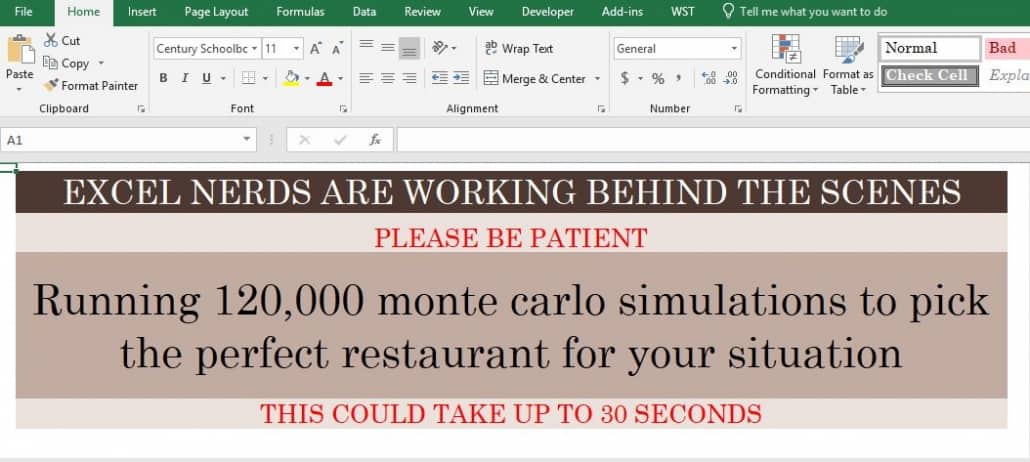
Excel-Based Restaurant

The waiting screen while the Monte Carlo simulations run

Let’s Pause to Be Serious – This Idea is Not Original

I have to confess. This idea is not my own. While the Excel model is 100% original, the idea actually came from internship lore.

You see between the first and second year of my Masters in Real Estate studies, I interned at USAA Real Estate Company (i.e. RealCo, which is a really great place to work by the way). Our boss kept a lengthy (100+) list of the best restaurants in San Antonio. There was, and I believe still is, an unofficial competition between RealCo interns to see who can check off the most restaurants from his list.

The challenge was to choose which restaurant to eat at. And while admittedly we rarely ran into an impasse such as the one I presented above, choosing among so many great restaurant options was difficult.

On one particular day while we we’re discussing where to eat, one of the full-time guys mentioned that a former employee had actually built an Excel model to help choose where to eat from the list each day.

I thought that idea was one part insane, one part amazing. And I promised to one day build such a tool for myself.

Unfortunately (or fortunately) for all of these years since, I’ve had much better things to do with my time; until today – Saturday, December 22, 2018.

Excel-Based Restaurant

Please don’t tell my wife that this is what I spent my time doing today while she did last-minute Christmas shopping

How to Use the The Excel-Based Restaurant Selection Tool for the Overly Indecisive

No A.CRE model post is complete without a tutorial. This one is pretty simple. In fact, I believe I’ve built the model to be so dummy proof that even the STNL guys can use it (just kidding STNL guys – but it is simple).

The process is step-by-step, moving automatically through the worksheets as you complete the steps.

  1. Begin by clicking ‘Click Here to Begin’ on the Start tab
  2. On the Guest List tab, enter the number of people who will be attending in the blue box above, and then enter their names in the blue boxes below; then click to continue
  3. On the Restaurant List tab, enter the number of restaurant options on the table in the blue box above, and then enter the restaurant names in the blue boxes below; then click to continue
  4. On the Questions tab, enter the Questions as they are presented to you. Be sure to use the drop-down menus, if/when applicable; then click ‘Tell Me Where to Eat’
  5. The model will then automagically run 120,000 simulations based on the answers you provided and eventually spit out a restaurant selection; at this point click ‘Start Over’ to reset the tool

It’s that simple, but I’ve also recorded a video just in case – because why not? I’ve got a few extra minutes until my wife gets home.

Download the Excel-Based Restaurant Selection Tool for the Overly Indecisive

To make this model accessible to everyone, it is offered on a “Pay What You’re Able” basis with no minimum (enter $0 if you’d like) or maximum (your support helps keep the content coming). Just enter a price together with an email address to send the download link to, and then click ‘Continue’.

Proceed to Download Page

Frequently Asked Questions about the Excel-Based Restaurant Selection Tool for the Overly Indecisive

What is the Excel-Based Restaurant Selection Tool?

It’s a playful Excel model that helps indecisive groups choose a restaurant or bar by running 120,000 Monte Carlo simulations based on user inputs. It’s described as a fun tool with seven worksheets, five VBA macros, and stochastic logic.

How does the tool determine the restaurant choice?

It uses stochastic modeling and six Monte Carlo simulation modules, each running 20,000 simulations, to analyze input from users about restaurant preferences and group members. The result is a recommended restaurant based on probabilistic logic.

What kind of user input is required?

Users must enter the number and names of guests, a list of restaurant options, and respond to a series of dropdown-based questions about preferences. These responses feed the simulation engine that determines the restaurant choice.

Do I need programming skills to use it?

No. The model is described as “dummy proof” and guides users step-by-step through each tab. The macros and simulations run automatically, so no coding or advanced Excel knowledge is needed.

Can I customize the restaurant and guest lists?

Yes. On the “Guest List” tab, you enter the number and names of guests. On the “Restaurant List” tab, you can input as many restaurant options as you want (based on the count you provide in the input box).

Is the tool purely for entertainment?

Yes, it’s primarily a humorous and entertaining use of Excel’s capabilities, designed to inject some fun into group decision-making. The tool was built “just for fun” over a holiday break and is not meant for high-stakes decision-making.

Do I need to pay to download the tool?

No. It’s offered on a “Pay What You’re Able” basis, meaning you can download it for free by entering $0, or choose to support A.CRE with any amount you prefer.

Who created this Excel tool?

The tool was created by Spencer Burton, co-founder of A.CRE and CRE Agents. He built the model as a fun side project inspired by past experiences during his internship at USAA Real Estate.


Version Notes

Version 1.0

  • Initial release

About the Author: Spencer Burton is Co-Founder and CEO of CRE Agents, an AI-powered platform training digital coworkers for commercial real estate. He has 20+ years of CRE experience and has underwritten over $30 billion in real estate across top institutional firms.

Spencer also co-founded Adventures in CRE, served as President at Stablewood, and holds a BS in International Affairs from Florida State University and a Masters in Real Estate Finance from Cornell University.

Contact Spencer
by Spencer Burton
Share this entry
  • Share on X
  • Share on LinkedIn
  • Share by Mail
  • Link to Instagram
  • Link to Youtube
https://www.adventuresincre.com/wp-content/uploads/2018/12/a-gift-from-A.CRE_.jpg 1080 1620 Spencer Burton https://adventuresincre.com/wp-content/uploads/2022/04/logo-transparent-black-e1649023554691.png Spencer Burton2018-12-22 20:30:202025-07-18 07:31:39Excel-Based Restaurant Selection Tool for the Overly Indecisive
You might also like
How to Use the Apartment Acquisition Model’s Monte Carlo Simulation Module
How to Run Monte Carlo Simulations in Excel (Updated Aug 2024)
Apartment Acquisition Model with Monte Carlo Simulation Module (Updated Jan 2021)
Accelerator - Learn More

Featured Content

  • RE Financial Modeling Training
  • Library of Excel Models
  • Post a Job – It’s Free
  • Master Financial Modeling
  • Technical Interview Guide
  • Definitive Guide to Excel
A.CRE Library of Excel Models

Recent Posts

  • A.CRE Real Estate Financial Models Download Guide (Updated Jun 2026)
  • Episodio 3 de Multiplicadores: La Brecha de la IA Ya Está Aquí
  • Nuevo Contenido en Español (Actualizado Junio 2026)
  • An AI Skill for the A.CRE Short-Term Rental Acquisition Model
  • Short-Term Rental Acquisition Model (Updated June 2026)

Note About Models

Models downloaded from A.CRE may contain errors. Verify formulas/methodology before basing investment decisions on any model here. Read our Terms and Conditions of Use and Disclaimer.

★★★★★

Accelerator Reviews

Search Adventures in CRE

Search Search

Have a Question or Need Help?

Visit our Help Section

Contact Adventures in CRE

  • Visit A.CRE Help
  • Via Email
  • Via LinkedIn

You Might Also Like

  • Real Estate Modeling Courses
  • Real Estate Financial Modeling
  • A.CRE Job Board
  • Careers in Commercial Real Estate
  • Real Estate Education

A.CRE Library of Excel Models

  • Browse Excel Models
  • Login/Register
  • View My Downloads
  • Edit Account Details

Terms, Policies, and Disclaimer

  • Privacy Policy
  • Cookie Policy
  • AI Usage Policy
  • Terms of Use
  • Disclaimer
© 2014 - Present - Copyright - www.AdventuresinCRE.com, LLC | Adventures in CRE | A.CRE
  • Link to Facebook
  • Link to Youtube
  • Link to LinkedIn
  • Link to X
  • Link to Tiktok
  • Link to Instagram
Link to: Hotel Proforma Basics – Hotel Cash Flow Projection Link to: Hotel Proforma Basics – Hotel Cash Flow Projection Hotel Proforma Basics – Hotel Cash Flow Projection Link to: A Few Indispensable Keyboard Shortcuts for Moving Quickly Around Excel Link to: A Few Indispensable Keyboard Shortcuts for Moving Quickly Around Excel A Few Indispensable Keyboard Shortcuts for Moving Quickly Around Excel
Scroll to top Scroll to top Scroll to top