
Ground Lease Valuation Model (Updated May 2026)
The topic of ground leases has come up several times in the past few weeks. Numerous A.CRE readers have emailed to ask for a purpose-built Ground Lease Valuation Model. And I’m in the process of creating an Advanced Concepts Module for our real estate financial modeling Accelerator program covering the mechanics of modeling ground leases. So I thought now would be a good time to share my Ground Lease Valuation Model in Excel.
This model can be used standalone, or added to your existing property-level model. Either way, it is helpful for both landowners looking to size a ground lease payment or leasehold owners looking to understand the value of the leasehold (i.e. improvements) relative to the fee simple interest (i.e. land).
- This model is now AI-ready, meaning we’ve built an AI Skill to accompany it. If you’re an A.CRE Accelerator member, you’ll be learning how to use AI Skills with tools like Claude to use AI in real estate financial modeling.

Excel model for evaluating a ground lease
What is a Ground Lease and Leasehold Interest?
If you unfamiliar with the concepts of Ground Lease and Leasehold Interest, I’ll refer you to the definitions in our Glossary of CRE Terms:
Ground lease – “A lease structure where a real estate investor rents the land (i.e. ground) only. In the case of a ground lease, generally one party owns the land (i.e. fee simple interest) while a separate party owns the improvements (i.e. leasehold interest). In most cases, the owner of the land leases the land to the owner of the improvements for an extended period of time (20 – 100 years).”
Leasehold Interest – “In real estate, a leasehold interest refers to a structure where an individual or entity (lessee) leases the land (i.e. ground lease) from the fee simple owner (lessor) of the land for an extended period of time. The lessee of a leasehold estate will generally own the improvements on the land and use the land and improvements as if the lessee were the owner of the land. During the term of the ground lease, the lessee will pay rent to the lessor for use of the land. At the end of the ground lease term, the lessee must return use of the land, and any improvements thereon, to the land owner.
Ground leases are common to prime locations, where landowners don’t necessarily want to sell but where they may not have the expertise (or desire) to operate. Thus, they lease the land to someone who owns and operates the improvements on the land, and receive a ground lease payment in return. You see this quite often with office buildings in the downtown core of major cities.
Another case where you’ll run into ground leases are in retail shopping centers. Oftentimes, prominent retail tenants prefer to build and own their space but the developer doesn’t necessarily want to sell the land. So, the retail tenant will agree to lease the ground for 40+ years and build their own building on the leased land. Banks, national restaurants in outparcels, and large department stores are examples of tenants that often agree to this structure.
How to Use the Ground Lease Valuation Model
All sections of the Ground Lease Valuation Model are contained on one worksheet. This is intentional to allow you to insert this model into your own property-level model to make it easier to add a ground lease component to your analysis.
All analysis is performed on the tab entitled ‘Ground Lease’. A ‘Version’ tab is also included where you can view a change log for the model, as well as find important links related to the model.
The Ground Lease worksheet is broken up into seven sections as outlined and explained below:
Section 1 – Property Description
The Property Description section includes five inputs related to the investment. These inputs are:
- SF/M2 – In cell I3 enter whether the measure of size is in square feet (SF) or square meters (M2).
- Property Name – Name of the investment. It is common in real estate to append the name of the investment with (Ground Lease) to denote that the investment is for the fee simple interest in land with a ground lease.
- Address – Address, city, state/province, zip/postal code, and country.
- Land Size – Total SF or M2 of land. The number of acres or hectares will than automatically be calculated in cell E6.
- Leasehold Net Rentable Area – Total net rentable area in SF or M2 of the physical improvements (i.e. the leasehold). The land is assumed to be owned by one individual or entity, and the leasehold interest (i.e. improvements) to be owned by a separate individual or entity. So for instance, you may be considering acquiring the land on which a Target Superstore is built. Target owns the building and is leasing the land for some extended period of time. The total rentable area of the building is the ‘Leasehold Net Rentable Area’.

Section 1 – Property Description
Section 2 – Investment Timing
The Investment Timing section includes four required inputs and one optional inputs. These inputs are related to the chronology of the ground lease and investment.
- Ground Lease Start Date – The month and year when the ground lease commenced. This should also be the month and year of the first payment.
- Next Ground Lease Payment – The month and year when the next ground lease payment is due.
- Ground Lease Length (Years) – The length of the ground lease in years from ground lease commencement through ground lease maturity. This is the total length of the ground lease, not the number of years remaining. The maximum length is 100 years. Based on the ground lease length, the model then calculates the Ground Lease End Date (i.e. maturity date).
- Analysis Start Date – The month and year that the analysis is to begin. This generally is equal to the Next Ground Lease Payment date, although the model was built to allow for analysis to begin prior to the Next Ground Lease Payment date.
- Analysis End Date – An optional input, this is by default the Ground Lease End Date. In the event you’re analyzing a shorter hold period, simply change the orange font cell I17 to the preferred analysis end date.
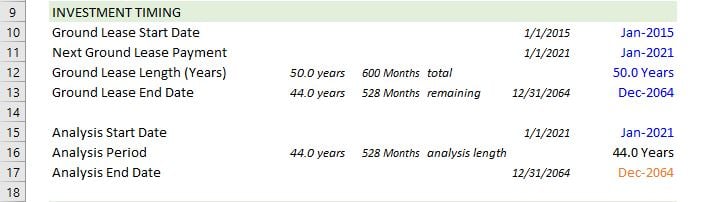
Section 2 – Investment Timing
Section 3 – Ground Lease Terms
The Ground Lease Terms section contains the business terms of the ground lease, including payment amount, frequency, and rent increases. This section includes five inputs plus the option to manually model the rent payment amounts.
- Initial Payment Amount – The amount of the first lease payment. Depending on the payment frequency input (see below), this amount may be for an annual or monthly payment.
- Lease Increase Method – The method used to model rent increases. This can either be:
- None – No rent increases.
- % Inc. – A percentage increase over the previous rent amount.
- $ Inc. – An amount increase over the previous rent amount.
- Custom – Manually model the rent payment amounts by year. If Custom is selected, the annual rent payment amounts in row 26 become inputs for you to manually change (i.e. font turns blue). Important Note: If you select Custom and begin to change the annual rent payment amounts in row 26, there is no way to revert back to another Lease Increase Method.
- Increase Frequency – How frequently rent increases occur. The minimum is one increase every year, and the maximum is one every 99 years.
- Increase Amount – The percentage or amount by which to increase the payment at each frequency. So if % Inc. is chosen as the Lease Increase Method, enter the percentage to increase the rent at each frequency. If $ Inc. is selected, enter the amount to increase the rent at each frequency. A description of the frequency and amount is shown in cells F26:H26 to help you understand the results of your inputs.
- Payment Frequency – Whether ground lease payments are made once per month or once per year.
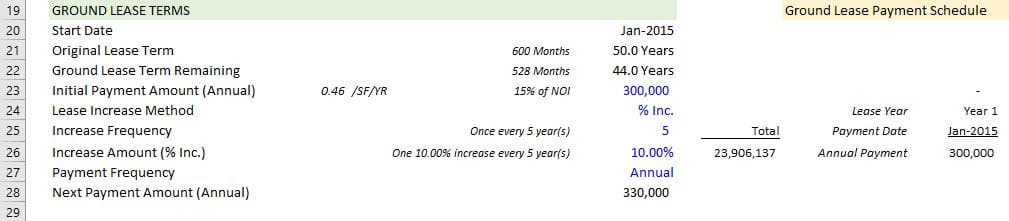
Section 3 – Ground Lease Terms
Section 4 – Valuation (Fee and Leasehold)
It is within the Valuation (Fee and Leasehold) section where you calculate the reversion value of the land (i.e. ground lease), the present value of the land (i.e. ground lease), and the imputed value of the leasehold interest. This section is broken up into three subsections, with five inputs and one optional input across the three subsections.
- Ground Lease Reversion Value – Within this subsection you model the value of the property as if there was no ground lease. Or in other words, a typical direct cap valuation of a real estate investment. Inputs include:
- Current Net Operating Income (Annual Before Ground Lease Payment) – Enter the annual net operating income derived from leasing the improvements, exclusive of any ground lease payment.
- Market Cap Rate – The cap rate for the property, as if no ground lease was included. The idea being to arrive at a value of the property before accounting for the ground lease.
- Retenanting Costs (Nominal) – At the end of the ground lease term, the ground lessor will get back the land plus any improvements on the land. What will it cost (i.e. Retenanting) to retenant the property in today’s cost (i.e. before inflation). Retenanting may include simple leasing costs, it may include renovation and leasing, or it may include tearing down the building and rebuilding something new. The idea is to arrive at a ‘Net Reversion Value (Nominal)’ after accounting for the cost to retenant.
- Reversion Growth Rate (Per Year) – All of the above calculations are done before accounting for inflation (i.e. growth). Enter a growth rate here, and the ‘Net Reversion Value (Nominal)’ will be grown to arrive at a ‘Reversion Value (Adjusted for Growth)’ used as the reversion value in the ground lease present value calculation.
- Reversion Value (Adjusted for Growth) – Optional Input. The reversion value used in the ground lease present value calculation. It is calculated by taking the property value net of any retenanting costs, and then growing it by a growth rate. The value is an optional input in the event you want to customize the reversion value.
- Ground Lease PV Valuation – To calculate the value of the ground lease, we take the present value of all ground lease payments plus the reversion value of the ground lease at maturity.
- Discount Rate – The discount rate at which to calculate the present value of the ground lease cash flows. Think of this discount rate as a hurdle rate (i.e. required rate of return) for a ground lease investment.
- Leasehold Valuation – The net leasehold value is then calculated by taking the direct cap value of the property before the ground lease, and subtracting out the present value of the ground lease.
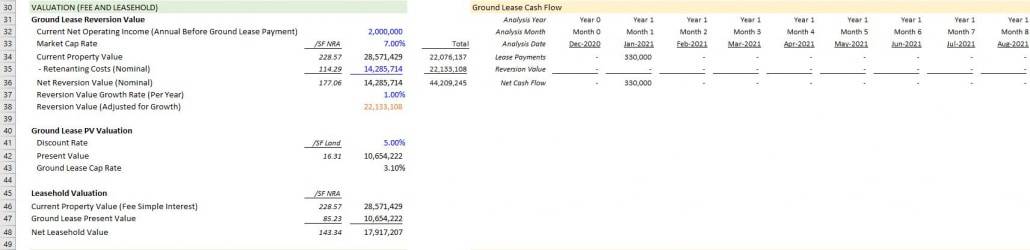
Section 4 – Valuation (Fee and Leasehold)
Section 5 – Ground Lease Returns (Unlevered)
The Ground Lease Returns (Unlevered) section allows you to calculate the unlevered (i.e. before debt) returns of a ground lease investment. If you are considering purchasing a ground lease, it is within this section where you can enter your acquisition/investment cost, and see the corresponding returns from that investment. The section includes just one input.
- Ground Lease Investment Cost – This is the cost to acquire land with a ground lease. It should include the acquisition cost, together with any other due diligence, closing, and pursuit costs related to the investment.
After entering the Ground Lease Investment Cost, the section calculates five return metrics:
- Unlevered Internal Rate of Return
- Unlevered Equity Multiple
- Net Profit
- Average Rate of Return
- Average Free-and-Clear Return
Note that the resulting returns are highly dependent on the analysis period, payment schedule, and reversion value.

Section 5 – Ground Lease Returns (Unlevered)
Section 6 – Ground Lease Returns (Levered)
The Ground Lease Returns (Levered) section allows you to calculate the levered (i.e. with debt) returns of a ground lease investment. If you are considering purchasing a ground lease and intend to finance the purchase, it is within this section where you can enter the debt assumptions, and see the corresponding return from that levered investment. The section includes three inputs.
- Ground Lease Permanent Loan Amount LTV– Enter the loan-to-value of the ground lease mortgage, and the model will calculate the loan amount.
- Annual Interest Rate – The annual rate to be paid on the mortgage. Note that the model currently only allows for an interest-only loan.
- Interest-Only Payment (Annual vs. Monthly) – Enter whether the mortgage payment will be due monthly or annually.
After entering the debt assumptions for the ground lease investment, the section calculates five return metrics:
-
- Levered Internal Rate of Return
- Levered Equity Multiple
- Net Profit
- Average Rate of Return
- Average Cash-on-Cash Return
As with the unlevered analysis, the resulting returns are highly dependent on the analysis period, payment schedule, and reversion value. The amount and rate of the debt will also heavily drive the levered return. And as a reminder, for now the model only allows for debt with interest-only payments and a balloon at the end of the analysis period.
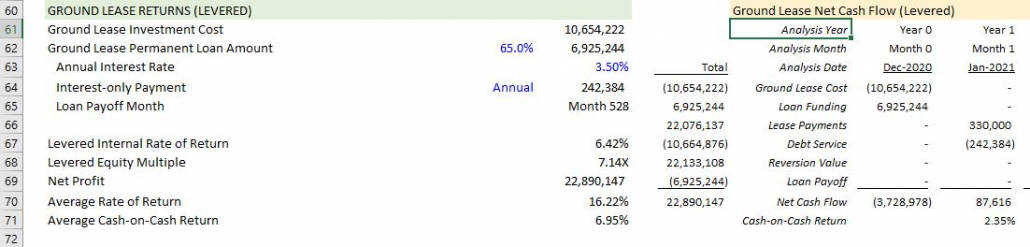
Section 6 – Ground Lease Returns (Levered)
Section 7 – Data Validation
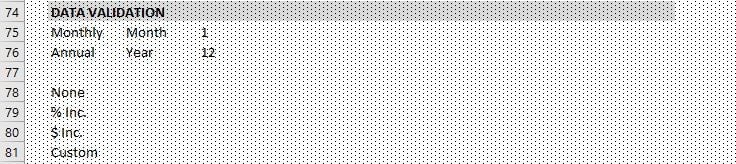
The final section is where backend inputs used in the various data validation lists are found. Unless you intend to modify the model, there is no reason to change the values in this section.
Section 7 – Data Validation
Video Walkthrough – Using the Ground Lease Valuation Model
In addition to the written guidance above, I’ve put together a short video that walks you through the various sections of the model. Note that this video is based on v1.0 of the model.
Using the AI Skill for this Ground Lease Valuation Model
This model is now AI-Ready. Along with the Excel file, your download includes a Claude Skill that teaches AI assistants like Claude how to operate this specific model on your behalf — triaging which side of the deal you’re analyzing, populating inputs conversationally from things like leases that you upload, and interpreting the outputs in the language of your investment decision.
If you’re new to Claude Skills, an AI Skill is a packaged set of instructions that an AI assistant loads alongside your file. It teaches the AI things it wouldn’t otherwise know. In this case, every input cell, every output, the five user roles the model serves, and the modeling discipline behind the analysis.
For a primer with a video tutorial, see our practical guide to Claude Skills.
Your download now includes three files: the Excel model, the AI Skill (.skill file), and a short README explaining how to use them together. The video below walks through the full AI-assisted workflow.
Download the Ground Lease Valuation Model
To make this model accessible to everyone, it is offered on a “Pay What You’re Able” basis with no minimum (enter $0 if you’d like) or maximum (your support helps keep the content coming – typical real estate valuation models sell for $100 – $300+ per license). Just enter a price together with an email address to send the download link to, and then click ‘Continue’. If you have any questions about our “Pay What You’re Able” program or why we offer our models on this basis, please reach out to either Mike or Spencer.
We regularly update the model (see version notes). Paid contributors to the model receive a new download link via email each time the model is updated.
Frequently Asked Questions about this Ground Lease Valuation Model
Version Notes
Version 2.33
- AI Skill (v2.33) created for this model
- Various placeholder assumptions updates
- Misc. formatting updates
Version 2.32
- Removed redundant details in E17:G17
- Updated I22 to reflect more accurate years of term remaining
- Updates to placeholder values
Version 2.31
- Further revisions to logic in I59
Version 2.3
- Fixed issue where the OFFSET() range in the optional formula for ‘Reversion Value’ (I59) was missing the last cell
Version 2.2
- Revised formula in M26:DG26 to solve for issue when payment is Monthly and not % Inc (thanks to Accelerator member JS for the fix!)
- Updates to placeholder values
Version 2.1
- Updates to placeholder values
- Added additional notes under ‘Quick Start Guide’ to clarify common confusion around start dates for different sections
- Misc. formatting updates
Version 2.0
- Moved ‘Analysis Start’, ‘Analysis Period’, and ‘Analysis End’ inputs above Ground Lease dates for improved user experience
- Added a ‘Quick Start Guide’ to provide a tutorial for using the model
- Renamed ‘Lease Increase Method’ to ‘Lease Payment Increase Method’ for clarification purposes
- Renamed ‘Ground Lease Reversion Value’ to ‘Current Fee Simple Value and Ground Lease Reversion Value’
- Added ‘Investment Term’ assumption to allow for investor to analyze returns on an Analysis Period shorter than the Ground Lease term
- Renamed ‘Investment Timing’ to ‘Valuation Timing’ to differentiate between valuation and investment returns
- Renamed ‘Analysis Start Date’ to ‘Valuation Start Date’, ‘Analysis Period’ to ‘Valuation Period’, and ‘Analysis End’ to ‘Valuation End’
- Updated heading formatting to better differentiate between Valuations sections and Investment Returns sections
- Adjusted return formulas to make dynamic to Investment Hold Period
- Update to placeholder inputs
- Misc. formatting enhancements
Version 1.0
- Initial release