

Multi-Tenant Industrial Acquisition Model
Multi-tenant industrial covers a lot of ground. On one end is an older infill business park with 20 small suites leased to contractors and local distributors. On the other is a 400,000 SF cross-dock distribution building split between two or three regional or national tenants.
Both take more work to underwrite than a single-tenant box. Leases roll at different times, recovery structures vary from lease to lease, vacant space carries downtime, free rent, and leasing costs, and a capital plan often has to be completed before the lease-up can start. I built this Multi-Tenant Industrial Acquisition Model in Excel to handle that work, whether your building has two tenants or 25.
The model underwrites the acquisition of an existing multi-tenant industrial property on a monthly basis. It handles suite-by-suite leasing, NNN and other recovery structures, a value-add capital budget, floating-rate acquisition debt with interest and operating reserves, an optional refinance, and a five-tier GP/LP equity waterfall. It works for a stabilized deal, a value-add repositioning, or a fully vacant lease-up.
- This model is AI-ready, meaning we’ve built an AI Skill to accompany it. If you’re an A.CRE Accelerator member, you’ll be learning how to use AI Skills with tools like Claude to use AI in real estate financial modeling.
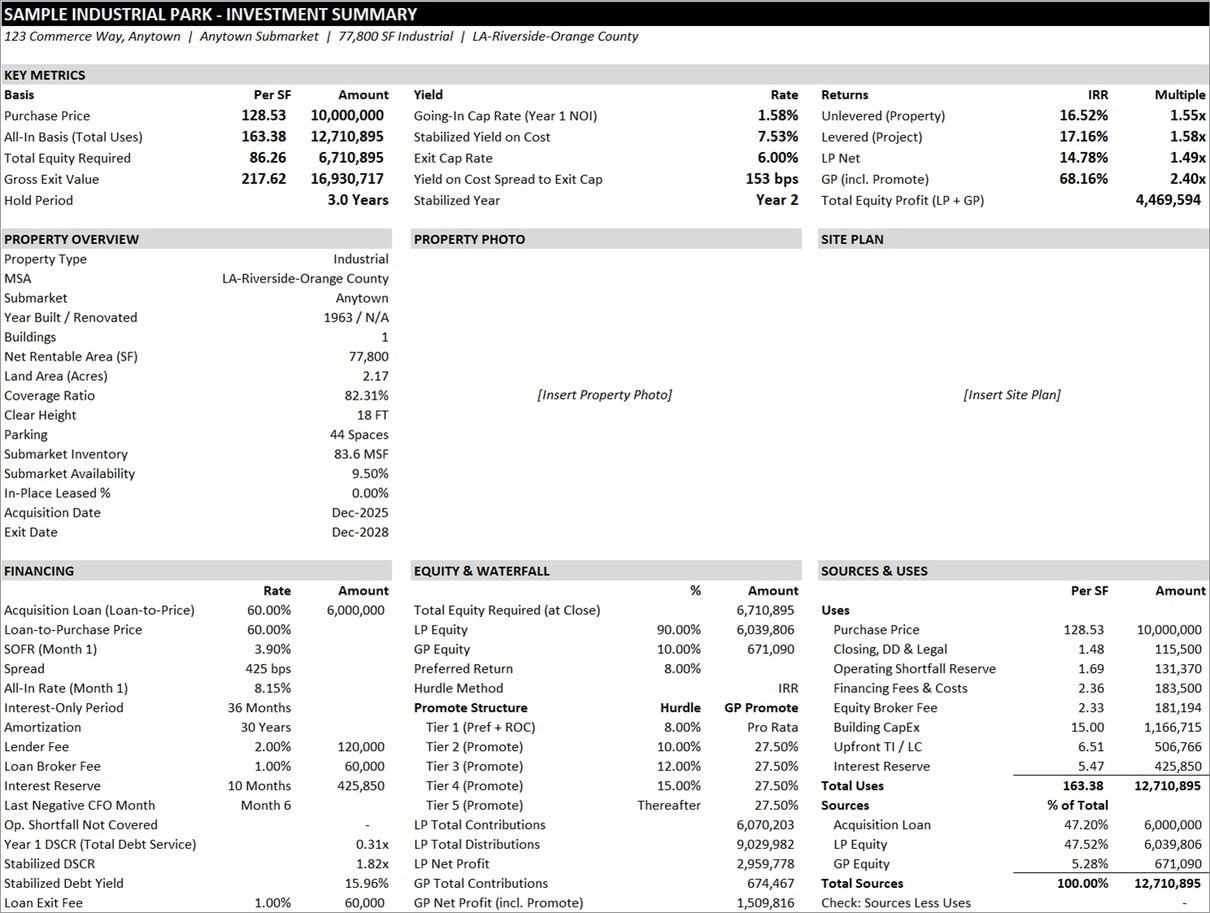
Multi-Tenant Industrial Acquisition Model in Excel
What is Multi-Tenant Industrial Real Estate?
If you’re new to the property type, multi-tenant industrial refers to any warehouse, distribution, or light industrial building leased to more than one tenant. The term covers several different products, and the underwriting shifts with each one:
- Small bay and shallow bay. Buildings divided into many small suites, often a few thousand to roughly 20,000 SF each, with shallower building depths. These tend to be older infill properties leased to local businesses such as contractors, service companies, small distributors, and light manufacturers, usually on three- to five-year terms.
- Flex. Industrial suites with a larger share of office or showroom space, which typically means higher tenant improvement costs and, in some cases, a different recovery structure.
- Mid bay. Larger buildings, often 100,000 to 200,000 SF, divided into suites in the range of roughly 15,000 to 75,000 SF.
- Multi-tenant bulk. Large modern distribution buildings, rear-load or cross-dock, split between two or three tenants, often regional or national companies on longer leases. Some are designed to be divided from day one. Others become multi-tenant when a tenant gives back part of its space or a landlord divides up a vacant building.
Whatever the size, multi-tenant industrial differs from a single-tenant building in a few ways that drive the underwriting:
- More than one source of rent. A default or non-renewal takes out part of the income rather than all of it. In a two-tenant bulk building, though, that part can be half the building.
- Staggered rollover. Leases expire at different times, and each expiration brings downtime, free rent, tenant improvements, and leasing commissions. In a small bay park, that’s a steady, recurring cost. In a two- or three-tenant bulk building, it’s a handful of large events, any one of which can swing the deal.
- Shared operating expenses. Expenses are allocated to each tenant by pro rata share and recovered under whatever structure each lease uses (NNN, base year, expense stop, or gross), so recoveries vary from tenant to tenant.
That’s why the model tracks each suite on its own, with its own lease terms, recovery structure, and rollover assumptions, rather than relying on a single blended occupancy assumption. Set up two suites for a bulk building split between two tenants, or as many as 25 for a small bay park.
How to Use the Multi-Tenant Industrial Acquisition Model
The model is organized into nine tabs. Inputs are in blue font and live primarily on the Underwriting and Rent Roll tabs. Everything else either rolls up results or documents your assumptions.
- Version: change log, compatibility, and links to this page and related resources
- Summary: a one-page investment summary built for an investment committee
- Underwriting: property information, project budget, debt, the monthly operating cash flow, reversion, and returns
- Rent Roll: market leasing profiles, recovery profiles, and suite-by-suite lease inputs
- Annual CF: the monthly cash flow rolled up to annual periods
- Rollover: lease expiration and occupancy schedule by suite
- Partnership CF: the GP/LP equity waterfall
- Market: subject property record, capital markets, submarket fundamentals, lease and sale comps, underwriting benchmarks, site risk, and demographics
- Data Sources: a log of where each piece of external data came from and when it was pulled
Summary Tab
The Summary tab is the page you hand to an investment committee. It shows key metrics (purchase price and all-in basis per SF, going-in cap rate, stabilized yield on cost, exit cap rate, and the spread between them), unlevered, levered, LP, and GP returns, a property overview, financing, the equity structure, sources and uses, the lease-up plan with market support from comps, an annual cash flow summary, sensitivity tables, and an investment thesis with key risks and mitigants. A deal tracker at the bottom (excluded from the print area) lets you track milestones from LOI through closing.
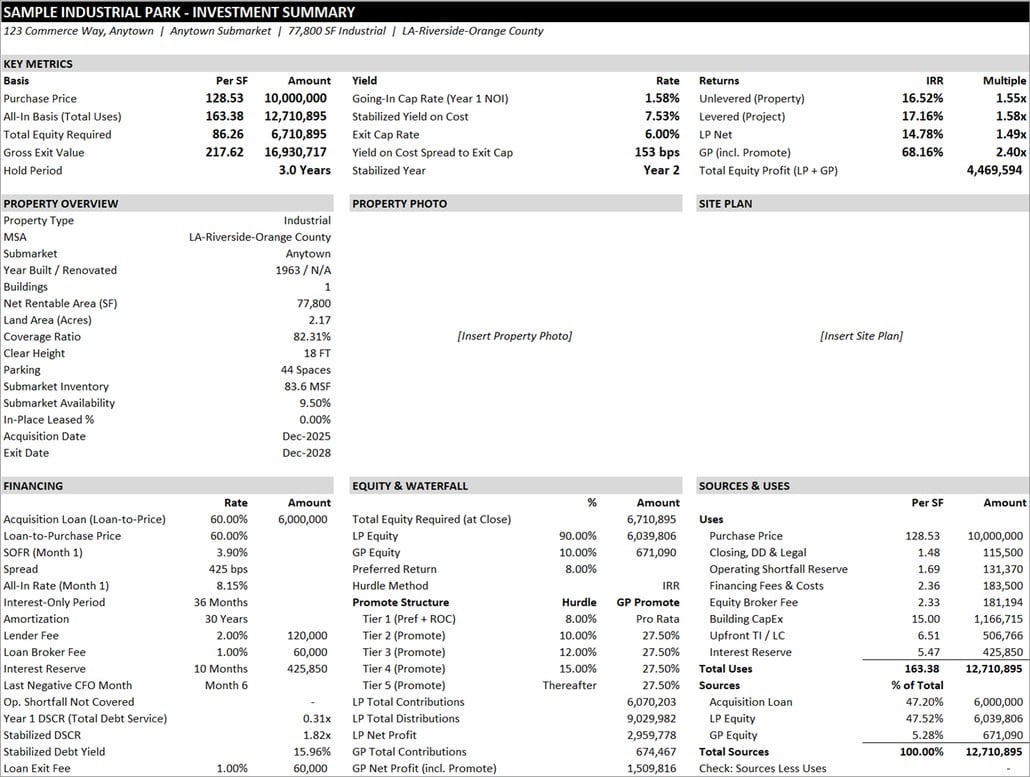
Summary Tab
Underwriting Tab
The Underwriting tab is the engine of the model. It runs monthly and is broken into the following sections:
- Property Information: name, address, MSA, submarket, year built, clear height, parking, acreage, and submarket inventory and availability.
- Unlevered Project Budget: purchase price, due diligence, legal, closing costs, and a line-item capital budget with contingency. Each line has a start and end month, so you can time the spend. Lease-up TI and LC and an operating shortfall reserve are funded in the budget as well.
- Financing Costs: loan broker and lender fees, loan closing costs, an equity broker fee, and an interest reserve.
- Sources of Capital: acquisition loan, LP equity, and GP equity, with a funding order and a check that sources equal uses.
- Debt Financing: a floating-rate acquisition loan sized on loan-to-cost, priced at a spread over a SOFR forward curve, with an interest-only period and amortization. An optional refinance loan is sized at the lesser of LTV, DSCR, and debt yield constraints.
- Operating Cash Flow: potential base rent, absorption and turnover vacancy, free rent, expense reimbursements by category, other income, general vacancy, and reimbursable and non-reimbursable operating expenses. Each expense line has a T12 figure, a growth rate, and a percent fixed, so variable expenses flex with occupancy.
- Capital Expenditures: tenant improvements, leasing commissions, and a capital reserve, with lease-up TI and LC netted against amounts already funded in the project budget.
- Reversion Cash Flow: sale price based on forward 12-month NOI and an exit cap rate, less cost of sale, loan payoff, and exit fees.
- Risk, Return, and Valuation: unlevered and levered IRR, equity multiple, free-and-clear return, cash-on-cash return, and present value at your discount rate.
- Lease-Up Reserve Coverage: compares the interest reserve period to the last month of negative cash flow, and flags any shortfall equity would need to fund.
- Circularity Plugs: the loan amount, LP equity, and reserves depend on each other. Rather than turning on iterative calculation, the model uses hardcoded plugs with a variance check, so you always know whether the plugs are in sync with the calculated values. After changing inputs, a single Excel Goal Seek brings them back in line (no macro required).
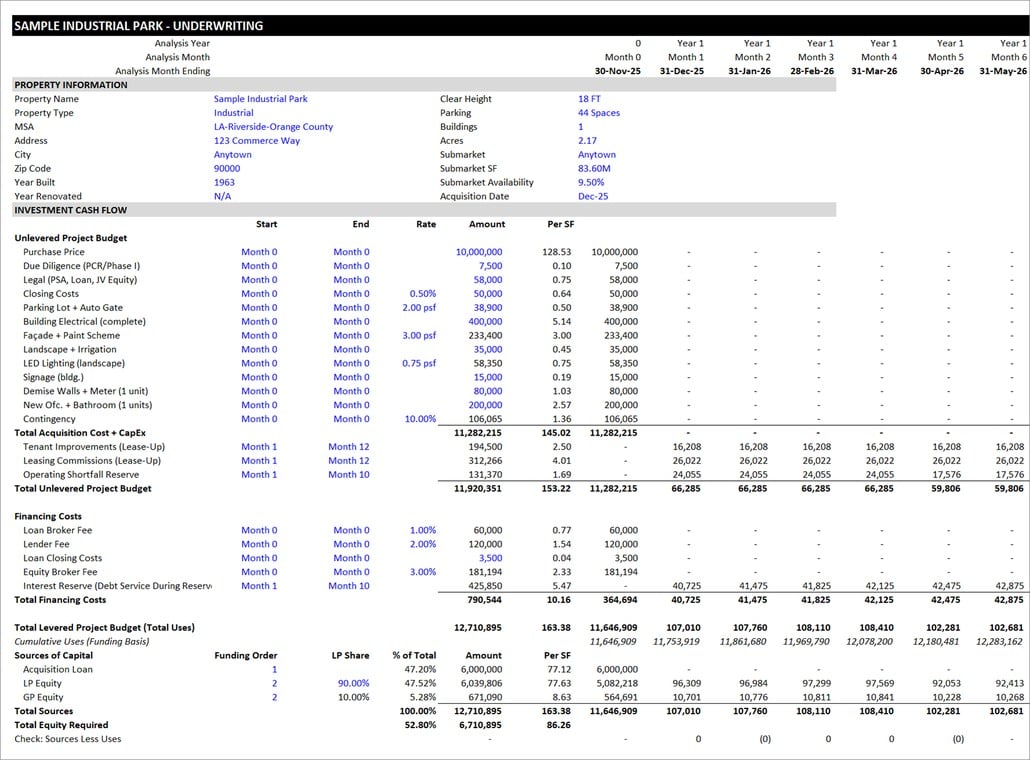
Underwriting Tab – Project Budget and Debt
Rent Roll Tab
The Rent Roll tab is where the multi-tenant mechanics live. It has three parts.
- Market Leasing Profiles: up to five profiles (for example, spec suite, large bay, and flex/office). Each sets market rent, rent growth, lease term, annual escalation, renewal probability, renewal rent as a percent of market, downtime, and free rent for new and renewal leases.
- Recovery Profiles: NNN, NNN with capped CAM, base year, expense stop, modified gross, and gross. You choose which expense categories each profile recovers, whether variable expenses gross up, and the admin fee.
- Lease Inputs: one row per suite, for in-place leases and vacant suites alike. Enter rentable SF, status, lease dates, starting rent, escalation type (percent, dollar, or custom rent steps), recovery profile, and the market leasing profile that applies at rollover.
When a lease expires, the model blends a renewal and a new lease by renewal probability, applying the profile’s downtime, free rent, TI, and LC. Vacant suites lease up after their downtime at market rent.
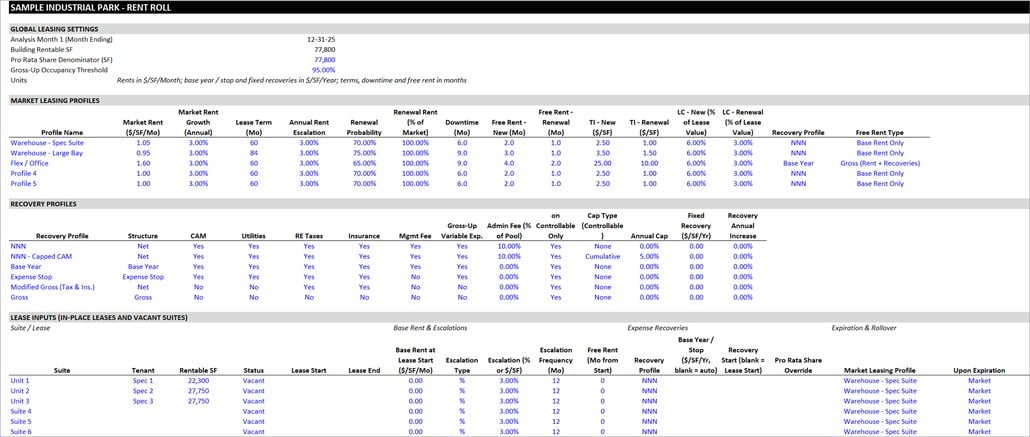
Rent Roll Tab
Annual CF and Rollover Tabs
The Annual CF tab rolls the monthly underwriting into annual periods, from investment cash flow through operations, reversion, and net cash flow, with annual DSCR, debt yield, free-and-clear return, and cash-on-cash return. A check confirms it ties back to the monthly figures. The Rollover tab shows leased and vacant SF by year, average and year-end occupancy, and the share of rentable SF expiring each year, so you can spot concentrated rollover risk.
Partnership CF Tab
The Partnership CF tab splits levered cash flow between the GP and LP through a waterfall with a preferred return, return of capital, and up to four promote tiers. You can set hurdles by IRR or by equity multiple, and the tab also handles the asset management, acquisition, and disposition fees paid to the GP. For a deeper look at how these structures work, see our real estate equity waterfall model.
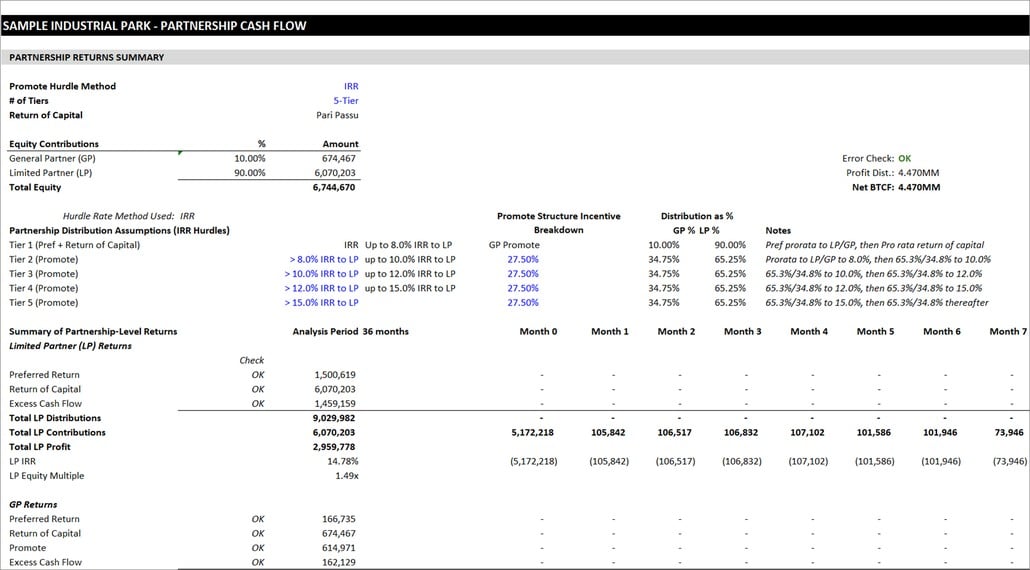
Partnership CF Tab
Market and Data Sources Tabs
The Market tab collects the external data that tests your assumptions without overwriting them: the subject’s public record (APN, assessed value, tax bill, last sale), capital markets (SOFR, Treasuries, swap rates), submarket vacancy, rent, deliveries and absorption, labor market data, lease and sale comparables, underwriting benchmarks with in-range flags, site risk and operating costs, and area demographics. It compares your underwritten rent against the lease comps and your purchase, all-in, and exit basis against the sale comps, and feeds the market support panel on the Summary tab. The Data Sources tab logs where each data point came from, when it was pulled, and any adjustments made, so anyone reviewing the model can trace the numbers.
Sensitivity Analysis
The Summary tab includes two sensitivity tables: total equity profit across exit cap rates and exit NOI, and LP net IRR across exit cap rates and market rent. The second uses an Excel data table driven from the Underwriting tab.
Video Walkthrough – Using the Multi-Tenant Industrial Acquisition Model
We’re working on a tutorial video walking through the model. Coming soon.
Using the AI Skill for this Multi-Tenant Industrial Acquisition Model
This model is AI-ready. Along with the Excel file, your download includes a Claude Skill that teaches AI assistants like Claude how to operate this specific model on your behalf. It can set up the rent roll from a rent roll or OM you upload, populate the budget and debt inputs conversationally, check your assumptions against comps and market data, and interpret the outputs in the language of your investment decision.
If you’re new to Claude Skills, an AI Skill is a packaged set of instructions that an AI assistant loads alongside your file. It teaches the AI things it wouldn’t otherwise know: in this case, every input cell, every output, how the tabs connect, and the modeling discipline behind multi-tenant industrial underwriting. For a primer with a video tutorial, see our practical guide to Claude Skills.
For a full walkthrough of what the Skill does and how to use it, see An AI Skill for the A.CRE Multi-Tenant Industrial Acquisition Model.
Your download includes three files: the Excel model, the AI Skill (.skill file), and a short README explaining how to use them together.
A tutorial video on using the AI Skill with this model is coming soon.
Other Industrial and Acquisition Models from A.CRE
Building a new industrial project rather than buying one? See our Industrial Real Estate Development Model. Need a quicker first pass on an office, retail, or industrial deal? Try our Back-of-the-Envelope Office, Retail, Industrial Acquisition Model or Real Estate Acquisitions Model #2. And to practice on a real industrial deal, work through Case Study #17 – Windsor Crossing. You can browse everything in our library of real estate Excel models.
Download the Multi-Tenant Industrial Acquisition Model
To make this model accessible to everyone, it is offered on a “Pay What You’re Able” basis with no minimum (enter $0 if you’d like) or maximum (your support helps keep the content coming – typical real estate valuation models sell for $100 – $300+ per license). Just enter a price together with an email address to send the download link to, and then click ‘Continue’. If you have any questions about our “Pay What You’re Able” program or why we offer our models on this basis, please reach out to either Mike or Spencer.
We regularly update the model (see version notes). Paid contributors to the model receive a new download link via email each time the model is updated.
Frequently Asked Questions about this Multi-Tenant Industrial Acquisition Model
Version Notes
Version 1.0
- Initial release
- AI Skill (v1.0) created for this model